You need 500 accepted people in the stack you already use. The useful question is which part of that job is missing: the selected audience, contact details, a usable identity, or a working transfer. Buying another tool for all four can add work when only one of them is broken.
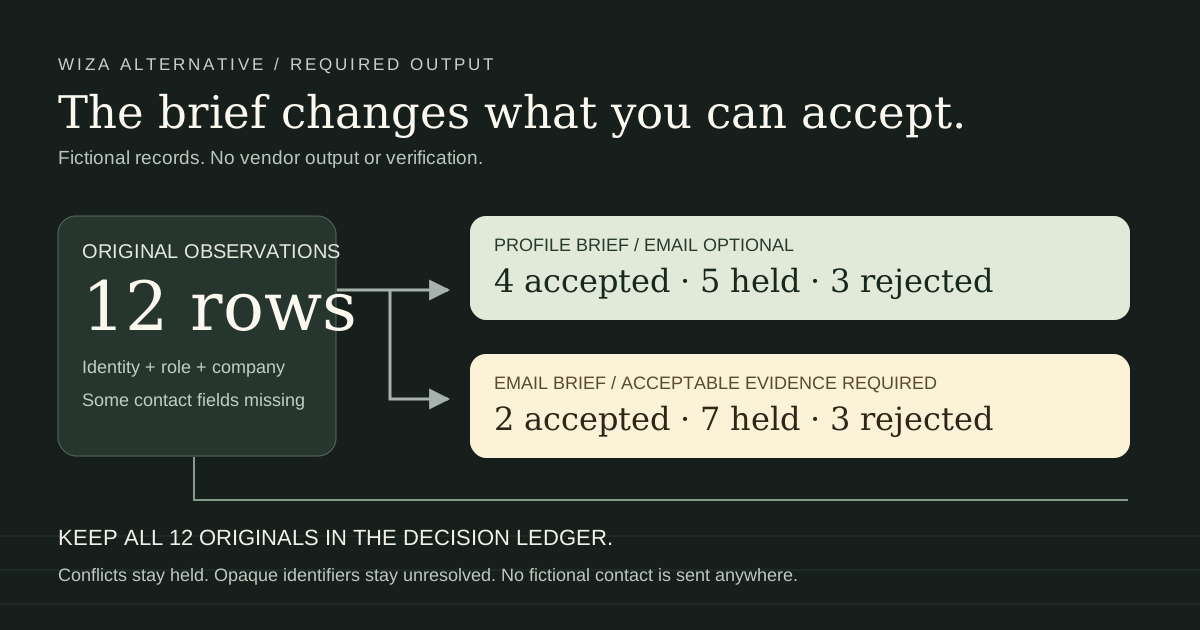
We build Leadsforlinked. This comparison is for operators who need hundreds of selected LinkedIn profile rows for an existing workflow. Start by testing the source gap. Keep Wiza when it already supplies the correct people, required contact data and destination route. The downloadable exercise below shows why twelve observed rows can produce four accepted profile records and only two accepted email records without either number proving product performance.
What changed in Wiza's list workflow in 2026
The 19 August extension update removed bulk exports and list creation from LinkedIn, Sales Navigator and Recruiter searches. Full-profile actions moved to the side panel. Prospect, CSV upload and CRM import remain list routes, and the update leaves existing lists and integrations intact.
That makes an older comparison framed entirely around a Sales Navigator export button misleading. It also makes a blanket claim that Wiza requires Sales Navigator misleading. Its Prospect overview describes database search, contact and company filters, saved searches, list creation and enrichment. Rebuilding filters can be useful, but matching filters does not establish identical membership to your selected LinkedIn audience.
Identify your source requirement before switching: a market segment you can rebuild with filters, or the particular people in a chosen search, event or post discussion. A database route may satisfy the first. For the second, compare identities against the original selection rather than assume similar titles mean the same audience.
Choose the missing job before the subscription
| Your missing deliverable | Route worth keeping or testing | Evidence before committing |
|---|---|---|
| A database segment with contact details | Wiza Prospect and enrichment | Sample identities and current role fit; acceptable email or phone evidence; usable handoff |
| Contact data for an audience you already own | Wiza CSV upload | Actual supported identity mapping and returned contact fields; current plan entitlement |
| Enrichment of contacts entering an existing CRM segment | Wiza Two-Way CRM Sync where supported | Supported CRM/list type, Beta availability, primary integration and field policy |
| Hundreds of selected public-profile rows, email optional | Test Leadsforlinked on the intended source | Actual exported profile identities, mandatory fields, review rate and approved destination payload |
| A few individual full-profile lookups | Wiza's existing profile workflow may be enough | The contact is actually found and the returned data satisfies your brief |
A person can be useful for account research or LinkedIn preparation without an email address. The same record may be unusable for an email-first campaign. Define the output in words the person receiving the file can accept: current UK operations leaders at selected software accounts, confirmed person identity, mandatory title and company, existing contacts excluded, owner assigned. Add email and phone rules only when the destination job needs them.
When Wiza's native workflow is the better fit
Keep the contact-data route when email or phone evidence is the purchase. Wiza's result-status guide distinguishes verified valid emails from risky addresses it could not verify. Its download guide offers Valid, Risky and All result selections. A returned address, a valid classification and an approved person are separate checks. Use the actual result and your delivery rule rather than count every downloaded address as accepted.
Keep native CRM automation when it already removes your manual transfer. Wiza's 20 August Two-Way CRM Sync guide describes a Beta route for HubSpot and Salesforce: a connected segment supplies new members for enrichment and selected data returns to the same records. A record leaving the segment does not remove the Wiza row, and a processed record that rejoins is not imported again. That differs from Auto-Sync, which pushes a completed list to the primary integration once.
If the requirement is weekly data refresh, record that separately from new segment membership. A manually downloaded CSV does not recreate your existing native automation. Before replacing it, identify the reviewer, source capture, exclusion reference and destination update policy for every repeat run. If nobody owns those steps, the cheaper source purchase may still leave an expensive operations gap.
Compare the output and full billing commitment
Checked 13 October 2026: Wiza's pricing page lists Free with 20 valid emails and five phone numbers; monthly Starter at $49 per user with 100 valid emails and 100 phone numbers; monthly Email at $99 per user with 500 valid emails. Annual Email is billed at $990 per user, displayed as $83 monthly, with 2,500 exports per month. The plan-limit guide distinguishes individual reveals from bulk exports; annual bulk limits and account-dependent overages still matter.
Our published extraction offers start with 100 free signup profile leads, released in batches of 20, without a card. The eligible one-time offer is 500 profile leads for €1.99. Basic is €4.99 monthly, or €35.88 for the full year at €2.99 effective monthly. These are different outputs and commitments from Wiza's contact-data plans. Do not divide a profile price by an assumed verified-email yield or treat the one-time offer as a repeatable monthly pack.
Budget the actual missing job: approved people still needed, remaining source allowance, necessary enrichment, destination access and billing horizon. Keep currencies separate and use the current account quote. If you already pay for Wiza and its source meets the brief, use the allowance you have before buying a duplicate source. If it lacks the selected audience, test a complementary source rather than rebuilding your whole stack.
Download the original field-acceptance exercise
Download the editable requirement worksheet
The ten-row worksheet records source fit, identity, current role, exclusions, contact evidence, destination mapping, recurrence, billing and final accepted people. Its rules are editable examples. Actual fields, sample evidence, counts, decision, reviewer and date are empty for your review. These are teaching columns, not Wiza or Leadsforlinked export headers and not a destination import template.
For a short practice run, download the twelve original observations and exercise instructions. Every identity is fictional, every row is marked synthetic and do not contact, and all email values use example.invalid. Do not upload these identities to a vendor. The contact-evidence labels simulate decisions; nobody verified these fictional addresses.
The profile brief accepts UK Heads or Directors of Operations with a company, confirmed public person identity, no unresolved identity conflict and no match in the fictional approved reference. Email is optional. The email brief adds a nonblank address with the exercise's valid-evidence label. R01 has no email and R11 has risky exercise evidence: both can pass the profile brief while failing the email brief.
| Brief | Accepted | Held | Rejected |
|---|---|---|---|
| Profile deliverable | 4: R01, R02, R03, R11 | 5 | 3 |
| Email deliverable | 2: R02, R03 | 7 | 3 |
Keep both R05 and R06 because the same identity has conflicting company observations. Hold R07's opaque Sales Navigator value and R12's missing public identity. R08 lacks the required role. Reject R04 as the duplicate of R02, R09 as outside the UK scope and R10 as already approved. Do not invent a public identifier by rewriting an opaque URL or pick a conflicting employer just to increase the count.
Check your reasoning against the complete decision ledger, which retains every original cell and all twelve records. Separate four-row profile and two-row email teaching subsets contain only their accepted records. Held originals remain available in the ledger. These counts teach the consequence of a different brief; they are not a product benchmark or a forecast for the free allowance.
Check the actual identifier before enrichment
An October 2026 firsthand buyer thread describes paid source and enrichment steps that failed because the receiving tool rejected Sales Navigator identifiers. The observed problem is a handoff mismatch, not evidence that another vendor has a particular conversion or coverage rate. It is a useful reason to inspect the identifier before purchasing hundreds more source rows.
Wiza's LinkedIn-profile upload guide documents a CSV of person URLs with field mapping before output selection. Its people-upload guide also describes names plus company or domain when neither URL nor email is available, and preserving an ID column. Choose the route that matches your actual input. Our teaching ledger is deliberately not a vendor upload file.
For real files, preserve the original identifier, source label and capture date, then map a confirmed destination key in a separate payload. A different spelling of a URL may be a formatting issue; two different people with similar names are an identity issue. Resolve the latter with source evidence. The local prospect workbench can help compare, exclude or merge snapshots, but its review records still need a decision. Its main output is not automatically an approved import.
Use the free test to decide the larger purchase
- Write the required deliverable. Set the accepted-row target, source audience, mandatory fields and existing-contact reference before extracting.
- Check your native source first. If Wiza Prospect or your current CRM segment already supplies the audience and required contact data, keep that working route.
- Test the missing selected-profile source. Create a Leadsforlinked account, install the Chrome extension and inspect an actual export from the intended standard LinkedIn source. Use the People search guide or commenter review when that is the job.
- Approve the sample by your brief. Record actual columns, raw rows, accepted people, holds and reasons in the worksheet. Required email evidence may change the accepted count.
- Validate the destination. Prepare only the approved mapped payload. The Clay handoff guide and Pipedrive person-only route explain different destination jobs; neither creates missing email evidence.
- Buy only the remaining source gap. Enter real counts, current balance and access horizon in the one-audience-job offer planner. Its arithmetic is conditional on your sample and account eligibility, not a guarantee that the next batch will have the same fit.
A target of 500 accepted people is still a substantial production job after a small test. The free allowance helps establish whether the source and fields fit; it does not promise to complete that target. Purchase more when the sample resolves the missing source job and the next accepted records have a defined destination. If the sample fails on identity or mandatory contact data, fix that requirement or keep the native route before scaling.
Sources checked 13 October 2026
- Wiza extension workflow change, effective 19 August 2026, read with newer-route precedence over older export guides.
- Wiza Prospect overview; profile-URL upload; name/company upload and ID preservation.
- Two-Way CRM Sync, 20 August 2026; Auto-Sync; result downloads; email-status definitions.
- Current Wiza pricing and plan/export limits; own published offers. Account checkout and authenticated processing were not tested.
- Buyer identifier mismatch, 6 October 2026. A firsthand problem observation, not measured search demand or a vendor benchmark.
Frequently asked questions
What is the best Wiza alternative for a LinkedIn profile list?
Choose the route that supplies your missing audience and required fields. Leadsforlinked is worth testing for selected profile rows when verified email or phone data is not the primary requirement. Keep Wiza when its database, enrichment or native CRM workflow already satisfies the job.
Can Wiza still bulk export a Sales Navigator search?
Wiza's 19 August 2026 extension update removed bulk export and list creation from LinkedIn, Sales Navigator and Recruiter search pages. Its documented list routes are Prospect, CSV upload and CRM import; individual full-profile actions remain available.
Do I need Sales Navigator for Wiza Prospect?
Wiza Prospect searches Wiza's own database. That source route differs from a selected Sales Navigator lead list, so assess audience fit before substituting one for the other. Do not add a Sales Navigator subscription to every Wiza purchase by default.
Does a Leadsforlinked profile CSV replace verified email data?
No verified-email or phone output is promised by this comparison. A person may pass the profile brief while remaining held for an email brief. Review actual fields and evidence, and keep or add the enrichment route your destination requires.
How much can I test free before buying more profile rows?
Leadsforlinked publishes 100 signup profile leads without a card, released in batches of 20. Those are source rows to inspect, not a guarantee of 100 accepted people. The eligible one-time 500-lead offer is €1.99; Basic is €4.99 monthly or €35.88 for the full year at €2.99 effective monthly.