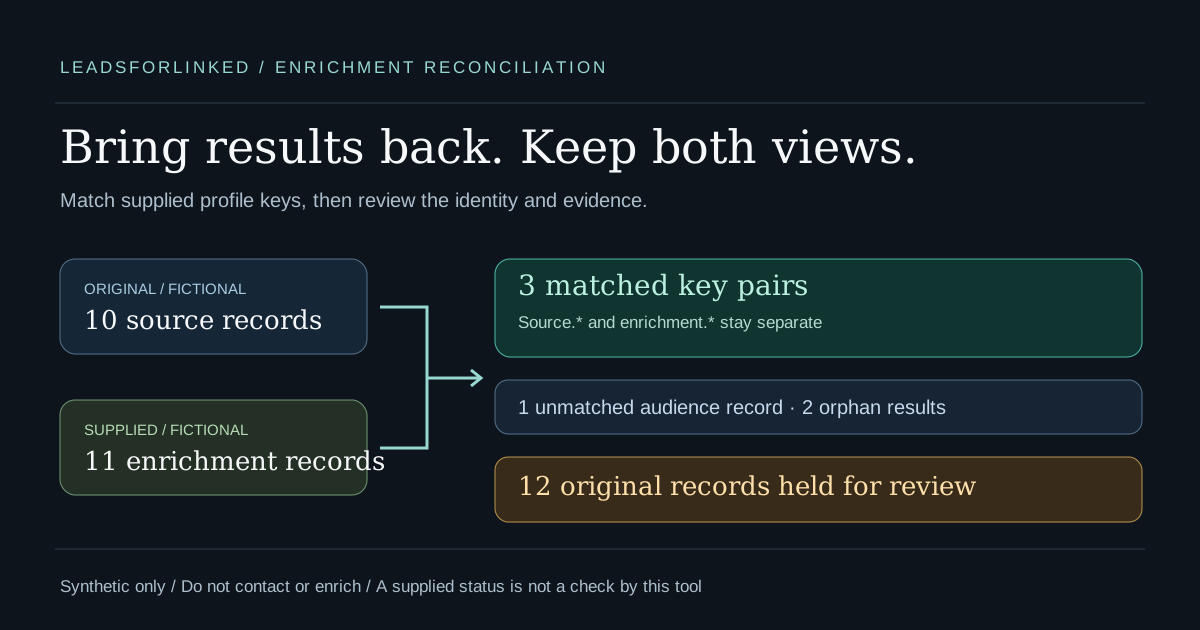
You selected a LinkedIn audience, sent a copy for enrichment and received another CSV. The returned file may omit unsuccessful records, contain duplicates or use different company and title values. Before importing it, bring the results back to the original audience without losing the source observations or assigning an email to the wrong record.
The job is reconciliation, not finding or verifying emails. Keep the original audience as the reference. Compare a deliberately selected public profile URL column on each side, retain both sets of values and hold uncertain groups. A matched key is a useful relationship to inspect; it is not approval for a CRM update or outreach.
Original reproducible exercise: this guide supplies a separate free local Enrichment CSV Joiner, two fictional input files and exact expected matched, unmatched, orphan and review outputs. All names, profile URLs, addresses, statuses and evidence are synthetic. No live enrichment, extraction or destination import is claimed.
Keep the identity column before sending the file
Preserve the original CSV, audience brief and source context before any external handoff. Confirm that the enrichment process returns an equivalent person key beside its results. If it only returns a name, company or email, you do not yet have the selected-key relationship needed for this join. Ask for the retained identifier or resolve the relationship against the source before using it.
Record which fields are observations from the original source and which are supplied by the enrichment process. Keep any status label, verification timestamp, provider reference and job identifier that actually exists. Do not invent those fields because an example schema contains them, and do not fill missing evidence with today's date or a success label.
The browser joiner matches a conservative public-person /in/... URL shape. It removes supported host, trailing-slash and tracking differences while preserving slug case and encoding. It does not resolve a Sales Navigator ID, company URL or changed public alias. LinkedIn's public URL guidance documents custom URL changes and custom-slug case-insensitivity, so treat a different stored key as a relationship to investigate rather than automatically a different person.
Do not join by the row number. An enrichment process can reorder or omit rows; identical positions are not identity evidence. Use the original filename and row marker to trace a record after the match, not to decide which person an address belongs to.
Keep a native table or workflow when it already fits
Honest concession: you may already have a better place to retain the relationship. If the required results stay attached to original rows in Clay or n8n, keep that native workflow. This local tool is useful when you already have two independent files and need a visible review before a manual destination handoff.
Clay's Lookup Rows documentation, checked 12 October 2026, describes retrieving data from another table using selected matching criteria while leaving that source intact. Choose a preserved key and strict equality for the identity relationship, inspect the match count and review duplicates before expecting a single result. Multiple-row lookup has an optional retrieval limit; a displayed sample is not the whole set. Pulling the first result does not resolve a conflicting group.
Do not treat a CSV import as that lookup. Clay's CSV import guide describes adding rows to the current table or replacing its contents. Neither is a selected-key reconciliation. Its table settings also document automatic runs and duplicate deletion. Preserve unresolved originals and inspect action settings before a table edit; keeping the oldest or newest duplicate is not conflict research.
n8n's current Merge documentation describes matching-field combinations and Enrich Input 1 for a left-join-style result. Configure the original audience as that input and retain competing fields through clash handling. Its default prioritizes Input 2 for clashing names; its multiple-match setting can emit every match or keep only the first. Inspect those options before overwriting observations or hiding duplicates. Position mode matches order, not person identity. This is a documented substitute, not a workflow run we tested on your instance.
Download the original fictional case
- Original audience: ten synthetic records
- Supplied enrichment: eleven synthetic records
- Expected matched key pairs: three rows
- Expected unmatched audience: one row
- Expected orphan enrichment: two rows
- Expected review originals: twelve rows
- Original parsed records and mapping
- Expected summary and provenance
- Example manifest and case decisions
These counts are computed from the linked fictional inputs on 12 October 2026. They are not an enrichment success rate or a production yield. The headers are our illustrative mapped review schema, not the actual Leadsforlinked or provider export contract. Two source columns deliberately share the name note; their positions and values remain distinct.
Source and contact-row outputs retain synthetic=TRUE and do_not_contact=TRUE. Review rows carry those same original flags inside retained cell arrays; JSON reports are evidence files, not contact payloads. No fixture should be contacted, enriched or added to a real campaign. The flags label this exercise and do not automatically enforce a destination blocklist.
Run the local join with explicit columns
- Open the free Enrichment CSV Joiner. It requires no signup.
- Load the audience CSV as the original and the result CSV as external enrichment. Leave delimiter detection on for this comma-delimited exercise.
- Select public_profile_url [2] for the original and profile_url [1] for the enrichment. The tool does not choose an identity column for you.
- Keep Excel-safe CSV downloads on to reproduce the supplied expected setting. Choose Join the files.
- Inspect all four partitions, then download their complete CSVs plus original-record and provenance JSON. Keep them with the original files.
The interface also embeds the same fictional exercise, with the same explicit mapping step. Its CSV filenames are enrichment-join-matched.csv, enrichment-join-unmatched.csv, enrichment-join-orphans.csv and enrichment-join-review.csv. Compare their content with the expected downloads; the word “expected” identifies our reference files, not another algorithm.
The supplied results deliberately contain a width-mismatched record with an extra cell. The tool reports that issue and holds the record and its usable-key partner for review. Syntax errors such as an unclosed quote block processing instead. It never silently throws away the extra cell or guesses where shifted data should go.
The tool processes file contents locally and makes no external profile or enrichment requests. Clear workspace removes loaded data from the page and prevents a pending read from restoring it; your original files and downloaded copies remain. The original-record JSON retains parsed cells, headers, filenames, selected mappings and provenance. Keep the raw input files for their exact physical CSV spelling and encoding. A later upload to another system has that destination's own processing boundary.
Read the partitions before building a payload
| Output | What it establishes | What it does not establish |
|---|---|---|
| Matched key pairs | One usable selected key record on each side | Verified identity, accepted audience fit or deliverable email |
| Unmatched audience | No supplied record with the selected source key | No email exists or the person is unsuitable |
| Orphan enrichment | No original audience record with that result key | A person who belongs in your selected audience |
| Review originals | Ambiguous, invalid or malformed evidence remains available | A resolved identity or approved field replacement |
The three matched pairs cover six original records. One unmatched source, two orphan results and twelve review originals account for the other records. That preserves all twenty-one inputs without creating a cross-product list of duplicate matches. Source and enrichment counts are accounted for separately in the JSON report.
Case S01 preserves an email labelled not_checked. S02 preserves a supplied verified label with fictional evidence while keeping different source and returned company/title observations side by side. S03 preserves a blank email and not_found. None of those strings becomes a check performed by the joiner. A matched row with changed company text still needs identity and role research before a destination update.
S05 has one source row and two enrichment records with conflicting supplied emails/statuses. S06 has two conflicting source observations and one enrichment record. All three originals from each group remain in review, including a record whose other values may look suitable. The tool does not choose a first or latest row, collapse identical duplicates or multiply an audience record for every enrichment match.
S07's Sales Navigator URL and S08's blank URL are not matched by name. S09 and its enrichment partner are held because the result row has an extra cell. The invalid company and blank result keys also stay in review. The two valid orphan result keys remain outside the matched audience; they are not appended simply because they contain supplied email text.
Choose the accepted fields without changing their meaning
Matched CSV headers identify the side and original column position, such as source.source_company [5] and enrichment.returned_company [4]. Those labels prevent two same-named fields from silently coalescing. They are an audit layout, not a promised CRM import schema. Build a separate payload with the actual destination's reviewed columns after resolving the identity and field choices.
For each accepted person, decide which source observation remains authoritative for this brief and whether supplied enrichment changes are supported. Keep the original result, its evidence and the decision in the archive. If the source is missing a required key or the provider returns conflicting data, resolve the source relationship first rather than invent a key from a name or use the last nonblank email.
If an email channel is required, use the supplied provider evidence and whatever fresh verification your team actually requires. The email-after-export guide covers that separate job. This joiner neither upgrades a catch-all label nor checks deliverability. A public profile URL and a matching email row do not supply contact permission.
Check the accepted identities against your historical CRM and exclusions before a new destination import. The existing-CRM exclusion workflow explains incomplete-reference warnings and why a raw remaining row is not automatically new. For recurring source work, keep the weekly snapshot comparison alongside the historical accepted list. Missing from a later source export is not proof of an employer departure.
Buy source volume only when that is the missing step
If the original audience is already sufficient, finish its identity and enrichment review. Extra profile extraction does not repair a discarded key, validate a supplied email or resolve conflicting observations. Keep a native table, existing CRM record set or working enrichment provider when it already supplies the approved audience.
When the next reviewed audience is missing source profiles, the published Leadsforlinked offers, checked 12 October 2026, include 100 signup profile leads without a card. Inspect a real export and your remaining balance first. The 500-lead €1.99 offer is one-time and subject to eligibility/current checkout; it is not a repeatable enrichment purchase.
Basic publishes unlimited scraping and CSV export at €4.99 monthly or €2.99 effective monthly billed yearly, a full €35.88 annual commitment. Those offers concern source profiles, not verified email yield or guaranteed accepted audience rows. Use the actual-input extraction planner after a sample is accepted, keeping the observed fraction a scenario rather than a forecast.
Sources and validation boundaries
A 2026 B2B team discussion describes checking that records are not lost across prospecting, enrichment, outreach and CRM handoffs. It is firsthand adjacent workflow pain, not a measured search-volume signal or proof that an enrichment-CSV join solves every integration problem.
The cited Clay, n8n, LinkedIn and own offer documentation was checked on 12 October 2026. The local module and browser event harness reproduce the fictional expected outputs, including identity holds and provenance. No actual browser pixel rendering, live provider enrichment, extension extraction, CRM import or customer outcome is claimed.
Frequently asked questions
Does joining an enrichment result verify its email address?
No. The joiner preserves supplied email values, statuses and evidence. A provider label such as verified stays input text; this tool performs no deliverability check, identity lookup or permission assessment.
Why are all duplicate-key records held for review?
A repeated key makes the relationship ambiguous. The tool retains all source and enrichment originals in the group, including identical duplicates, rather than choose a first or latest result or multiply audience rows.
What happens to unmatched audience and orphan enrichment rows?
Unmatched audience rows have no corresponding enrichment key. Orphan enrichment rows have no corresponding original audience key. They are downloadable separately and are not silently added to the matched-key payload. Invalid or blank keys go to review instead.
Can Clay or n8n handle the join without another CSV tool?
Yes, when your native workflow already preserves the original records and a reliable shared key. Clay documents table lookups and n8n documents matching-field combinations. Check duplicate handling and field clashes; selecting the first match or joining by row position does not establish identity.
Are these files real exports or verified enrichment results?
No. Every identity, URL, company, email, status and evidence value is fictional. Source and contact-row outputs retain synthetic=TRUE and do_not_contact=TRUE; review contains the original flags inside retained cell arrays. Reports are not contact payloads, and the flags do not enforce a destination blocklist.