A useful commenter list starts with a relevant conversation. If you sell help with a sales-to-onboarding handoff, look for people discussing that problem, then check who is responsible for it. A large comment total alone will not tell you who fits your offer.
Choose a post about the problem you solve
Write down the service and the roles you want to reach. For a CRM handoff cleanup at a B2B subscription business, that might mean revenue operations, sales operations or customer onboarding.
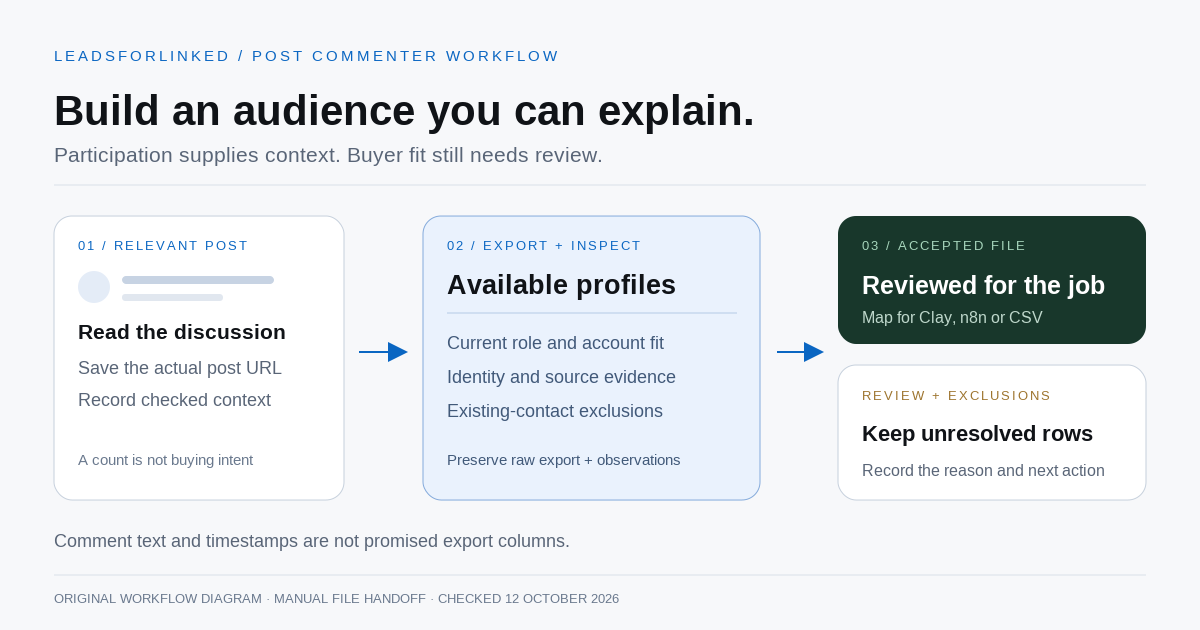
Use LinkedIn's search and Posts filter to find the discussion. Read the post and replies, check current responsibilities and save the link. Someone discussing employee onboarding may have a different job from someone fixing the handoff to customer success. Participation gives you context, not confirmed buying intent or permission to contact.
Export the commenter audience from the app
Leadsforlinked's profile-source guide includes post commenters. Start with a post accessible to your account and inspect a small result before collecting a larger audience.
- Create your account and confirm your email. The free offer is 100 profile leads, no card.
- Install and sign in to the extension. Open Extension in the app and follow its Chrome Web Store link.
- Open the selected post in LinkedIn. Use the supported commenter source in your installed extension. Check the selected source, quantity and credit display, then create or select an audience for the import.
- Open that audience in the app. Choose Export to CSV, then inspect the returned profile URLs, names, roles and company values before extending the list.
Check what the specific source returns. Coverage and profile fields can be incomplete; do not assume every commenter, comment text or interaction timestamps are included. Repeated comments also do not mean distinct people. Keep the original CSV unchanged.
Keep the reason you selected each person
If your export lacks them, add source_post_url, a short source_context and your review date to a working copy. These are your own review columns. When combining posts, keep each relevant post reference rather than replacing it with the latest source.
Read the comment before recording what it means. Asked how to assign onboarding ownership is a useful observation; wants to buy consulting is a separate conclusion that the comment may not support.
Check role fit and existing relationships
Keep people whose current responsibilities and companies fit your service. Put unclear roles or identities aside for research. Some rows may have a Sales Navigator link instead of a public profile link. If your CRM needs the public link, look the person up; do not edit the link by hand.
Use our free Exclude existing contacts tool to remove people already in your CRM. Match on the profile link. Check rows without a profile link by hand. When you combine several posts, use Merge exports.
Take the reviewed list into your next workflow
Keep a separate file for the real people you accepted and retain your review decisions beside it. Map only the fields your destination needs, using a working copy rather than overwriting the original export.
To send the list to Clay or n8n, follow our Clay CSV guide or our n8n guide. Both are manual CSV imports: Leadsforlinked has no direct Clay or n8n connection. The general CSV guide covers file-review steps.
Keep a native source when it supplies the right people
Already using HeyReach? It can import the people who reacted to a post (see its Leads Screen guide), but not the people who commented. If reactors are enough for you, use HeyReach.
LinkedIn restricts scraping extensions and unauthorized automation. Browser pacing is not an account-safety guarantee. Keep contact permission separate from profile fit.
Export more if the list fits
If the source produces irrelevant roles, choose a better discussion before collecting more. If the list fits, export more people from posts like this one. Your first 100 leads are free.
Sources and further reading
- LinkedIn: member-post search: native post discovery.
- Leadsforlinked profile sources and offer and plans.
- HeyReach: Leads Screen: native source and list-management options.
- LinkedIn: prohibited software.
- Operator discussion about comments and qualification: a question behind the review, not evidence of customer results.
Frequently asked questions
Does commenting on a LinkedIn post mean someone wants to buy?
No. Read the comment and check the person's current role, company and relevant need. Participation gives you context; comment totals and reactions do not establish buying intent.
Will the CSV contain comment text and timestamps?
The CSV holds profile fields: profile URL, name, role and company. Keep the post link and the comment in your own columns.
Can I export every commenter from any post?
Coverage depends on the specific post, available source, account access and returned identities. Inspect a small result before extending the audience. A displayed comment count is not a guarantee of that many distinct exported people.
Does HeyReach's post import provide the same commenter audience?
Its documented LinkedIn Post source is Reactors. Reactors and commenters are different selections, so that source does not establish an equivalent commenter export. Keep the native route when reactors meet your task.