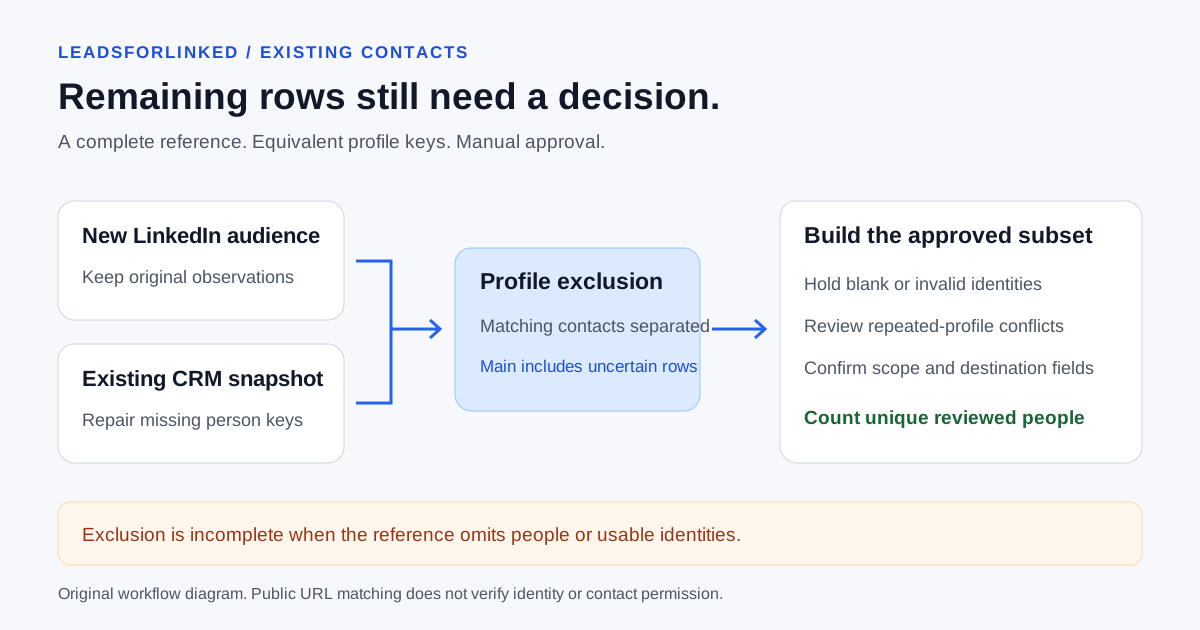
You have collected another LinkedIn audience, but some people are customers, active prospects or already assigned to another rep. You need additional people for a specific campaign or research job. Uploading every extracted row would hide the overlap and inflate the apparent audience.
This guide uses the free Prospect List Workbench exclusion task with public person-profile URLs. It separates matching existing contacts, shows unresolved identities and preserves the source. Original work product: synthetic extracted and CRM snapshots, reproducible expected outputs and separate manual approval examples. Local processing was checked on ; no live CRM export or LinkedIn extraction is claimed.
Define what the audience must exclude
Write the exclusion rule before collecting more: all existing contacts, current customers, active opportunities, recently contacted people or a client-approved suppression list. Those are different reference populations. A new person at an existing account may pass person-level exclusion while failing your account rule.
A 2026 CRM discussion asks how external or purchased lists are reconciled before reaching reps. The author describes uncertain new-record status and overlapping ownership. It is firsthand workflow pain, not measured search demand or proof that a particular tool resolves every identity.
The honest concession: if the required audience is already stored in HubSpot or Pipedrive, use the CRM's filtered contact view and existing records. That avoids fresh extraction and a separate file comparison. This manual recipe is useful for a separately curated external export or reviewable client deliverable. It does not synchronize contacts or change CRM suppression settings.
Export the actual reference population and profile property
In HubSpot, use the record export guide, updated 2 April 2026: open the appropriate Contacts view and export its current properties. Include the populated person-profile property, record identity and relationship information needed for your rule. Default exports use the view's properties; customize the selection when needed. A rep's filtered view may omit people the wider team must exclude.
For Pipedrive, the export guide, updated 3 September 2026, describes applying a list filter, selecting columns and exporting filter results. Its People export route can supply a wider baseline with the required access. Export permissions do not override record visibility. Check whether another owner or visibility group is missing from your snapshot.
Locate the real person-profile field rather than assume a universal header. HubSpot's property guide, updated 28 August 2026, says newly created custom properties normally contain no values. Pipedrive's field guide describes choosing the Person entity and including custom fields in list columns. Creating a field does not populate missing identities.
Keep the reference file unchanged with its export date, filter and access scope. A CRM Record ID is useful for tracing the contact, but a fresh profile export does not automatically contain the same ID. This recipe matches profile URLs only; it does not fall back to names or missing emails.
Download the reproducible synthetic exercise
- Load the extracted audience and the incomplete CRM reference.
- Compare your result with expected Main result, expected Excluded contacts and expected Review rows.
- Then load the authored repaired reference. Inspect the separate manually approved demonstration, the manually held demonstration and the checked summaries.
Every identity, company, relationship and repair is invented. All CSV rows have synthetic=TRUE and do_not_contact=TRUE. Do not enrich or contact them. The flags do not configure another tool's blocklist. Headers are our illustrations, not a promised Leadsforlinked or CRM export contract.
The expected files reproduce the current processing library, executed locally. They are not a benchmark of real data or a live browser download test. The manually approved file adds an editorial decision; the workbench does not generate that approval.
Choose both identity columns explicitly
- Open the exclusion workspace. Load the extracted audience as New prospect list and the CRM snapshot as Existing contacts or exclusions.
- Select
linkedin_profile_urlin the first file andcrm_profile_urlin the second. Select LinkedIn profile URL as Identifier type. For real files, locate the equivalent populated fields yourself. - Choose Compare lists. Inspect the warning and all result groups before downloading. Resolve parsing issues before running a malformed file.
The current profile-key check standardizes supported LinkedIn hosts, tracking suffixes and trailing slashes. It preserves slug case and encoded spelling. It checks a constrained public /in/ URL pattern; it does not request the page, verify a person's identity or resolve Sales Navigator IDs. A changed vanity URL may need manual investigation.
File contents are processed locally in the browser by this workbench. Clear workspace removes loaded page state, not copies already downloaded to your device. Excel-safe downloads add an apostrophe to formula-like cells; select that deliberately because it changes cell text.
Read the first pass without calling every remaining row new
For the supplied first-pass files, the locally checked result is:
| Result | Synthetic count | Meaning |
|---|---|---|
| Main result | 7 | Unmatched rows, including the 3 primary rows also requiring review |
| Excluded contacts | 3 | S01, S02 and S08 match usable reference profile keys |
| Review rows | 3 | S05 lacks a key; S06 is a company URL; S07 is opaque |
| Unusable reference identities | 3 | 1 blank and 2 invalid reference keys make exclusion incomplete |
The interface's Input rows includes both files: 10 extracted plus 6 reference records, or 16 total. Review overlaps Main result; adding all download counts double-counts those uncertain rows. Excluded metadata _matched_reference_rows refers to reference CSV row positions, not CRM IDs. The duplicate A reference preserves both matching positions.
Reference warnings need a separate inspection of the original CRM file. The Review download describes problematic extracted rows; it does not list the reference rows whose identifiers failed. A valid unmatched profile can still be an existing contact when the reference has holes.
Repair the baseline, then review repeated unmatched profiles
The authored repaired reference fills the fictional D, F and G person links after an imagined identity investigation. Those substitutions illustrate a manual task; they are not inferred from the malformed values. Rerun with that reference and the same extracted file. The checked result becomes 4 excluded, 6 main and 3 primary review rows, with no blank or invalid reference keys.
S04 now matches its existing CRM contact. S09 and S10 still remain in Main result: they share a valid public profile URL but disagree on role and company observations. Exclude mode does not deduplicate unmatched source profiles or flag their conflicting fields. Do not count them as two new people or silently keep the later row.
After fictional manual fit and identity review, the approved demonstration contains only S03. The held demonstration contains the 3 primary identity cases plus both conflicting observations, or 5 rows. These are authored decisions, not real outreach approvals. Your actual reviewed subset may differ.
Build the destination payload from approved unique people
Remove primary review cases from the approved working copy, resolve repeat-profile conflicts and check required fields against the destination. Preserve the original source and reference, excluded matches, held reasons and the final approved subset. Same-name people require evidence; a remaining row is not permission to contact someone.
The Pipedrive person mapping guide separates new people from genuine-ID updates. The HubSpot guide covers existing-contact Record ID updates rather than a blanket creation promise. Exclusion alone does not satisfy either import schema.
Buy the next source batch against the remaining approved gap
Refresh the reference before each collection cycle, especially when another rep has added contacts since your snapshot. Count unique people approved after identity, fit and exclusion review, rather than Main result rows. Change the source when repeated overlap dominates the accepted audience.
A separate synthetic planning example needs 600 approved people and already has 220, including its reviewed sample. That sample accepted 54 from 120 raw rows. The remaining gap is 380; if future acceptance were similar, ceil(380 ÷ (54/120)) = 845 additional raw profiles would be needed. This is conditional arithmetic, not a guaranteed yield or a result of the ten-row fixture.
Leadsforlinked's published offer, checked 12 October 2026, includes 100 free leads without a card. Test your actual source fields and exclusion baseline. When the reviewed job needs more source profiles, choose a current extraction pack or recurring plan for that gap. Buying more raw rows will not repair missing CRM identity data or establish email addresses.
Sources and verification
Checked 12 October 2026. Counts come from the linked synthetic files and local processing; manual approvals and the purchase example are authored demonstrations. No real exclusion yield, CRM integration or browser-run benchmark is claimed.
- HubSpot: record exports, updated 2 April 2026; property configuration, updated 28 August 2026.
- Pipedrive: exports and visibility and Person custom fields, updated 3 September 2026.
- 2026 external-list reconciliation discussion, firsthand problem only.
- Current local workbench and synthetic processing summary, checked today.
- Leadsforlinked published allowance, checked today.
LinkedIn's prohibited-software policy restricts scraping extensions and automation and describes account risk. Excluding known contacts does not approve collection or outreach.
Frequently asked questions
Does the workbench's Main result contain only new approved people?
No. Exclude mode keeps unmatched rows in Main result, including blank or invalid primary identities also listed in Review. Missing reference identities can make exclusion incomplete. Build a separate approved unique-person subset after review.
What happens when a CRM reference profile URL is missing or invalid?
The workbench warns that those reference rows could not be matched. They are not placed in the primary Review download. Inspect the original reference, resolve the actual identities and rerun before claiming the exclusion is complete.
Does exclusion also deduplicate repeated profiles in my new audience?
No. Current Exclude mode does not deduplicate valid unmatched primary keys or detect conflicts in their other fields. Review repeated profiles and contradictory observations separately before counting accepted people.
Can I match a fresh LinkedIn export to a CRM Record ID instead?
Only if both files genuinely contain the same identifier. This recipe uses the actual public person-profile column in each file. A fresh LinkedIn-only export does not automatically supply your CRM's internal Record ID, and names are not a fallback identity key.
Are the synthetic downloads ready for outreach or a CRM import?
No. Every CSV row is synthetic and marked do not contact. Expected files reproduce local processing, while the approved and held files add fictional manual decisions. Replace all examples with reviewed real data and prepare the destination's actual fields.