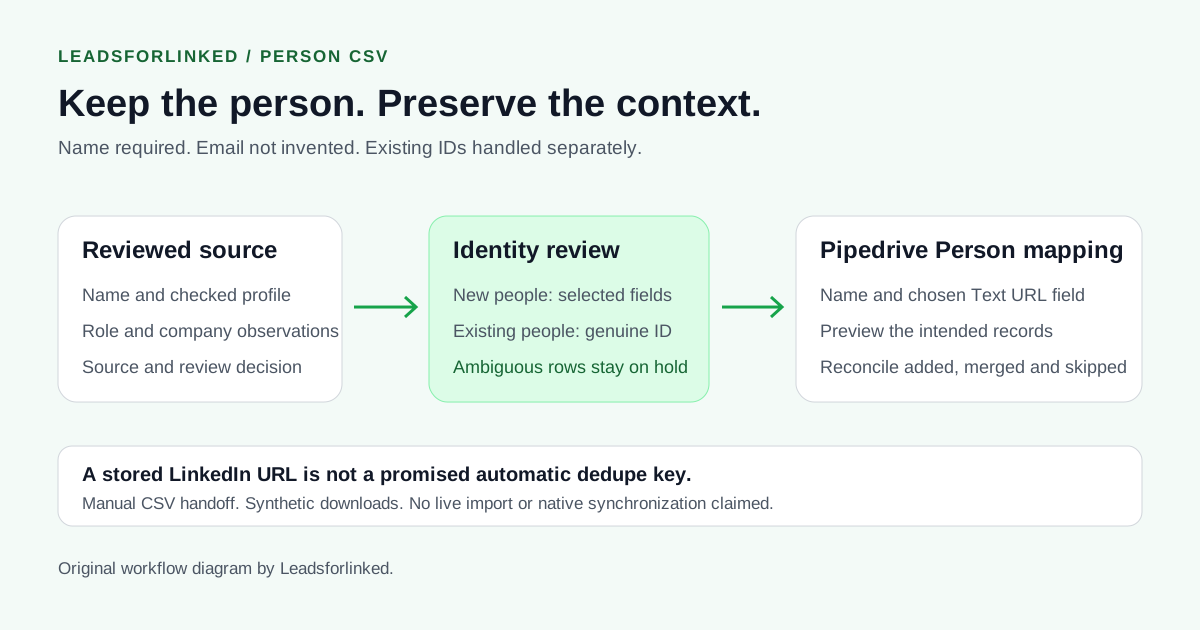
Your team already uses Pipedrive. You have selected additional people from LinkedIn, reviewed their responsibilities and kept the reason each belongs in the audience. You need those identities and observations in the CRM without manufacturing email addresses or creating a second contact every time you collect a new list.
Pipedrive's mandatory-field guide, updated 3 September 2026, requires a person name to import people. Email or phone supplies additional identity information; it is not that guide's mandatory person field. This recipe prepares person records, not qualified opportunities or permission to contact them.
Original work product: an approved source demonstration, its separately mapped person-field demonstration and held identity cases. All are synthetic. Documentation was checked ; no live Pipedrive import is claimed.
Start with a selected audience your CRM does not already supply
Define the people needed for the next sales task: responsible role, relevant account and exclusions. A client-approved set of profile identities is different from a broad job-title search. Retain the source and review decision before choosing the importer.
A March 2026 sales discussion describes a LinkedIn, Surfe and Pipedrive stack and asks whether list intelligence alone is enough for salespeople. That is a firsthand workflow question, not a measured buying-intent or conversion result. An import creates usable records; qualification remains separate.
Keep Pipedrive's own Prospector when its people and company filters supply the audience. Pipedrive's Surfe Marketplace listing describes directly adding LinkedIn contacts to the CRM. That third-party route can be simpler when your team already uses it successfully. An external CSV is useful for a separately curated audience and deliberate review, rather than every Pipedrive account.
Download the source, mapped demonstration and review cases
- Approved source demonstration CSV: identities, observations and review decisions.
- Mapped person-field demonstration CSV: the selected fields projected from that source.
- Held identity and update cases CSV: unresolved rows kept outside the new-person payload.
Every row is marked synthetic=TRUE and do_not_contact=TRUE. Names, profile URLs, companies and context are invented. These flags are informational and do not configure a native suppression rule. Do not contact, enrich or import the examples as production prospects.
The mapped file is a manual projection of the approved demonstration, not an observed Pipedrive result. Our headers illustrate your preparation choices; they are not mandatory vendor headers or a verified Leadsforlinked export schema. There are no email addresses, phone numbers or genuine destination IDs in the downloads.
Separate new people from existing records and ambiguity
Compare the new audience with your existing contact baseline. The Prospect List Workbench exclusion view can compare the actual identity columns in your files. A row remaining after that comparison is not proven new if the baseline is incomplete or uses different identifiers.
Keep missing names on hold. Resolve the actual name rather than deriving it from a URL slug. For this recipe, also require a checked source person link, although Pipedrive's minimum requirement is the name. A company page is not person identity, and an opaque Sales Navigator identifier must not be turned into an invented public URL.
The review fixture contains a missing name, missing source URL, company page, opaque identifier, two same-name profiles with the same company observation, and an already identified existing person. These are preparation decisions, not measured import failures. Preserve both same-name identities until the evidence resolves them.
Create or select Person observation fields
Check your existing field inventory before adding more. Pipedrive's custom-field guide, updated 3 September 2026, describes Personal preferences → Data fields, choosing the entity and adding a custom field. Select Person. Field creation requires the appropriate global permissions and available account capacity.
Use a suitable existing Person field for the source profile link, or create a Person Text field with an agreed name such as “Source LinkedIn profile.” The field-type documentation, updated 3 September 2026, explicitly supports URLs in Text fields. Storage does not verify the profile or establish a unique deduplication key.
| Our mapped column | Intended Pipedrive mapping | Decision |
|---|---|---|
person_name | Person Name | Use the reviewed actual name; no guessed split |
linkedin_profile_url | Chosen Person Text field | Store the checked person source |
source_role_observation | Chosen Person Text field | Keep the source observation distinct from an authoritative employment change |
source_company_observation | Chosen Person Text field | Does not create or link an Organization |
source_context | Chosen Person Text or Large text field | Preserve why this person belongs |
| Synthetic and review fields | Keep outside the real payload | Do not map as marketing permission or native controls |
The import-fields guide groups Person and Organization fields separately. Its Organization LinkedIn field serves company records. Do not map a person's URL there. This person-only recipe stores company context as a Person observation; approve any actual organization creation or association separately.
Understand what automatic merging can and cannot decide
Pipedrive's import duplicate guide, updated 3 September 2026, describes recognizing a person's name and then checking organization, phone or email. With merging selected, a match can merge records and add imported data. It does not document automatic LinkedIn-URL matching.
Two real people can share a name and employer. Conversely, one person's name or employer can change. Resolve these cases against the actual source and destination record before choosing merge behavior. An automatic merge option is not an identity investigation, and bypassing it can create duplicate contacts.
Use genuine System IDs for existing-person updates
Keep existing contacts in a separate update payload. Pipedrive's spreadsheet update guide, updated 3 September 2026, uses Pipedrive System ID to identify the intended record. Obtain the genuine Person ID from your account's contact list export; a deal or organization ID identifies a different item.
Preserve the ID and map only the Person fields you intend to update. Imported changes to mapped fields can overwrite existing data. Do not guess an ID from a LinkedIn slug or choose the first same-name record. The review file's textual ID placeholder is deliberately not uploadable: the error guide requires integer IDs and documents missing-person errors for unknown IDs.
Map and preview the real person payload
Follow the spreadsheet import guide, updated 7 October 2026: open Tools and apps → Import data → Import from spreadsheet and choose Get started. Select the intended data type, upload your reviewed real CSV and inspect the suggested mappings. Correct mappings manually when needed.
Keep the recipe's fields under Person. Inspect the preview for the intended name, stored source URL and observations. Check that unexpected Organizations, Leads Inbox entries or deals are not being created. Review duplicate handling before finishing. Preserve the exact source, approved payload and mapping choice.
Read the import-history summary and affected records afterwards. Reconcile added, updated, merged and skipped items. Download the skip file to retain each affected row and reason, then correct the relevant rows. A successful file upload does not prove correct identity, prospect quality or contact permission.
Produce additional reviewed profiles after the mapping works
Leadsforlinked's published product guide describes profile sourcing and CSV export. The published offer, checked 12 October 2026, includes 100 free leads without a card, released in batches of 20. Inspect your actual export and the Pipedrive mapping first.
When your existing source does not supply the selected audience, use the tested collection route to produce additional profiles and choose a current extraction pack or recurring plan. The paid job is that additional source audience. It does not supply verified emails, genuine Pipedrive IDs, native synchronization or messaging permission.
LinkedIn's prohibited-software guidance restricts scraping extensions and automation and describes account risk. A manual CRM handoff does not make the collection approved by LinkedIn.
Sources and verification
Checked 12 October 2026. The downloadable projection and review decisions are original synthetic work. No live Pipedrive import, response benchmark or production exporter schema is claimed.
- Pipedrive: mandatory fields, updated 3 September 2026.
- Pipedrive: import workflow and history, updated 7 October 2026.
- Pipedrive: custom-field configuration, field types and item-specific mapping, updated 3 September 2026.
- Pipedrive: duplicate rules, System ID updates and skip-file errors, updated 3 September 2026.
- Pipedrive: native Prospector and Surfe Marketplace listing, checked today.
- 2026 sales discussion, firsthand workflow question only.
- Leadsforlinked product guide and published allowance, checked today.
- LinkedIn: prohibited software, checked today.
Frequently asked questions
Can I import Pipedrive people without email addresses?
Pipedrive's mandatory-field guide lists person name as the required field for people. Email or phone adds identity information. This guide prepares reviewed person records without inventing email addresses; it does not establish permission to contact them.
Where should I map a person's LinkedIn profile URL?
Use a suitable existing Person field or a deliberately configured Person Text custom field. Pipedrive documents Text fields for URLs. Do not map a person's profile to the Organization LinkedIn field.
Will Pipedrive merge people automatically by LinkedIn URL?
That is not documented by the import duplicate guide. It describes person name plus matching organization, phone or email. Resolve ambiguous identities before choosing merge behavior; a stored profile URL is not assumed to be a unique key.
How do I update someone who already exists in Pipedrive?
Prepare a separate update payload using the genuine Person System ID exported from your own account. Preserve the ID and map only intended changes. A LinkedIn URL, company ID or invented placeholder does not supply the correct Person ID.
Are the downloaded CSVs ready to import or contact?
No. All rows are synthetic and marked do not contact. The mapped file is an editorial projection, not a live Pipedrive result. Replace every fictional identity and observation, then build a reviewed real payload and map it deliberately.