Your next audience file should contain reviewed people you still need, not last week's names with a new filename. Comparing two LinkedIn exports can separate unmatched profiles, changed observations, absent records and uncertain identities before another CRM import or enrichment run.
The practical job here is a recurring revenue-operations audience: save the source scope, export a new snapshot, compare it with the previous snapshot, then check the candidate additions against the historical accepted and exclusion records. The output is a decision queue. It is not a verified employment-event feed or permission to contact anyone.
Original worked exercise: download two fictional snapshots and five exact expected CSV outputs generated with the same local comparison engine as our free tool. The supplied dates, people, companies and observations are synthetic. The exercise makes the identity and review boundaries inspectable; it is not a measured production result.
Keep a weekly comparison contract
Write the audience rule before comparing files: which companies, roles and locations belong in the job; which source route you used; and what makes a row usable. Keep the search URL, account or client brief, export filename, observation date and coverage notes with each original. Put a changed query or selection in that log rather than let it look like a change in the people.
Reusing a search is useful, but it does not establish equal coverage. LinkedIn's People search guidance, checked 12 October 2026, says results and the displayed counter can differ. A CSV is the set you actually captured, not a census of everyone satisfying the brief.
Maintain a raw original and a comparison copy separately. In the comparison copy, keep the field names and meanings consistent. Store capture timestamps and changing batch notes in the file log instead of a shared comparison column unless you deliberately want those metadata changes reported. Otherwise every row can look changed just because its collection date moved.
Honest concession: if your existing CRM already provides the required import/update rules, or your Sales Navigator Advanced Plus setup fits LinkedIn's supported CRM Sync route, use that workflow. The same primary page documents Salesforce, Microsoft Dynamics and HubSpot options and says Sales Navigator itself does not offer CSV/XLS lead-account exports. Local comparison is useful when you already have two files and need a transparent review before a manual handoff.
Download the paired snapshots and expected results
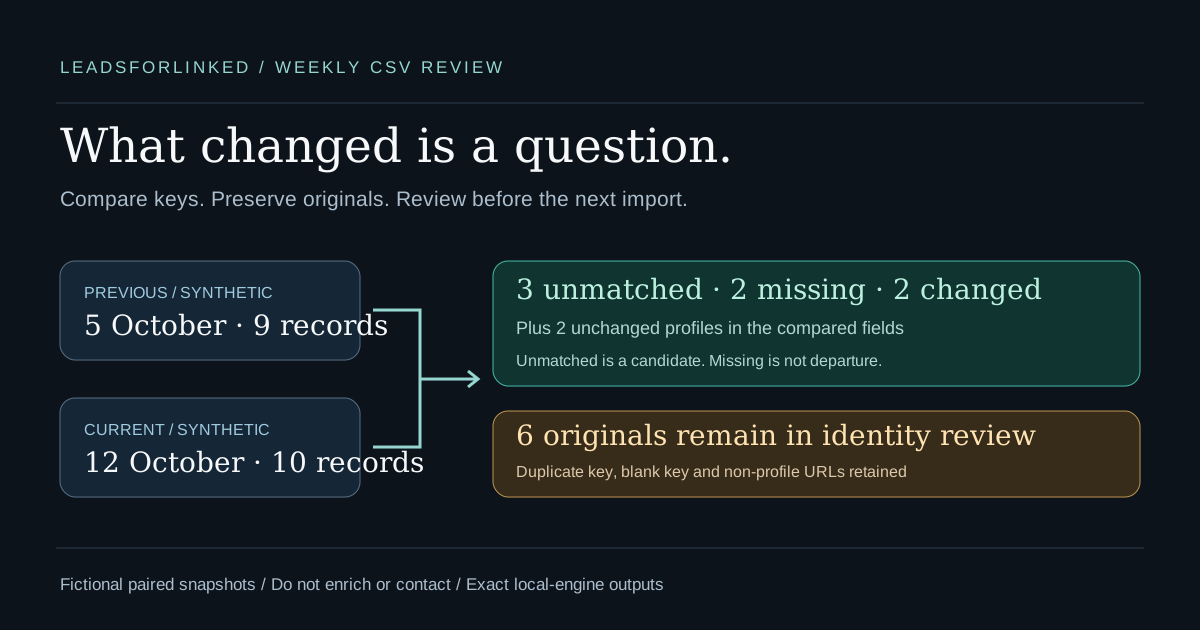
The fictional snapshots are dated one week apart, 5 and 12 October 2026. The previous file contains nine data records; the current file contains ten. Both use our illustrative review columns, including case_id and public_profile_url. These are not guaranteed Leadsforlinked production headers. Inspect and map your actual export explicitly.
- Previous synthetic snapshot: nine records
- Current synthetic snapshot: ten records
- Expected main comparison: nine rows
- Expected unmatched current keys: three rows
- Expected missing keys: two rows
- Expected changed fields: two rows
- Expected identity review: six original rows
- Example manifest: mapping, counts, provenance and case-by-case decisions
Source and contact-row outputs retain synthetic=TRUE and do_not_contact=TRUE. Changed fields uses a report schema without those columns: it describes the same fictional keys and is not a contact payload. All names, URLs and companies are fictional, including the public-profile-shaped URLs. Do not contact or enrich them. These columns are labels, not an enforced CRM suppression rule. Use the files only to reproduce the comparison.
Run the comparison in the free workbench
- Open the Prospect List Workbench in Compare snapshots mode.
- Load the previous synthetic CSV as Previous snapshot and the current CSV as Current snapshot.
- Select public_profile_url [2] as the matching column in both panels. Keep LinkedIn profile URL as the identifier type. Do not select the example case ID or person's name as a substitute.
- Enable Excel-safe downloads to match the supplied expected export setting, then choose Compare snapshots.
- Inspect the warning and Compared fields list. This fixture compares seven equally named non-key columns. Download Main result, New rows, Missing rows, Changed fields and Review rows.
Use the expected downloads to check the result content. The workbench names its files prospect-compare-output.csv, prospect-compare-newRows.csv, prospect-compare-missingRows.csv, prospect-compare-changedRows.csv and prospect-compare-review.csv. Our expected filenames describe the same tables. Rename your actual downloads with their snapshot pair before archiving them.
The tool reads and compares file contents locally in your browser; its comparison code makes no external profile requests. Clear workspace removes loaded data from that page, but it does not delete your original files, downloaded copies or destination records. A later Clay, n8n or CRM upload has that destination's own processing boundary.
Resolve reported CSV parsing issues before running. The example includes a quoted comma and embedded newline in an unchanged note. Source-row markers refer to the data record's position counting the header, not necessarily a text editor's physical line number when cells span lines. Keep the original file beside the results so those markers stay useful.
Read the outputs as evidence, not conclusions
| Fixture result | Exact count | Next decision |
|---|---|---|
| Unmatched current keys | 3 | Check identity, audience fit and historical/suppression records before calling them net-new |
| Missing keys | 2 | Check scope and aliases; do not infer an employer departure |
| Changed profiles / fields | 2 / 2 | Inspect the previous/current field values and source rows before updating a destination |
| Unchanged profiles | 2 | Only the compared fields are unchanged; other facts were not examined |
| Review originals | 6 | Resolve the duplicate key, blank key and non-profile URLs; retain all original observations |
These counts are computed from the linked synthetic inputs on 12 October 2026. The main table combines unambiguous new, missing, changed and unchanged records. Compare mode withholds uncertain identities from those classifications and places them in Review rows. The two changed profiles also appear in the field-by-field file, so those outputs overlap; do not add every download's row count as if each were a separate person.
Case S01 is unchanged even though its current source URL has a different host spelling, trailing slash and tracking query. The canonical key removes those surface differences while the current original URL remains in the output. S02 has different title text and S03 different company text. Those are exported observations to investigate, not proven promotions or moves.
S05 occurs once previously and twice currently under the same canonical key. The tool sends all three originals to review, even though one current title matches the previous title. It does not pick the latest row or silently discard a duplicate. S06's Sales Navigator URL, S07's previous blank key and S11's company URL account for the other review rows.
Resolve aliases before calling a record new
New means the chosen key was absent from the selected previous file. S07 demonstrates the boundary: the previous record had no URL, so the current URL cannot be matched by name. The current row appears in New rows while its previous observation remains in review. Hold that candidate until you establish the relationship; a familiar name is not proof.
S08 deliberately changes only URL slug case. LinkedIn documents custom public URL case-insensitivity and the ability to change custom URLs. The workbench conservatively preserves slug case and encoding and does not determine whether an arbitrary value is a custom or assigned alias. This example therefore produces a missing old key and an unmatched current key. They require manual alias review before a net-new decision.
Keep an identity decision and its source evidence beside the raw spellings. Do not automatically lowercase every opaque identifier, invent a public /in/ slug from a Sales Navigator ID or merge people sharing a name. The local normalizer accepts a conservative public-person path shape; it does not check that a profile exists, is accessible or belongs to the claimed person.
For a real file pair with changed headers, create aligned copies and retain the originals. The browser tool compares equally named non-key columns; it does not infer that job_title and role mean the same thing. Inspect the fields it reports. If none are comparable, a shared key is presence-only, not unchanged. If only metadata columns match, their sameness does not establish that the substantive fields match.
Turn the candidate queue into a usable weekly list
Review the New rows file against the audience brief, then compare the retained candidates with your historical accepted list and current exclusions using the workbench exclusion view. Last week's file alone misses people absent last week but already imported earlier. Keep unresolved identities out of the destination payload until the evidence is sufficient.
Exclusion mode has a different retention rule from comparison: uncertain candidate rows can remain in its Main result and also appear in review. Invalid or blank keys in the existing-contact reference make exclusion incomplete. Read those warnings and build a separately accepted file; the raw remaining count is not automatically a net-new count.
In the fictional exercise, hold S07 for missing prior identity and S08 for alias review. S10 is the remaining unmatched-key candidate for audience and historical checks. That is a demonstration decision, not one newly verified lead or a production fit rate. No synthetic file should enter a real CRM, enrichment provider or campaign.
For your actual accepted subset, preserve the original snapshot filenames and row references. Send only the reviewed destination columns through a tested mapping. The Clay CSV guide explains a manual import with enrichments initially paused. The n8n workflow prepares a user-uploaded file in your n8n instance; it is not a native LinkedIn extraction integration. Neither destination creates verified emails merely because a profile URL is present.
Archive the original pair, all comparison outputs and the decision log together. Update historical accepted and exclusion records from resolved decisions, not from every unmatched key. On the next pass, retain both the recent snapshot comparison and the historical check. This keeps research changes distinct from previously contacted people resurfacing.
Buy repeated source volume after the sample works
The free comparison tool needs no signup. Extra extraction becomes relevant when the next audience job needs source records you do not already have. The published Leadsforlinked offer, checked 12 October 2026, includes 100 profile leads at signup without a card, released in batches under current terms. Use your actual remaining balance and review the real output's fields first.
The same dated page lists 500 leads for €1.99 as a one-time offer, subject to eligibility and current checkout. Do not treat it as a repeatable weekly pack. Basic publishes unlimited scraping and CSV export at €4.99 monthly, or €2.99 effective monthly billed yearly, a full €35.88 annual commitment. A recurring extraction subscription does not guarantee that every row is new, fits the audience or has verified contact details.
Compare the commitment with the work you actually plan to repeat. If your current CRM or sender already has the required reviewed audience, use it. If the sample reveals unresolved identities or unsuitable fields, buying more of the same does not fix those issues. The one-job versus repeat-extraction planner uses your observed usable fraction and balance as a scenario, not a forecast.
Evidence and validation boundaries
A 2026 small-team discussion asks how to move selected Sales Navigator leads through CSV cleanup into a CRM while avoiding repeated contact. A firsthand reply describes duplicate and missing-field cleanup. That is observed workflow pain, not measured search volume or evidence that this guide improves replies, sales or time spent.
The primary LinkedIn and own product sources above were checked on 12 October 2026. The expected files were generated with the current local workbench engine and checked through executable fixture tests. This guide claims no live extension extraction, production CSV schema, live destination import, verified identity or measured customer result.
Frequently asked questions
Does new mean this person has never been in my CRM?
No. New means a usable matching key is present in the current file and absent from the selected previous file. Compare candidates with your historical accepted and exclusion records before calling them net-new. Blank keys and unresolved aliases can make that history incomplete.
Does missing from this week mean the person left the company?
No. It means the matching key was present in the previous file and absent from the current file. Filters, result coverage, export access or a changed profile URL can produce the same result. An employment claim needs separate research.
What happens to duplicate or invalid profile keys?
In compare mode, repeated matching keys in either snapshot send all related rows from both snapshots to review. Blank keys, company URLs and unresolved Sales Navigator lead URLs also go to review. The tool does not guess identity from a name.
Can I compare different CSV column names?
Select the equivalent identity column explicitly in each file. The browser comparison checks equally named non-key fields. Prepare aligned comparison copies if meaningful headers differ, preserve the originals, and inspect the Compared fields list. No comparable fields means a presence-only result, not unchanged data.
Are the downloads real exports or verified LinkedIn identities?
No. They are original fictional snapshots with illustrative mapped headers. Source and contact-row outputs retain synthetic=TRUE and do_not_contact=TRUE; Changed fields is a report of those fictional keys, not a contact payload. Those flags do not enforce a destination blocklist. The expected outputs are generated by the local workbench engine; no live extraction or identity verification is claimed.