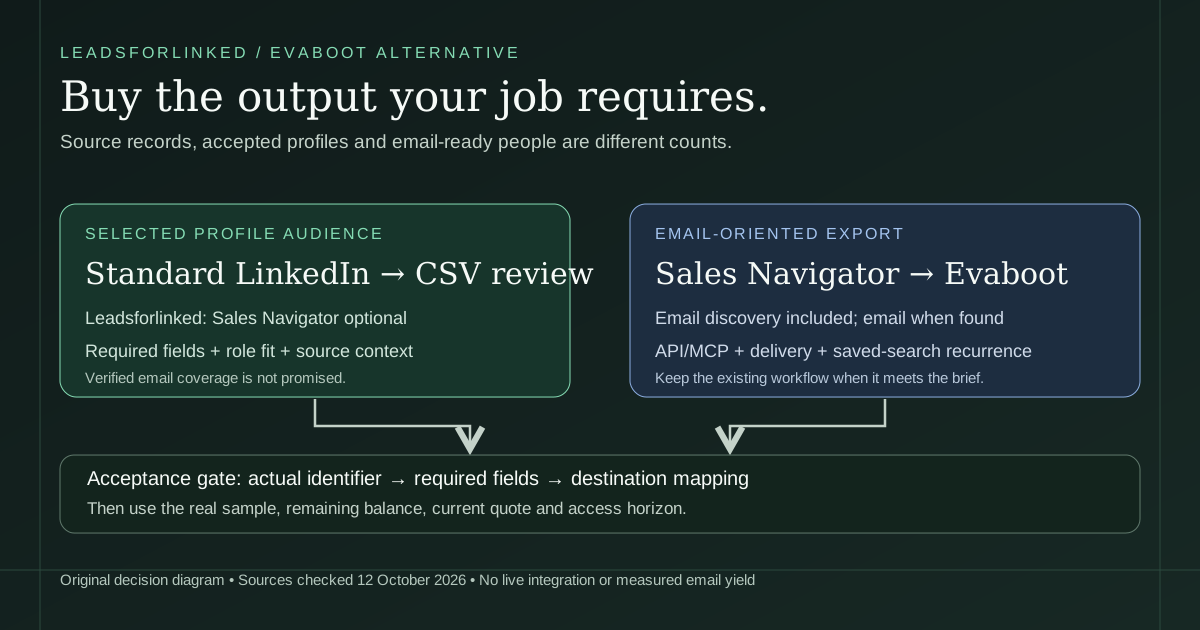
The reason to look for an Evaboot alternative should be specific. Perhaps you need a reviewed audience from standard LinkedIn and do not need email addresses. Perhaps you already have Sales Navigator, but want to understand the credit bill. Or perhaps a recurring export into Clay already works and the actual problem is reviewing the returned people. Those are different purchases, even when every tool eventually produces rows.
A 2026 CRM discussion asks how to move a Sales Navigator lead list into Excel with contact information. A separate 2026 enrichment discussion questions whether an additional contact-data subscription is still needed. These are firsthand buyer questions, not evidence of search volume, data coverage or a product's performance.
We build Leadsforlinked. Our recommendation is to buy additional profile sourcing when it supplies a selected audience your current workflow is missing. Keep Evaboot when its email discovery, Sales Navigator access or scheduled delivery already meets your requirement. A lower headline price does not make a profile-only file equivalent to an email-oriented export.
Six routes for the job you need to finish
Primary documentation was checked on 12 October 2026; Evaboot pricing, credit and trial sources were rechecked on 20 October. The row order follows the decisions on this page, not a benchmark ranking. The table keeps price scope, source access and required output separate.
| Tool or native route | Source job | Sales Navigator boundary | Email requirement | Operations and handoff | Price or allowance scope | Primary reference |
|---|---|---|---|---|---|---|
| Leadsforlinked | A deliberately selected LinkedIn profile audience | Optional for published standard LinkedIn sourcing | Inspect profile fields; verified emails are not promised | Review actual CSV and map a manual destination payload | 100 signup leads; eligible 500-lead one-time offer €1.99; Basic €4.99 monthly | Own offers |
| Evaboot | Sales Navigator export with included email discovery | Active own seat for Sales Navigator search exports | Email when found; no guaranteed coverage | CSV/XLSX, API/MCP, integrations and saved-search recurrence documented | Starter $9/month for 100 credits; Grow $29/month for 400; once-only trial quantity not quoted here | Current pricing |
| Apollo | Existing saved contacts or database search | Database route differs from a selected Sales Navigator audience | Export can filter verified emails; does not automatically enrich existing rows | Use native saved-contact export when it already supplies the list | Saved-contact CSV export uses no credits under current guide; check account entitlements | CSV rules |
| Clay | Native people search by companies, titles and other criteria | Find People uses Clay's source; not a promise of identical LinkedIn audience coverage | Choose the required enrichment and inspect results separately | Keep native sourcing when it already produces the approved audience | Check current source/action allowance and plan; no price inferred here | Find People |
| PhantomBuster | Connected standard LinkedIn search workflow | Separate Phantom for Sales Navigator searches | Search output is profile information; email discovery is a separate resource | Connected LinkedIn session and search URL required | Free/trial export capped at 10 results; collection runtime is a different limit | Search route |
| LinkedIn connection archive | Your own first-degree connection list | Native account-data request; not arbitrary Sales Navigator lead export | Only emails members permit to be seen or downloaded | Use the native archive when your existing relationship list is enough | Archive scope is your first-degree network, not a new search audience | Archive scope |
Read the allowance in the context of the row. A saved-contact export, a signup profile allowance and a monthly email-oriented export plan are not interchangeable baskets. Confirm the current plan and checkout before buying; this comparison does not convert USD into EUR or assign a fixed price to your Sales Navigator seat.
When Leadsforlinked supplies the missing profile audience
Choose our standard LinkedIn route when you have deliberately selected the source and need profile records for review, research or a mapped CSV handoff. Published source options include searches, post commenters, event attendees and group members. The value is the selected audience, rather than a claim that all returned people want to buy. An interaction with a post is context to inspect, not demonstrated buying intent.
The public route is to create an account, install the Chrome extension, open the intended source and inspect an actual sample export. Use the search export guide for a People search, or the commenter audience review when the source is a relevant post. Confirm the installed route before scaling; a public feature description is not proof of every possible saved-list input.
In the Free tier and lead packs, the published billing unit is one profile lead per credit with duplicates refunded. That describes billing, not a guarantee that each row contains every field or passes your audience brief. Keep names, current role, company context and identity checks in the review. If the destination requires a verified email, our profile extraction does not finish that requirement on its own.
Start with the sample rather than replace an entire stack. An email provider, sender or CRM that already works can remain in place. A manual CSV handoff is enough when you need a reviewed external subset; it is not a native sync, an automatic recurrence contract or a proof of successful import into another platform.
What Evaboot now includes, and when to keep it
Evaboot's current data-export documentation describes profile and company information, with a professional email when found. It also says phone numbers are not exported. For a Sales Navigator audience that needs email discovery in the same workflow, that is a concrete reason to keep the product rather than pay for raw profiles and reconstruct the enrichment step elsewhere.
The current credit guide charges one credit per exported lead including email discovery. A lead with no discovered email still costs one credit. Standalone Email Finder charges per found email, Email Verifier per checked address, and URL enrichment per URL. Do not apply a standalone finder's “not found” rule to a complete lead export, or add a second email-discovery charge to the current lead-export unit.
Evaboot is also more than a file-download endpoint. Its API documentation describes asynchronous extraction, email finding and verification. Its MCP guide documents assistant access. We read those sources; we did not execute authenticated calls or test assistant actions. Their existence defeats a blanket claim that a CSV export leaves every customer without automation options.
Its integration guide documents webhook delivery of export, enrichment and email-job results. Dedicated n8n and Clay guides describe those destinations. Check destination plan access, mapping and trigger mode. We do not treat an integration guide as a live delivery result, or promise that every CRM has a direct native connector.
For recurring work, its saved-search guide describes daily, weekly or monthly runs that return new leads. It explicitly excludes lead lists and one-off searches from recurrence. If your team already relies on this documented route, keep it unless the replacement actually meets the scheduling requirement. Exporting a manual snapshot does not replace that behavior.
Check the identifier route before copying a list
A public person URL with a custom /in/name slug, a unique-ID LinkedIn URL, a Sales Navigator lead URL and a company Page are different values. Preserve the raw input and decide what the destination needs. A person-profile-shaped path is a formatting clue; it does not verify identity or current employment.
Evaboot's URL-enrichment documentation accepts unique-ID or Sales Navigator URLs and says custom public URLs are not supported by that route. It also distinguishes person enrichment from company enrichment. If your existing handoff contains public slugs only, do not assume the bulk URL route accepts them, or create a unique ID by rewriting the path.
Our comparison therefore does not promise a universal URL conversion. For a selected standard LinkedIn audience, inspect the actual exported person URLs and resolve opaque values against the original source before preparing a destination payload. Preserve the original source observations if you normalize a comparison key. Where two observations conflict, keep both originals until review establishes which values belong in the accepted file.
Download the source and destination acceptance worksheet
Download the editable purchase worksheet
The six-row worksheet follows the six routes in the comparison. It records the candidate source job and identifier boundary, then leaves real review fields empty: destination, required fields, downloaded file, actual columns, checked rows, accepted profile rows, accepted email rows, already approved rows, remaining balance, access horizon, current quote, expiry, destination mapping status and decision. These are your review records, not exporter headers or a destination import template.
- Define the deliverable. Record the selected audience, required fields and destination. Decide whether email evidence and recurrence are required or optional before evaluating the routes.
- Inspect the actual file. Count rows with resolvable person identity, relevant current role and account fit. Keep excluded and unresolved records distinguishable. Record source context manually if the exporter does not provide it.
- Count email-ready rows separately. Require the actual address and acceptable status evidence. A found-email count does not automatically satisfy the team's verification, freshness or contact-permission rule.
- Review the destination mapping. Confirm its accepted identifier type, required columns and duplicate behavior. A successful upload is not proof of the correct person or employer association.
- Record the purchase boundary. Use the actual account balance, entitlement end and checkout quote. Decide whether the source and destination passed before choosing a volume or recurring commitment.
Do not total requirement-field counts into approved people. A row is accepted only when all mandatory rules for that brief pass. There are no real or fictional prospect identities in this worksheet, and no prefilled sample results. Its blank measurement cells are deliberate: the reader supplies the evidence.
Use the offer planner with real inputs
The extraction offer planner asks for the target usable rows, already approved rows, exported and usable sample counts, actual remaining credit balance, pack eligibility and months of paid access. It runs the arithmetic locally. It does not inspect your account, checkout or source audience, and it compares our published offers rather than calculate an Evaboot invoice.
Our current public offer, checked 12 October 2026, starts with 100 signup leads without a card, released in batches of 20. The 500-lead €1.99 limited offer is one-time and subject to availability and your checkout eligibility. Basic is €4.99 per month, or €2.99 effective monthly billed yearly, which is €35.88 for the full year. A yearly effective monthly label does not mean a one-month €2.99 purchase.
Here is an original synthetic budgeting example: target 500 approved profiles, 140 already approved, 90 usable from a 120-row sample, 35 credits remaining, a three-month access horizon and an eligible current offer. The approval gap is 360. Applying the sample fraction only as a scenario gives ceil(360 × 120 ÷ 90) = 480 additional raw profiles, and a raw credit shortfall of 480 − 35 = 445.
One eligible 500-lead offer covers that scenario's raw shortfall, leaving 55 pack credits. This does not establish that the additional profiles will yield 360 approvals. Three monthly Basic payments total €14.97, compared with the €35.88 annual commitment. The horizon compares subscription payments; it does not forecast three future list volumes or multiply the €1.99 offer into repeated promotional packs.
After reviewing your sample, check the available pack and term on our current offer page. For recurring access, open the Basic checkout route to review the current quote. Choose the displayed monthly or yearly commitment deliberately before paying.
For Evaboot, use its current pricing page and your own remaining balance. The monthly tiers include Starter $9 for 100 credits, Grow $29 for 400, Scale $49 for 1,000 and $99 for 3,000. The bare dollar sign is kept as published; no annual price is inferred here. If a separate hypothetical job needs 480 exported leads and the Evaboot balance is zero, the 400-credit Grow allowance is insufficient; the published 1,000-credit tier covers that count. Do not transfer the 35-credit balance from our example into a different vendor's account.
Those Evaboot export credits include email discovery when found, which our profile offer does not. A fair comparison adds the actual email-enrichment cost only if your brief requires it, and adds a Sales Navigator seat only when that source requires one and the seat represents an actual purchase. We do not claim a dollar-to-euro saving or a cost per verified email without measured accepted-email output.
Evaboot's free-account guide confirms once-only trial credits per person and company, but does not establish a numeric quantity on the checked page. Its pricing FAQ says unused subscription credits roll over while the subscription stays active. Check your actual account terms and quote; use the relevant invoice when reviewing a past purchase. Preserve your balance and expiry evidence before changing a plan.
Use another existing route when it already fits
Apollo: keep its native CSV export when the approved contacts are already saved there. Its current guide says saved-contact export uses no credits, while net-new selected people are saved first and each with a verified email costs one credit. Export does not automatically enrich missing email fields. That is a reason to inspect the existing records before buying another extraction.
Clay: its Find People source can search people at selected companies using role and other criteria. If that native source already supplies the required audience, keep it. An externally selected commenter audience or research shortlist is a different job; the reviewed CSV handoff explains how to map that subset without assuming every later enrichment is approved.
PhantomBuster: evaluate its connected search workflow when it fits your broader automation process. Its Free and trial export boundary is ten results, even if runtime lets a job collect more. A small free download can test the mapping but should not be described as a free deliverable of hundreds of rows.
LinkedIn: its connection archive can finish an existing first-degree relationship-list job. For teams already on Sales Navigator Advanced Plus, LinkedIn's CRM Sync guidance describes a supported CRM route. The same Help page says Sales Navigator does not offer arbitrary account or lead CSV/XLS export. Keep a native route when it already supplies the required workflow.
Switch the missing workflow after the acceptance check
Save the raw source file, accepted subset, unresolved rows and mapping decision together. Compare known contacts with the actual identity columns in the Prospect List Workbench. Missing or invalid baseline identities make that exclusion incomplete. A remaining row is not proven new merely because its name did not match.
Then prepare a limited destination payload using real approved identities. The n8n CSV preparation workflow separates format-clean and review records on your own instance; clean does not mean identity-approved. The HubSpot existing-contact guide explains a separate Record ID update job. Neither handoff creates email evidence or reproduces Evaboot's authenticated API integration.
Keep a working recurrence or enrichment process until the replacement meets those same requirements. Review actual renewal terms and dependencies before changing subscriptions. This guide sets no invented migration duration and does not assume you should cancel Sales Navigator merely because standard LinkedIn can supply a different audience.
There is also no safety advantage established by this comparison. LinkedIn's prohibited-software guidance covers scraping extensions and automation and describes restriction risk. Small batches or pacing do not establish platform approval. This page uses primary documentation, a blank acceptance worksheet and explicitly synthetic arithmetic; it claims no live extraction, email-yield benchmark or destination import.
Sources and verification
Evaboot pricing, credit and trial sources were rechecked on 20 October 2026; the other linked sources retain their 12 October checks. The blank worksheet, budgeting scenario and decision method are original work, not customer results. No live extraction, integration or email-yield measurement is claimed. Original publication: 7 May 2026; pricing revision: 20 October 2026.
- Evaboot: current tiers, required search seat and rollover scope. Rechecked 20 October 2026.
- Evaboot: exported profile/company data, emails when found and phone boundary. Checked 12 October 2026.
- Evaboot: current lead export and standalone credit definitions. Rechecked 20 October 2026.
- Evaboot: once-only trial scope. Rechecked 20 October 2026.
- Evaboot: unique-ID and Sales Navigator URL input boundary. Checked 12 October 2026.
- Evaboot: saved-search recurrence and exclusions. Checked 12 October 2026.
- Evaboot: delivery modes and CRM workflow scope. Checked 12 October 2026.
- Evaboot: API capabilities. Checked 12 October 2026.
- Evaboot: MCP and standalone email versus LinkedIn seat requirements. Checked 12 October 2026.
- Evaboot: n8n delivery. Checked 12 October 2026.
- Evaboot: Clay delivery. Checked 12 October 2026.
- Apollo: current export/enrichment boundary. Checked 12 October 2026.
- Clay: native people sourcing. Checked 12 October 2026.
- PhantomBuster: connected search inputs and Free/trial export cap. Checked 12 October 2026.
- LinkedIn: own connection archive. Checked 12 October 2026.
- LinkedIn: Sales Navigator export boundary and CRM Sync. Checked 12 October 2026.
- LinkedIn: prohibited scraping/automation guidance. Checked 12 October 2026.
- Leadsforlinked: current own offers. Checked 12 October 2026.
- Leadsforlinked: published standard LinkedIn sourcing and CSV route. Checked 12 October 2026.
- 2026 CRM discussion: firsthand export request, not a benchmark. Checked 12 October 2026.
- 2026 enrichment discussion: firsthand subscription question, not measured demand. Checked 12 October 2026.
Frequently asked questions
Is Leadsforlinked a free Evaboot alternative?
Leadsforlinked publishes 100 signup profile leads without a card, released in batches of 20, with Sales Navigator optional. Evaboot also documents once-only trial credits, but the checked pages do not establish a numeric trial quantity. The outputs differ: our profile CSV is not a promise of verified emails.
Does Evaboot still require Sales Navigator?
Its own Sales Navigator search exports and LinkedIn operations require an active connected seat. Evaboot's MCP documentation separately says standalone email finding and validation do not need one. Do not apply the search prerequisite to every Evaboot service.
Does an Evaboot export charge extra for each email found?
Current Help says one exported lead costs one credit with email discovery included, even when no email is found. Standalone Email Finder and Email Verifier have their own credit rules. Check your actual account terms and quote before budgeting; consult the relevant invoice for a past purchase.
Can I move a recurring saved search to a profile CSV workflow?
You can prepare a reviewed manual CSV handoff, but that does not recreate scheduled saved-search exports. Evaboot documents recurrence for Sales Navigator saved searches, excluding lead lists and one-off searches. Keep that working route if recurrence is required; this guide does not establish an equivalent automatic route in our installed extension.
Should I choose the €1.99 pack, monthly Basic or annual Basic?
Use a real sample, the actual remaining balance and your access horizon. The 500-lead €1.99 offer is one-time, limited and subject to checkout eligibility. Basic is €4.99 monthly or €35.88 for the full year at €2.99 effective monthly. The planner budgets source rows; it does not guarantee audience fit or verified-email yield.