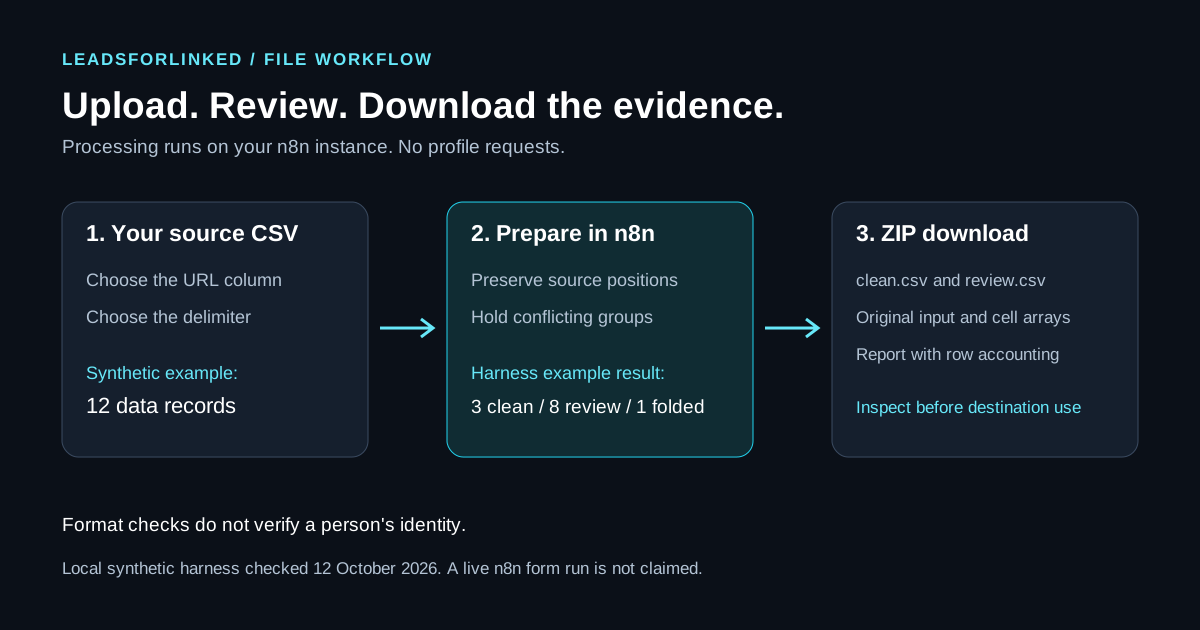
You have a selected LinkedIn audience in a CSV and want a repeatable preparation step in n8n. This downloadable workflow accepts your file, asks which column contains profile URLs, and returns a ZIP with clean rows, review cases and retained originals. It does not browse LinkedIn or send messages.
Original work product: an editable workflow JSON, its readable processing code, a synthetic input, expected outputs and a local verification harness. Checks completed on used that harness. A live n8n import, Form Trigger submission and browser download are not claimed as validated. Run the supplied fixture in your own instance first.
Choose the file job before the integration
Use this workflow when you already hold an externally selected audience and need explicit identity mapping, duplicate review and a file handoff. Keep the observation that explains why each person belongs in the audience beside the source fields.
The native-node concession: n8n's LinkedIn node documentation currently lists post creation. Use that node for its supported publishing job. The template here processes an uploaded file and contains no LinkedIn node, API connection or profile-extraction step. If your existing tool already produces an adequate reviewed list, another extractor is unnecessary.
Download the workflow and the reproducible example
- Workflow JSON and setup and behavior notes.
- Synthetic input CSV. Its people and identifiers are fictional; do not contact or enrich them.
- Expected clean CSV, review CSV and report JSON.
- Readable Code-node source and optional local harness.
The workflow imports inactive, with no service credentials. Its declared nodes are Form Trigger 2.4, Code 2 and Form Ending 2.3. The package notes describe current source-schema checks and their limits; these version declarations do not establish compatibility with your installed release.
Import and run the whole workflow
n8n's workflow import documentation describes Import from File in the workflow menu. Import the downloaded JSON and inspect the connected nodes: Upload CSV and select column, Validate CSV without losing originals, then Download clean and review ZIP.
Required file-handling setting: keep the imported workflow's binaryMode value set to separate. If the upload arrives in combined mode, the processor stops with a message to change the mode and submit again. Check this setting before testing; the download depends on separate binary input.
- Execute the whole workflow and open its test form. Executing only the trigger does not run the processing and download steps.
- Upload
n8n-linkedin-csv-synthetic.csv. - Enter profile column 2 and choose Comma. The sample's second header is
LinkedIn URL; column numbering starts at 1. - Submit the form and inspect the returned
linkedin-csv-clean-review.zip. Compare the report and CSVs with the expected downloads.
The Form Trigger guide distinguishes test execution from a published production URL. The Form Ending guide documents returning a binary file. This template configures that final step to return the bundle ZIP.
Reproduce the checked sample result
The synthetic file contains 12 data records. The local harness run checked on 12 October 2026 returned 3 clean rows, 8 review rows and 1 folded duplicate. Those counts account for all input records: 3 + 8 + 1 = 12. A multiline CSV record can span several physical lines, so do not count text lines as people.
For the optional local run, keep the JSON, harness and sample in the same folder. Node.js runs the embedded processing code with a stub for n8n's binary helper:
node n8n-linkedin-csv-harness.cjs n8n-linkedin-csv-synthetic.csv 2 Comma outputThis writes the ZIP and its contents to output. Our run matched the downloadable clean, review and report files byte for byte, and preserved the upload bytes. It did not run an n8n server or exercise the form download. Use it to inspect processing behavior, then separately test your instance.
Understand what qualifies for clean output
Select the identity column by position. No default falls back to a person's name or a similarly named header. Output labels include positions, such as column_2:LinkedIn URL, so repeated headers do not overwrite each other. These are template labels, not exporter or CRM header requirements.
The code accepts UTF-8 input and an explicitly selected comma, semicolon or tab delimiter. Its 5 MiB file limit is a template limit, not a LinkedIn or n8n allowance. A missing upload or oversized file raises an execution error.
Profile handling is a format check. Supported public /in/ links are normalized to HTTPS and www.linkedin.com, without tracking queries or a trailing slash. Slug case and percent encoding remain distinct. No request checks whether a URL exists or belongs to the named person. A plausible /in/ path, including an opaque-looking value, is not verified identity evidence.
Company URLs, unsupported paths, missing identities and wrong-width rows go to review. Equal normalized profile keys fold only when every other cell is exactly equal. A conflicting company, differing note or blank-versus-filled value sends all members of that group to review. The workflow does not choose the newest record or merge people by name.
A CSV syntax error blocks every clean data row because later record boundaries may be unreliable. Inspect the report and unchanged input instead of repairing a broken file by silently dropping records.
Read the ZIP before using the list
| File | Purpose |
|---|---|
clean.csv | Format-passed rows, original source cells and folded-record provenance |
review.csv | Excluded records, reasons, source positions and retained cells |
input-original.csv.txt | Exact upload bytes, including original line endings |
originals.json | Header positions, cell arrays, parsed record text and dispositions |
report.json | Blocking status, mapping, warnings and row accounting |
The CSV outputs prefix formula-like cells with an apostrophe. That changes their exported text deliberately; originals remain in the JSON and unchanged upload. Inspect those originals before opening them directly in a spreadsheet. Review any apostrophe-prefixed value before using it as destination data.
Clean means the template's preparation rules passed. It does not mean the row is approved for outreach, its email is verified or its destination requirements are complete. Keep unresolved rows separate, check exclusions and approve a destination payload deliberately.
Account for your n8n instance's data handling
The form uploads to your n8n server or n8n Cloud environment. Processing is not browser-only. The supplied workflow has no outbound content-request or sending node, but your instance handles the uploaded profile data.
The JSON requests disabled routine execution saving. Check imported settings and your instance's retention, binary storage and backups. The Form Ending uses waiting/resume state that may persist transient data. n8n's workflow settings documentation describes execution-saving controls; none of these settings proves zero storage or automatic deletion.
Form authentication defaults to None and the workflow is inactive. Use synthetic data in the test form first. Before exposing a production form, configure appropriate access on your instance and repeat its upload/download test. Any additional destination connection needs its own mapping and credentials.
Prepare the source audience for the next job
Leadsforlinked's published offer, checked 12 October 2026, includes 100 free leads at signup without a card. Inspect your actual profile CSV, select its identity column, and retain the context you need before running this preparation workflow.
If the reviewed audience meets the job and you need additional profiles, evaluate a current extraction pack or recurring plan. Keep an adequate existing source. This is a manual file transfer, with no promise of a native Leadsforlinked API or n8n integration.
Sources and verification
Official documentation and downloadable code were checked 12 October 2026. Example counts are local harness results, not a live n8n run or performance benchmark.
- n8n: native LinkedIn operations
- n8n: importing workflow JSON
- n8n: Form Trigger and test execution
- n8n: returning a binary download
- n8n: execution-saving controls
- Package notes: exact rules, source-schema checks and validation limits
- Leadsforlinked: current free allowance
Frequently asked questions
Does this workflow extract profiles from LinkedIn?
No. It processes a CSV you supply. It contains no LinkedIn extraction, profile request, Sales Navigator resolution or outreach step. The native n8n LinkedIn node documents post creation, a separate job.
Which profile column should I select?
Enter the actual URL column's position, starting at 1. The synthetic sample uses column 2 and Comma. The template never falls back to a name; output labels preserve column positions.
Does clean output mean the profile identity is verified?
No. URL normalization is lexical and makes no network request. Confirm the actual person, exclusions and destination requirements before approving a row for another workflow.
Where are conflicting duplicates and original values kept?
Conflicting URL groups go entirely to review.csv. Originals and source positions remain in originals.json, while input-original.csv.txt preserves the exact upload. Output CSVs deliberately escape formula-like text.
Was this package tested in a live n8n instance?
No live instance or browser download was tested. The local harness executed the embedded processing code and matched the expected files. Run the synthetic fixture through your own n8n import, form and download before using real data.