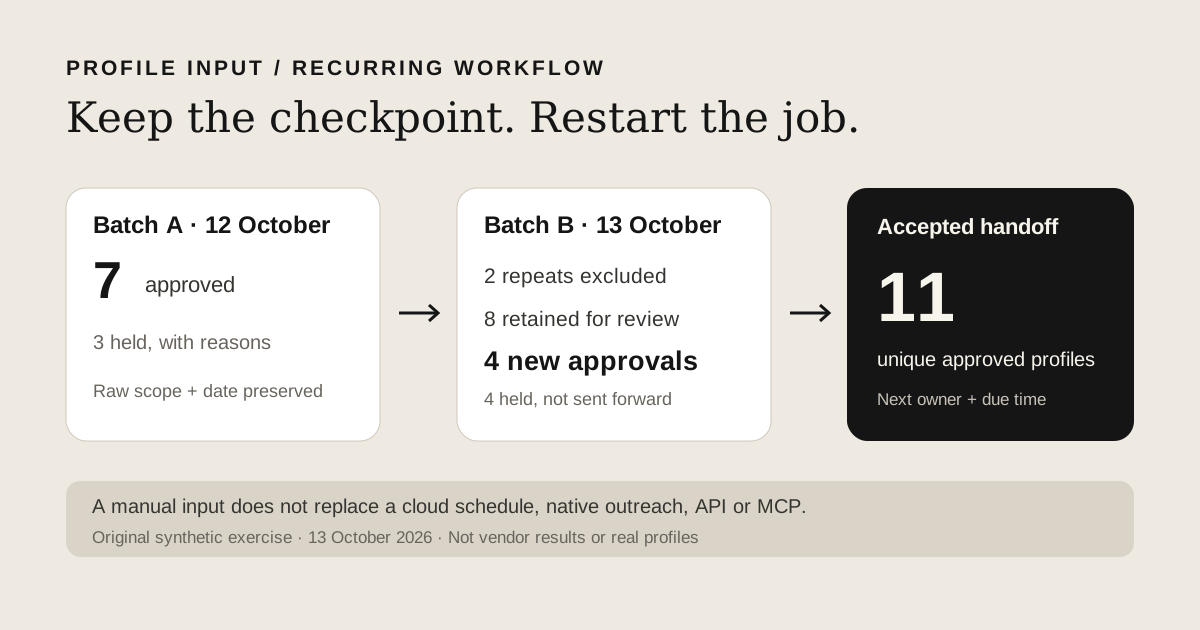
If an audience job fails halfway through, the immediate question is which profiles are already approved, which still need review, and who owns the next run. Buying another extractor without answering those questions can leave the same confusion in a different dashboard.
This page includes an original interruption and restart exercise, created on 13 October 2026, with raw batches, repeat-exclusion outputs, explicit held records and a blank workflow handoff. It is fictional, not an extraction-speed or reliability comparison. We build Leadsforlinked and want you to test the missing profile input before you replace a working system.
Choose by the job you must deliver
Write the deliverable in plain language: a selected audience of current people, the required columns, the destination, and when another approved audience is due. A CSV you inspect today and a job that launches without an operator next week are different purchases.
| Tool | Source and output | Best fit | Recurrence and control | Enrichment | What to test first |
|---|---|---|---|---|---|
| Leadsforlinked | Selected LinkedIn profile CSV; standard LinkedIn supported, Sales Navigator optional | A reviewed profile input for your existing stack | This guide uses operator-owned exports; unattended scheduling and API parity are not promised | The free offer does not promise verified emails | Actual source, required fields and accepted profile count |
| PhantomBuster | Regular LinkedIn Search Export; separate Sales Navigator route; CSV and further workflows | Linked cloud extraction and downstream actions | Documented launches, API and hosted OAuth MCP | Separate enrichment workflows and resources | Actual run logs, source route, output completeness and downstream requirements |
Our offers and PhantomBuster's pricing were checked on the date above. At the checked annual rate, Start costs $672 billed yearly, equivalent to $56/month. Check the monthly option before comparing monthly budgets. Our own extraction offers are listed in the purchase section. These payments do not buy identical work.
When Leadsforlinked fits the profile-input job
Suppose your agency already has an enrichment provider and a sender, but each client campaign still starts with finding the right LinkedIn profiles. A replacement for that input can be useful even when the downstream tools stay. Define the role, geography and company criteria, capture a real sample, then compare what the destination needs with what your file contains.
A useful sample answers practical questions. Can you identify a person rather than a company Page? Is the profile still in the approved audience? Are the company and role usable for your qualification rule? Which required fields are missing? Does your reference audience include existing clients, previously contacted people and suppression decisions? Save those answers alongside the raw export so that another operator can continue the work.
We publish 100 free profile leads at signup, no card, released in batches of 20. That is a profile-input test, not 100 promised accepted prospects, verified emails or completed destination imports. See our current source and offer terms, checked 13 October 2026. Use the search export acceptance guide for a larger source job.
Test the profile input your next campaign needs
Use the free allowance on your actual audience. Keep the raw file and count the profiles your review accepts.
Get my 100 free profile leadsWhat PhantomBuster now does natively
Keep PhantomBuster when you need its documented cloud execution and linked actions. An operator-reviewed profile input does a different job. Do not buy a replacement for a feature you already have.
Its LinkedIn Search Export guide, checked 13 October 2026, supports regular LinkedIn searches, keyword input, Google Sheets and paid CSV input. It documents duplicate removal and optional extra profile details. Search-preview data is not the same as a full profile or guaranteed business email.
The launch guide documents manual, repeated, chained and advanced launch modes. A configured Phantom can continue in the cloud after the browser closes. Its native outreach guide combines extraction, invitations and follow-ups. Follow-up behavior and scheduling choices depend on that workflow; it is not an unrestricted scheduler or a verified professional-email export.
For an orchestrated workflow, the API documentation covers launches, status and logs. The hosted MCP documentation describes OAuth access to a selected workspace and a curated set of automation, result and lead-list tools. Keep that control path if your operation depends on it. A downloaded CSV does not reproduce it. These documents were checked on 13 October 2026; no authenticated launch or connector test was performed here.
One September 2026 operator report describes intermittent failures and asks for profile extraction plus email and company enrichment. That is a useful problem to investigate, not a reliability benchmark. Record the failing step and its logs, then test each required output. Switching the extractor alone will not replace missing enrichment or restore a lost approval checkpoint.
Download the interrupted-job exercise
The fictional job is UK SaaS revenue-operations sourcing. Batch A was captured on 12 October and batch B on 13 October 2026 after a restart. Those dates are teaching checkpoints, not vendor run observations. Every example record says synthetic=TRUE and do_not_contact=TRUE. Do not contact or visit the invented identities.
- Read the method and replay settings
- Raw captures: batch A and batch B
- First checkpoint: seven approved A records and three held A records with reasons
- Expected workbench files: eight retained, two excluded, two identity-review records
- Manual checkpoint: decisions for all eight retained records and eleven final approved fictional records
- Blank workflow ownership and status matrix
- Open the local prospect-list workbench in Exclude mode. Upload batch B as the primary file and approved batch A as the reference.
- Select LinkedIn URL in both files and the LinkedIn profile URL key type. Run the exclusion. Keep the raw files separately.
- Compare the three output downloads with the expected files. The readme specifies the default BOM and Excel-safe settings for an exact CSV replay.
- Inspect the manual decisions before using retained rows. Identity review catches the blank and opaque Sales Navigator values. Audience review also holds an out-of-scope role and an unconfirmed employer, even though their URLs have a person-shaped path.
The repeat with a different title is deliberately excluded against the previously approved identity. Exclusion does not update that earlier person's employer or role. Both raw records remain available if you decide to investigate a refresh. Do not treat a changed title as a second prospect or overwrite an approved record without an explicit decision.
A blank reference key cannot prove someone is new. This exercise's approved reference is complete by construction; your CRM may not be. Follow the existing-contact exclusion guide when reference identities need repair. Never convert an opaque Sales Navigator ID into a public slug by changing its URL path.
Hand off an accepted audience, with its next owner
The blank status matrix is for the person continuing the job. Fill the input, observed status, evidence note, next action and next due time. Keep source capture, identity review, audience acceptance, enrichment and destination handoff as separate steps. A completed capture does not imply completed enrichment or permission to send a campaign.
For each accepted row, retain the source batch, scope and capture date. Preserve held records with a reason rather than deleting them to improve a count. If the destination requires email, specify the provider, matching key and verification result. If it accepts a person URL only, map that actual header. See the Clay CSV handoff or the n8n file workflow when those destinations fit. These links describe preparation routes, not a live import of this exercise.
For recurrence, name the operator who will produce the next snapshot or identify the native scheduler already tested. Set a checkpoint for partial outputs and a review owner for failed rows. The blank matrix does not schedule a launch. That distinction matters when the same accepted-audience job is due repeatedly rather than once.
From the free test to a larger accepted audience
The free test should lead to a concrete purchase question: how many additional accepted profiles does the job need, how many raw records might that require under your observed sample, and how much extraction access remains? Open the one-CSV-job offer planner with your actual values.
accepted gap = max(0, target accepted profiles - already approved profiles)
raw scenario = ceil(accepted gap × sample raw rows / sample accepted rows)
Use a nonzero sample. Its acceptance fraction is a planning assumption, not a prediction for another search. The fictional restart files above demonstrate review decisions; they do not measure either product's extraction quality and should not supply your purchase estimate.
Our dated public offer lists an eligible one-time 500-profile purchase for €1.99. If your required additional credits fit and this offer is available to your account, it can cover a bounded input job. It is not a repeat purchase for every future campaign. Basic publishes unlimited extraction and CSV export at €4.99 monthly, or €2.99 effective monthly with the whole €35.88 annual commitment. Check current checkout, required features and your actual payment horizon. Extraction access is not verified email delivery, guaranteed throughput or an unattended refresh promise.
PhantomBuster budgets execution time separately from enrichment resources. Its current pricing FAQ says exhaustion pauses automations until reset or upgrade; it does not automatically apply overage charges. Compare the actual required cloud workflow and commitment rather than assigning every extracted profile a made-up compute price. Keep its native route when that route removes work your operation still needs.
Build the accepted audience your workflow needs
Start with a real profile sample, review it, then use the planner to size the remaining extraction job.
Test 100 free profile leadsReplace only the missing step
Choose Leadsforlinked for the profile input when the sample passes and your existing enrichment, sender and refresh ownership remain clear. Choose PhantomBuster when its linked cloud job already satisfies those requirements. Before cancelling a working setup, preserve results and configurations, confirm the next due audience, and replay the replacement through the real destination. This guide does not claim to migrate an automation, deliver the fictional CSV to a CRM, or verify a checkout.
Account restrictions, changing source pages and missing fields can affect the workflow you build. A source result count or a vendor's launch setting is not a risk-free account quota. Stop and diagnose failures using the actual account and run evidence instead of promising that another brand makes extraction unlimited in practice.
Frequently asked questions
Is Leadsforlinked a full replacement for PhantomBuster?
Use it for a reviewed LinkedIn profile CSV when that is the missing input. Keep PhantomBuster when you need its documented cloud launches, native outreach workflow, API or MCP control. A manual export is not an unattended recurring workflow.
Does PhantomBuster require Sales Navigator?
Not for its documented regular LinkedIn Search Export. PhantomBuster provides a separate Sales Navigator Search Export route. Choose the source that reaches the audience and exposes the fields your job needs.
Can I migrate a running Phantom or its schedule?
The worksheet does not migrate a Phantom configuration, schedule, session or API integration. Preserve raw results, approved records and the run checkpoint first. Rebuild and test the actual destination and recurrence requirements before replacing a working automation.
Are retained workbench rows ready for outreach?
No. In the fictional restart exercise, eight rows are retained and two of those also need identity review. Manual audience checks accept four retained rows and hold four. The final approved sample is still fictional and marked do_not_contact.
What should I buy after the free profile test?
Use your actual accepted sample and remaining credits in the offer planner. The published 500-profile €1.99 offer is one-time and depends on eligibility. Basic is €4.99 monthly or €35.88 for the whole year at the displayed €2.99 effective monthly rate. Check current terms and required workflow features before paying.
Source notes and method
Official vendor documentation and public offers were checked on 13 October 2026. The forum report is one unverified operator account. No comparative reliability, speed, field-fill or account-risk measurement was performed. The downloadable work product is an original synthetic reconciliation exercise run against the site's unchanged local workbench. Required fields and real audience fit still need your own sample.