A lead list can look polished and still be wrong for the client. A relevant company is not enough if the contact owns the wrong function; a plausible title is not enough if the account cannot use the offer. Before producing the larger audience, give the client a small review pack that makes those decisions inspectable.
This guide supplies an original, editable approval worksheet, a concrete fictional profile-row delivery pack and a larger-list specification. It is a targeting review method, not a claim about meeting rates or a substitute for permission to contact someone. Its job is to expose disagreements while changing the search is still straightforward.
Agree on the decision before collecting the sample
Write down what the agency is selling, who can use it and why the selected role matters. Replace “B2B decision-makers” with an operational rule such as “companies running a sales team, with a current revenue-operations contact who can evaluate a CRM cleanup project.” That wording is an example brief, not a universal buyer definition.
Separate the company rule from the person rule. The client might approve a software business but reject its recruitment team, or accept a founder at a small business while requiring a functional owner elsewhere. Record explicit exclusions, such as existing customers or accounts allocated to another partner. Do not infer spending authority from a senior title alone.
A 2026 agency discussion describes the cost of researching accounts and the value of a specific, observable reason to approach them. It is firsthand problem evidence, not a representative conversion study. The worksheet turns that principle into something a client can approve or challenge.
Download the editable review pack
Open the CSV in your spreadsheet application. Duplicate it for the client, replace the demonstration rows and keep the column names consistent. Every company, prospect and evidence URL in the download is synthetic. The example.com links are placeholders, not sources supporting real prospects. Do not send these rows to an outreach campaign.
| Field group | What the client is reviewing |
|---|---|
| Brief and identity | client_brief, brief_version, sample_id, company, role and profile URL connect the row to an actual requirement. |
| Fit evidence | account_fit_evidence, role_fit_evidence, evidence_url and evidence_checked_on explain what was observed. |
| Uncertainty and exclusions | open_question and exclusion_check distinguish unknowns from verified exclusions. |
| Approval | decision, decision_reason, reviewer, reviewed_on and next_action make feedback actionable. |
Use ACCEPT, REJECT or REVIEW for the decision. An accepted row satisfies the agreed targeting rule; a review row needs a fact or a client decision. Neither label is proof of buying intent. Retain the original profile URL when you have one, and check that it points to the intended person before reviewing any linked company details.
Use a boundary sample, not just your easiest matches
Choose examples that can reveal a disagreement. Include a clear fit, a clear exclusion and an uncertain case. Add a borderline role or account when that boundary materially changes the audience. This is a deliberately selected calibration sample, so its acceptance share is not an estimate of how the full market will perform.
For the synthetic CRM cleanup brief, the download contains four demonstration rows:
| Synthetic row | Evidence and decision | Change to the work |
|---|---|---|
| Sample A | Relevant sales organization and revenue-operations ownership. Demo decision: ACCEPT. | Keep the account rule and role evidence. |
| Sample B | An independent coach with no evidenced sales-operations team. Demo decision: REJECT. | Exclude this account type from this brief. |
| Sample C | Relevant company, but a people-operations contact. Demo decision: REJECT. | Fix the role selection, not the company universe. |
| Sample D | Potentially relevant founder; ownership of the cleanup project is unknown. Demo decision: REVIEW. | Confirm the client’s rule before including similar founders. |
These outcomes come from the invented brief and rows in this download, created on 12 October 2026. They are not customer results. Notice why the reasons matter: rejecting Sample C should not remove every employee at its company, while rejecting Sample B may change the company filter. A bare “bad lead” response hides that distinction.
Inspect actual fictional profile rows, not just planning fields
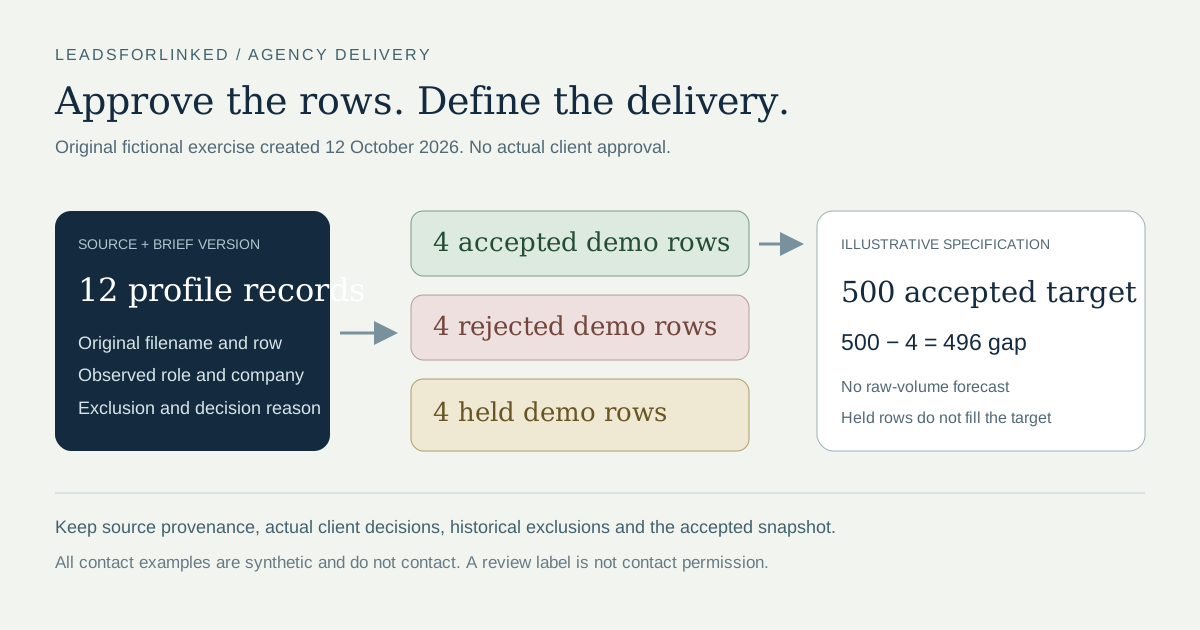
The original worksheet above remains useful for calibrating the targeting rule. The new v2-demo delivery exercise applies a fictional France-only CRM-operations brief to 12 profile records. It has 4 accepted, 4 rejected and 4 held rows, created and checked on 12 October 2026. They are authored decisions under an invented brief, not actual client approvals or algorithmic qualification.
The original worksheet calls its unresolved state REVIEW; the delivery files call it HOLD. Both keep a record outside the accepted subset while a fact or client decision remains unresolved.
- Download all 12 fictional source records.
- Download the two-row fictional client reference.
- Download the four accepted demonstration rows.
- Download the four rejected demonstration rows.
- Download the four held demonstration rows.
- Read the dated counts, decisions, exclusion replay and file hashes.
Each profile-row file is marked synthetic=TRUE and do_not_contact=TRUE. Every person URL uses a clearly fictional /in/synthetic-agency-delivery-not-a-real-person-... path. No identity, observation, reviewer or client in these files is real. Do not contact, enrich or send them to a production campaign. The flags are labels and do not enforce a destination blocklist.
| Fictional records | Decision | Effect on the real workflow |
|---|---|---|
| A01, A05, A10, A12 | ACCEPT: current operations ownership, account and geography meet the invented brief | Preserve the accepted identity and evidence; a real client must make its own decision |
| A02, A03 | REJECT: wrong account type or wrong role | Change the relevant selection rule; keep the useful company when only the role failed |
| A06, A11 | REJECT: existing-client exclusion or outside the agreed geography | Retain the reference or scope reason; these rows do not fill the delivery target |
| A04, A07 | HOLD: founder ownership unknown or only past-role evidence | Resolve the missing evidence before acceptance |
| A08, A09 | HOLD: the same public profile key has contradictory role observations | Keep both originals; choosing the most attractive title does not resolve the conflict |
source_file and source_record point each subset row back to the unchanged full source file, counting its header as record 1. Source context, observation date, brief version, decision reason and reviewer remain beside it. The subset files partition all 12 original records exactly once. These are our review headers, not a promise about actual Leadsforlinked export headers or a tested CRM import schema.
You can reproduce the exclusion check in Exclude existing contacts: map the source's public_profile_url and reference's crm_public_profile_url, using LinkedIn profile URL matching. The current local engine produces 11 Main rows, 1 excluded row and 0 Review rows for these usable fictional keys. A06 is excluded. The expected counts and source version are in the dated manifest.
That result does not approve the remaining audience. A08 and A09 remain in Main because Exclude mode does not flag conflicting unmatched observations. Our manual exercise holds them anyway. Missing or invalid keys in a real client reference also make the exclusion incomplete; read the warnings and the full CRM exclusion recipe before claiming a row is new.
Run the client review as a targeting decision
Send the brief version with the sample. Ask the reviewer to judge the evidence, not to guess whether a person will reply. If a fact is unavailable, leave the row in REVIEW and assign the question to an owner. A profile with a matching keyword may only show past experience, so record current-role evidence separately from general profile text.
LinkedIn’s current People search guidance documents the People tab and available filters, and warns that result counts are approximate. Use those controls to locate possible matches, then inspect the actual profile and account evidence. A search result counter is not a completed, qualified list.
Record the reviewer’s name and the actual review date. Keep row decisions separate from outreach status: “approved for this audience” is different from “already contacted,” “do not contact” or “customer.” Before the list becomes operational, reconcile it against the client’s exclusions and contact history using the appropriate tools and permissions.
Translate rejection reasons into one change at a time
Group feedback by the thing that failed. A wrong-account rejection changes the company rule. A wrong-role rejection changes title variants or manual role review. Missing evidence creates a research task. A changed offer or geography creates a new brief version. Avoid tightening every filter at once, because you will not know which adjustment removed the unwanted rows.
Preserve rejected rows and their reasons in the review file. Create a fresh sample from the revised search and include the previously disputed boundary. Once the client approves the rule, apply it to the larger audience and continue inspecting uncertain cases. Approval should describe a repeatable selection method, not just enthusiasm about a few attractive names.
Honest limitation: a CSV is weak at maintaining a shared account history. HubSpot’s documented target-account workspace, available on the listed Professional and Enterprise subscriptions, can keep associated contacts and buying roles together. Use an existing CRM for persistent team context when that is already your system. This worksheet earns its place before collection, when the targeting decision still needs to be made.
Define the larger list before buying its source volume
A 2026 agency discussion includes a participant who says they helped run service operations and encountered client disagreements about what counted as a lead. They recommend agreeing qualification and invalid-record handling in writing. This is an unverified firsthand anecdote about definition and handoff pain, not a result benchmark or evidence of data-use permission.
Use the larger-list delivery specification to record the actual client agreement. It has 10 requirements, created on 12 October 2026: audience target and boundary, public identity, source provenance, historical exclusions, approval and hold policy, destination mapping, replacement handling, data-use scope and a versioned receipt. Its illustrative column is filled; every actual_client_agreement cell is blank for your real terms. It contains definitions, not contact records.
In this fictional specification, the target is 500 unique accepted profiles. The four accepted demo rows leave 500 − 4 = 496 additional accepted profiles to find. That is a planning gap in an invented job. It is not a commitment to deliver them, a required raw extraction count or permission to count the rejected and held rows.
The deliberately chosen boundary exercise does not estimate a usable yield. Do not extrapolate its acceptance share into a purchase quantity. Use a real representative check of the actual source if you need a volume scenario, and keep the observed fraction a planning assumption. The actual-input extraction planner can then use the remaining accepted target, real credit balance and access horizon.
For each real delivery, define the required fields, the accepted identity key, the exclusion-reference version and who can approve disputed records. Agree what triggers a replacement: wrong account, wrong role and known exclusion differ from an unanswered message. A list of relevant profiles is a source audience; it is not evidence of intent, booked meetings or verified emails.
Before transferring real data, check the actual source permissions, client agreement and intended use. This example grants no right to extract, share or resell a dataset. Keep a receipt for the accepted snapshot and retain the rejected and held evidence separately. A filename, count and content hash describe the delivered file; they do not prove that its people were correctly researched.
Choose a client-scoped handoff that preserves the decision
Native alternative: keep an existing CRM or review workspace when it already contains the right audience. The HubSpot target-account workspace described above preserves account and contact context; an extra extraction is useful only when the agreed audience needs additional externally selected profiles.
Airtable's current view-sharing guide, read 12 October 2026, offers a link to a view. A separately scoped client view can make review easier. Inspect visible fields and expanded-record settings, and capture the actual decision separately; this recipe does not promise that a shared-view visitor can edit approval records.
Scope the underlying view to that client before sharing it. Airtable's URL-filter guidance warns that recipients can remove URL filters and that they do not restrict loaded data. Its sharing guide also says viewer-applied filters do not narrow the downloaded CSV: the original shared view is exported. A visual filter is therefore insufficient for separating client deliveries.
Whether the handoff is a CSV or a scoped workspace, keep the approved subset distinct from the archive. Preserve original source observations beside later enrichment and any actual provider evidence; do not overwrite them with a returned company or an email status label. Use the enrichment reconciliation guide when results come back in another file. Map the final accepted fields to the actual destination and inspect its result before treating the handoff as complete.
Build the approved audience, then review the next step
When the rules are agreed, use the relevant LinkedIn search export workflow to collect the shortlist. The prospect-list workbench provides the next place to prepare the operational list. Keep the approval file as a separate review record; this article does not claim its columns are a tested Leadsforlinked import format.
The paid job is producing the missing selected source audience for the agreed delivery. Once a real sample passes identity, targeting, exclusions and destination checks, compare the current extraction pack or recurring plan with the remaining requirement. Keep sourcing against the same brief and maintain the historical accepted set; a new raw export is not automatically a new completed delivery.
Leadsforlinked's published offer, checked 12 October 2026, includes 100 signup leads without a card, released in batches of 20. Inspect your actual export first. For repeated extraction after acceptance, open the existing Basic quote and check the displayed price, billing period and current account terms. This is a source-profile purchase, not an email-verification service or a licensed-resale promise.
Sources and verification
This page was checked on 12 October 2026. The worksheet, synthetic examples and selection method are our original work. They are not a measured customer case study.
- Original profile-row delivery manifest: authored 12-record decision partition, actual local exclusion replay and file hashes. Created and checked 12 October 2026; no real client approval or delivery.
- 2026 agency definition discussion: a participant's reported service-operations experience; anecdote only. Read 12 October 2026; exact month is not asserted.
- Airtable view sharing: field settings and original-view CSV scope. Read 12 October 2026.
- Airtable URL filters: removable filters and underlying client scope. Read 12 October 2026.
- Agency discussion, 2026: firsthand account-selection and research pain; anecdotes, not market-wide results. Checked 12 October 2026.
- LinkedIn Help: Search for people: People results, available filters and approximate counts. Checked 12 October 2026.
- HubSpot: Target accounts: associated contacts and buying-role context; subscription availability is documented there. Checked 12 October 2026.
- Leadsforlinked published offer: the free allowance and CSV export; no paid price or safety guarantee asserted. Checked 12 October 2026.
Frequently asked questions
What should an agency sample lead list include?
Include a profile identifier, company evidence, role evidence, the reason the account fits, an exclusion check and a client decision with a written reason. Keep unknown information visible instead of filling it with guesses.
How many sample leads should the client review?
Use enough examples to cover the targeting boundaries. The original calibration worksheet has four fictional cases; the separate delivery exercise has twelve records split into four accepted, four rejected and four held rows. Neither hand-selected example is a recommended sample size or a measured usable-yield estimate.
Does an accepted lead mean we can contact the person?
No. Acceptance records targeting fit. Permission, suppression checks, contractual restrictions and the rules of the chosen outreach channel still need their own review before contact.
Can I import this approval worksheet into Leadsforlinked?
This download is a spreadsheet review document. We have not tested it as an application import format. Keep the approval notes separate and use the product's supported export or import format for any operational list.
What should I do when the client rejects the sample?
Classify each rejection as a wrong account, wrong role, missing evidence or changed brief. Revise the relevant targeting rule, preserve the previous version and review a fresh boundary sample before producing the larger list.