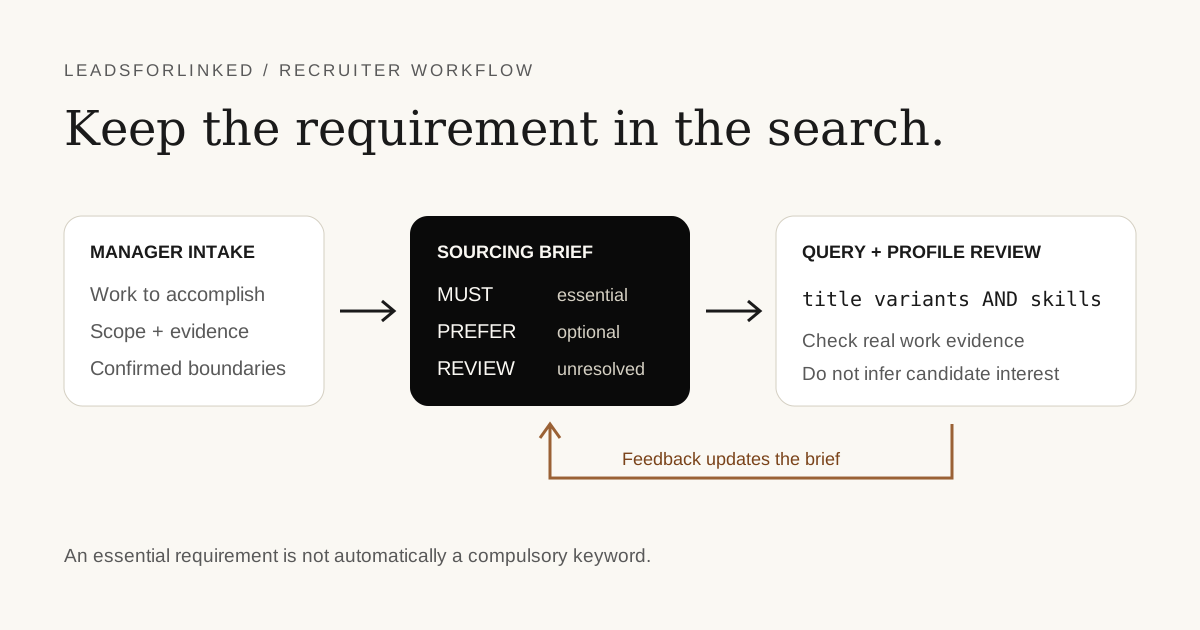
A hiring manager can describe the role clearly while the search still drifts. A preferred tool becomes mandatory, a seniority hint becomes a rigid title, or an exclusion removes people with useful earlier experience. The problem is the translation between the intake and the query.
This guide provides an original sourcing-brief CSV that connects each requirement to its origin, observable evidence and search treatment. The included backend-engineer brief is synthetic. It demonstrates the method without claiming that an example query has been tested on live candidates or produces a particular result count.
Capture the requirement before translating it
Start with what the new hire must accomplish, the scope they will own and how the manager intends to assess it. A title alone can hide different jobs. “Senior engineer” might mean independent delivery, architecture ownership or mentoring; each interpretation changes which evidence you need.
Workable’s primary intake guide recommends clarifying responsibilities, required qualifications, preferences and dealbreakers with the manager. That is the source for the intake distinction, not a claim that a particular recruiting tool is necessary. The worksheet below adds a traceable translation from that conversation into the search.
In a June 2026 recruiter discussion, the poster describes a search gradually diverging from the agreed intake. Replies discuss example profiles and a confirmed recap. Treat this as firsthand evidence of a failure mode, not a measured prevalence or productivity benchmark.
Download and complete the sourcing brief
Download the sourcing-brief CSV
Open the file in your spreadsheet application. Keep an untouched copy, replace the demonstration brief and confirm the uncertain rows with the hiring manager. All requirement statements and approvals in the download are synthetic examples. They are not notes from a real intake or evidence about a real candidate.
| Column | Purpose |
|---|---|
requirement and manager_statement | Record the hiring need and the original wording, rather than a recruiter’s silent interpretation. |
priority and evidence_to_check | Distinguish MUST, PREFERENCE and REVIEW, and specify what would support a match. |
search_treatment and query_fragment | Explain whether the requirement belongs in a keyword query, an available filter or manual review. |
open_question and confirmation_status | Keep ambiguity visible and stop an unanswered question becoming an exclusion. |
brief_version, change_note and approval fields | Preserve the decision and show when the requirement changed. |
The sheet is a planning document. It does not find candidates, score them or connect to an ATS. Do not upload confidential intake notes or candidate information to a public share link. Use your organization’s approved storage and access rules for the working version.
Choose the right treatment for each requirement
A MUST is not automatically a mandatory keyword. First ask whether it is essential to do the job. Then ask whether the evidence is likely to appear in searchable profile text. “Owns production incident response” may matter more than an exact title, but a profile might describe that work in several ways.
Keep preferences separate. If AWS experience is useful but learnable, adding it with AND to every query quietly makes it a prerequisite. Put it into a secondary variant or a review question instead. When a requirement is unclear, mark REVIEW rather than expanding a list of exclusions from memory.
Be particularly careful with negative keywords. Excluding “manager” across all profile text could remove a hands-on candidate whose previous role mentioned management. A manager-approved exclusion should state what is actually disqualifying and where it can be verified. Manual review is appropriate when the profile text cannot express the boundary reliably.
Worked example: a backend role with a cloud preference
The download uses this invented brief: a backend engineer who can maintain a Python and Django application; cloud experience is preferred; the role has no direct reports. The manager still needs to confirm the location arrangement. None of those statements describes a live vacancy.
| Synthetic requirement | Translation | What still needs review |
|---|---|---|
| Backend application work | Include backend title variants and inspect relevant project descriptions. | A matching title does not prove ownership. |
| Python and Django are essential | Use the confirmed skill terms in a starting query. | Depth and recency require assessment. |
| AWS is preferred | Use a separate optional variant, not a compulsory term. | The manager must confirm whether alternatives are acceptable. |
| No direct reports | Review the desired scope rather than excluding all managers. | Past management is not automatically disqualifying. |
An illustrative starting string is:
("backend engineer" OR "backend developer") AND Python AND DjangoThis is a syntax example, not a validated search result. LinkedIn’s current Boolean help documents uppercase AND, OR and NOT, quotes for exact phrases, and parentheses for grouping. It does not support wildcard asterisks. Keep account-specific limits and the actual returned profiles in view when running a query.
Open the People results and apply the relevant filters available in your account. LinkedIn’s People search help distinguishes Boolean from natural-language search and states that counts are approximate. Do not turn the displayed total into a claim about the number of qualified or interested candidates.
Calibrate with example profiles before collecting more
Review a small, deliberately varied set with the hiring manager. Include a clear match, a plausible adjacent background and a disputed boundary. Record the reason for each decision against the requirement row. This is a calibration exercise, not a representative sample from which to estimate the whole talent market.
Ask for evidence-based feedback: “Which responsibility is missing?” is more useful than “not senior enough.” If the manager objects to a profile that satisfies the written brief, decide whether the brief was incomplete or the profile lacks evidence. Correct the appropriate part; do not hide a new requirement inside the next query.
Use existing candidates first when that is appropriate. Honest concession: Greenhouse’s documented Talent Rediscovery workflow can search past applicants and prospects using recruiting history. A CSV cannot replace that ATS context. Leadsforlinked becomes relevant when you need a new LinkedIn shortlist after reviewing the pool you already hold.
Keep the approved brief connected to every revision
Once the manager confirms the brief, save its version with the query and the calibration decisions. Record the query you actually ran, not only a proposed string. If you simplify it after an error or broaden it after reviewing poor matches, explain the change in the sheet.
When the manager changes scope, preserve the previous rows and create a new version. Identify which existing candidates are affected before collecting another audience. A change to location or essential experience may alter the pool; a wording correction might not. Written change reasons keep the next sourcing pass aligned with the real vacancy.
Use the Boolean search generator for constructing the string and the search export guide for the collection step. Keep this planning file separate from the candidate export, then use the prospect-list workbench when preparing the operational shortlist. No worksheet-to-app integration is asserted here.
Sources and verification
This page was checked on 12 October 2026. The worksheet, synthetic examples and selection method are our original work. They are not a measured customer case study.
- Workable: Intake meeting guide: primary recruiter guidance on responsibilities, must-haves and preferences. Checked 12 October 2026.
- Recruiter discussion, June 2026: firsthand intake-to-search drift and profile-calibration discussion; not a benchmark. Checked 12 October 2026.
- LinkedIn Help: Boolean search: documented operators, phrase grouping and unsupported wildcards. Checked 12 October 2026.
- LinkedIn Help: People search: People results, filters and approximate result counts. Checked 12 October 2026.
- Greenhouse: Talent Rediscovery: existing candidate-history search, including documented availability and workflow distinctions. Checked 12 October 2026.
- Leadsforlinked published offer: the free allowance and CSV export; no worksheet integration asserted. Checked 12 October 2026.
Frequently asked questions
What is a recruiter sourcing brief?
It is an approved translation of the hiring requirement into observable candidate evidence, search terms, filters and review questions. It records which requirements are essential, which are preferences and which remain unresolved.
How is a sourcing brief different from a job description?
A job description presents the role to candidates. A sourcing brief tells the recruiter how to find and assess possible matches, including alternate titles, evidence gaps and boundaries agreed with the hiring manager.
Can I require every desired skill in the Boolean search?
Only make a term compulsory when the hiring manager confirms it is essential and it is likely to appear in searchable profile text. Keep preferences in separate search variants or in manual review so the query does not silently redefine the role.
Does this template find or score candidates automatically?
No. The CSV is an editable planning worksheet. Its example strings illustrate documented Boolean syntax, but we have not measured their live result counts or candidate quality. A recruiter must run and review the search.
What should happen when the hiring manager changes a requirement?
Record the change, its reason and approval in a new brief version. Recheck the saved query and the affected sample profiles, then explain which candidates are newly included or excluded before scaling the revised search.