Leadsforlinked · LinkedIn outreach platform
Give every conversation a next step.
Build a LinkedIn campaign, keep up with replies and track where each conversation goes. Starter brings multi-step outreach, your Inbox and a Kanban pipeline into one workflow.
Monthly billing · One connected LinkedIn account.
Need a profile list first? Start with the free CSV option.
Your sequence, laid out.
Open full-size product capture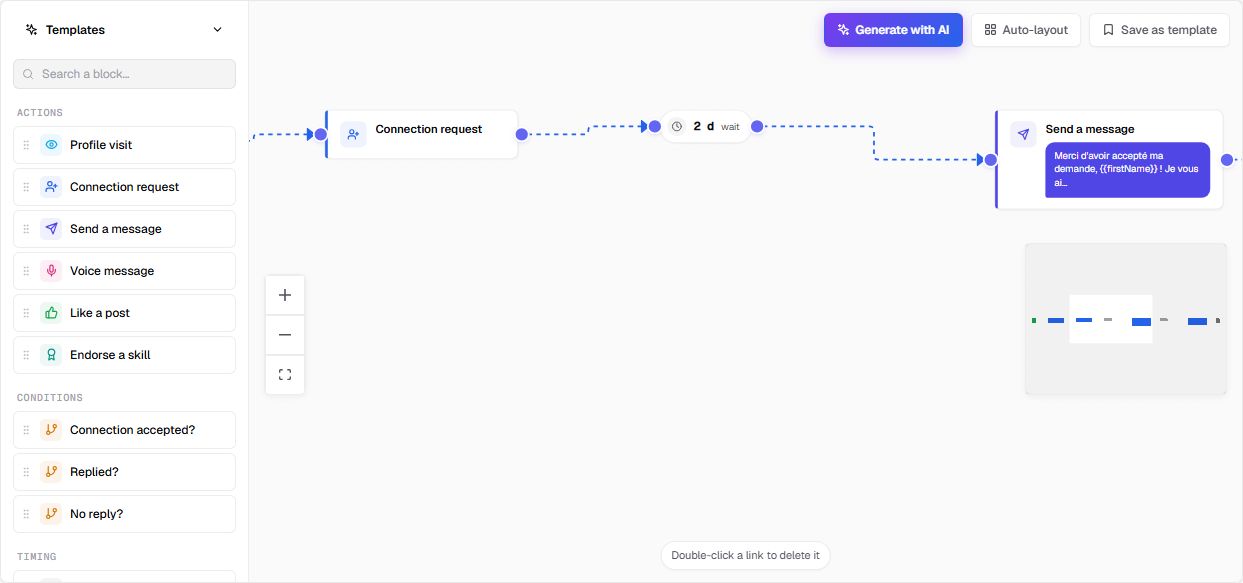
From audience to conversation
Keep the work connected after you find the right people.
A list is the starting point. A campaign needs a message, a follow-up plan and someone ready to take over when a person responds.
Build the outreach
Lay out your campaign steps and the waits between them. Start with a focused audience and write messages around the reason you chose those people.
Already have a profile CSV?Handle the replies
Use the Inbox and reply tracking to keep conversations visible. Starter fits a workflow where you write the response and decide the next action yourself.
Explore the Inbox and reply workflowTrack the next move
Use the Kanban pipeline to organize active conversations. Keep the next action clear as someone moves from an initial exchange to a later stage.
Example workflow
A small consulting team. One person owning outreach.
You have selected operations leaders at companies that fit your service. Your job now is to open relevant conversations and keep track of the follow-through.
Illustrative use case. No customer results or performance figures are implied.
- Review the audience. Confirm current roles and company fit, and remove people already in a conversation with your team.
- Prepare a short sequence. Write the opening and a relevant follow-up. Review the destination campaign and its draft status before adding people.
- Own the response. Review replies in the Inbox, answer in context and use the pipeline to keep track of the next action.
- Review before expanding. Use analytics alongside the conversations themselves to decide what to adjust.
Worked campaign · fictional
From a relevant opening to the right next action.
Suppose your consultancy helps distributors improve sales-to-operations handoffs. Your reviewed audience contains existing LinkedIn connections who lead operations and have announced an order-system rollout. That project gives you a reason to ask about responsibility; it does not prove a problem. Exclude existing conversations and anyone who has asked you to stop.
Opening: understand the situation
“Hi Alex — I saw Rowan Distribution’s update about bringing two depots onto one order system. Are you coordinating the handover between sales and operations, or is someone else leading it?”
One conditional follow-up
Only if there is still no reply and further contact is appropriate:
“Would a short handoff checklist be useful while you plan the rollout? Happy to share it, or leave it here if this isn’t relevant.”
Configure the draft: use a message, a wait and the proposed follow-up. Choose timing for this audience and inspect the available reply checks before launch. The real builder capture above includes a connection request; omit that step for these existing connections. Check the audience and draft destination before adding people.
Interested
“Yes, please send the checklist.” In the Inbox, share it and ask where the handoff currently needs work. If Alex identifies repeated data entry, explore what it delays before proposing a service. Agree a next step only when that need is clear.
A question
“Does your service include migrating our records?” Check your actual scope, then answer that question. Keep responsibility for obtaining any specialist input; another pitch would leave the question unresolved.
A decline
“We have this covered. Please don’t follow up.” Respect the request, record it in your working process and check remaining scheduled actions. Do not substitute a new angle or a different colleague.
All people, company details and messages here are fictional. These are proposed campaign choices and human actions, not observed sends or results. Opening a thread or changing a pipeline stage does not establish that a queued follow-up has stopped. See the Inbox workflow and product boundaries.
Choose the work you need
Ready for campaigns, or still building your list?
I need outreach and reply management.
Starter · €29/month
Choose the paid workflow for campaigns, follow-ups, Inbox, Kanban and analytics.
- One connected LinkedIn account
- Includes Basic extraction, CSV and audiences
- No need to buy a lead pack or use up free profiles first
I need profiles to review or export.
100 profile leads · Free once
Create your account, verify your email and use the Chrome extension to collect a supported LinkedIn source into an audience. Download its CSV in the app.
- Released in batches of 20; no card required
- Review role fit and the fields in your actual file
- Free profiles cover extraction; campaigns are paid
Recurring CSV only? Basic is €4.99/month on monthly billing for unlimited extraction, CSV export and audiences. It does not include campaigns or Inbox.
Need AI or more accounts? Diamond Pro is €79/month and adds scheduled sourcing, AI scoring, AI Hunter and AI Responder. Diamond Plus is €149/month and adds Signal Radar, Post Spy, three connected LinkedIn accounts and priority support.
Prices above are in EUR on monthly billing. Review your billing period and the current account offer before subscribing. Compare the full plan catalogue.
Before you choose.
Can I start with people I already have?
Yes. The app offers CSV upload or pasted data in Audiences → Add prospects → Import a CSV, with linkedin_url required. Review the receiving fields and people, then check the selected campaign and whether future audience additions will feed it. The campaign guide walks through that handoff.
Do I need Diamond Pro for follow-ups?
Starter includes multi-step campaigns, Inbox, reply tracking, Kanban and analytics for one connected account. Choose Diamond Pro when you also need its scheduled sourcing or AI tools, including AI Responder.
Is the free profile allowance a campaign trial?
The free offer is 100 profile leads once, in batches of 20, with no card required. It lets you collect an audience and inspect its CSV. Campaigns, follow-ups and Inbox start on paid Starter.
What if I only need a CSV for my current tools?
Start with the free profile allowance, an available lead pack or Basic for recurring extraction. You can keep your existing sender or CRM if it already completes the job. See the profile extractor and CSV field guide.
What should I review before launching a campaign?
Confirm the audience, selected account, campaign state, sequence and reply handling in your account. LinkedIn restricts third-party automation; send delays do not guarantee permission or protection from account restrictions. See the terms and campaign planning guide.
One account. A connected workflow.