Leadsforlinked · LinkedIn outreach Inbox

A reply deserves a next step.

Someone asks a question, shows interest or says the timing is wrong. The work changes. Use the Inbox and pipeline as the workspace for reviewing that conversation and deciding what you should do next.

Monthly billing · One connected LinkedIn account · Includes campaigns, Inbox, Kanban and analytics. Only need profile CSVs?

The reply is the starting point

Read the conversation. Decide the action. Keep the context.

The Inbox is where you look for the exchange; the pipeline gives you a way to organize its progress. Your next action comes from what the person actually said, rather than from the stage label alone.

Before responding, read the latest message alongside the earlier conversation. Decide who will answer and what they need to resolve. Keep that responsibility and next task clear in your own working process.

What you can inspect in Leadsforlinked

  • Inbox: the reviewed interface showed All, Replies and AI pending filters.
  • Pipeline: visible stages included Replied, Discussion and Converted, with a Customize stages control.
  • Plan choice: Starter includes Inbox and Kanban; AI Responder belongs to Diamond Pro.

Starter is for personal reply handling. When a reply arrives, review the campaign status and any remaining scheduled messages before continuing outreach. A pipeline stage does not confirm that follow-ups have stopped or that a person has been assigned to respond.

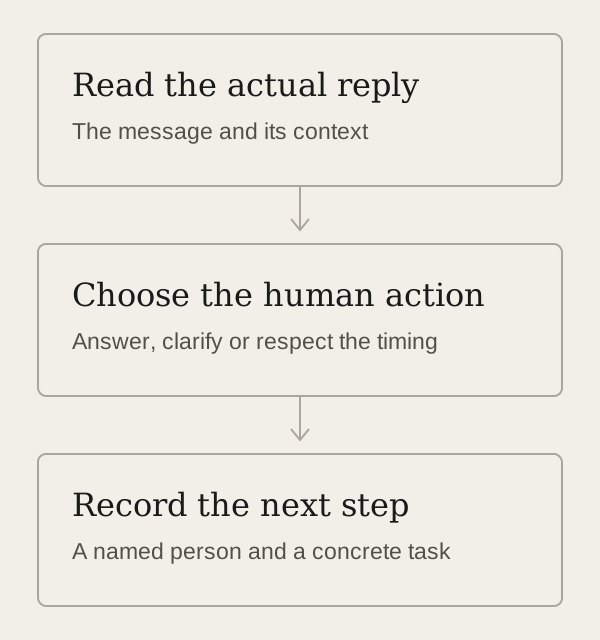
Illustrative process: read the actual reply, choose the human action, then record a named person's next task.
Illustrative reply-handling process, not a product screenshot. Open the full-size diagram.

Three conversations. Three different decisions.

Keep the received reply separate from what happens next.

In this fictional example, Maya handles outreach for a small consultancy. These are her working decisions and tasks, not app-generated statuses or customer results.

Interest

“This looks relevant. Could we discuss it?”
Human action
Maya replies to understand the topic the person wants to cover and agree a suitable time.
Next task
Maya confirms the agreed time and purpose once the person responds.
Progress meaning
A conversation is open. An expression of interest alone is not a booked meeting or a converted customer.

A question

“Does your service include migrating our existing records?”
Human action
Maya checks the actual service scope before answering. If she needs a specialist, she passes along the exact question.
Next task
Maya obtains the answer and replies in the same conversation.
Progress meaning
The question needs an answer. A generic follow-up pitch would leave the buying question unresolved.

Not now

“Not a priority this quarter. Please leave it with me.”
Human action
Maya acknowledges the timing and respects the request. She checks the remaining campaign actions before continuing any outreach.
Next task
Maya records the person's request in her working notes; she does not schedule another pitch or invent a return date.
Progress meaning
This is not an active opportunity merely because a reply arrived. The person's request determines the next decision.

Inbox and pipeline do different work

A stage tells you where. The conversation tells you why.

Use the reply to decide the response

Read the actual exchange before answering or involving someone else. Keep the person's question intact, and check whether your proposed next message still makes sense.

If the request is to stop or wait, handle that request before any further pitch. Opening a thread or changing a pipeline stage should not be treated as proof that a queued message has been cancelled.

Use the pipeline to organize progress

Define what a stage means for your work. A Replied label can include a question or a refusal; it is not enough to call a conversation qualified.

Keep the named person and concrete next task in your working process. For sequence settings and launch checks, use the multi-step campaign guide.

Choose the reply workflow you need

Human handling starts with Starter.

Starter · €29/month on monthly billing. One connected LinkedIn account, multi-step campaigns, Inbox, reply tracking, Kanban and analytics. Basic extraction, CSV export and audiences are included.

Diamond Pro · €79/month. Adds the AI layer, including AI Responder, scheduled sourcing and scoring. Choose it for that additional work; reading and personally answering campaign replies does not require an AI purchase. Review the selected response mode before enabling AI replies.

Profile list only? The signup allowance is 100 profile leads once, released in batches of 20 after email verification, with no card required. Download the audience CSV in the app. This is the extraction offer; campaigns and Inbox are paid features.

Prices are in EUR on monthly billing. Review your billing period and current account offer before subscribing. Compare the platform plans.
Questions before you choose.

Will a reply automatically stop every follow-up?

Check the selected campaign's behavior and any remaining scheduled actions when a reply arrives. Do not assume that opening a conversation or changing its stage cancels every follow-up across your campaigns.

Is this a shared inbox for a sales team?

This page covers the one-connected-account Starter workflow. It does not establish team assignment, shared seats or all-channel synchronization. If those are required, confirm the exact supported arrangement before choosing a plan.

Does the pipeline replace the reply itself?

No. Use a stage to organize progress, while retaining the actual conversation as the basis for the next action. A stage alone cannot tell you whether the person asked a question, declined or requested a pause.

Can I keep the sender and inbox I already use?

Yes. If your current workspace already handles campaigns, replies and next steps, you may only need profile extraction. Choose the free CSV option or the relevant extraction plan instead of buying another outreach workspace.

Keep the next action connected to the reply.