Quick answer: choose the missing job first. A profile CSV can support research without containing an email address. Verified contact data needs a separate finding and status check. Running a LinkedIn campaign also needs the right sender, reviewed audience and reply process. Leadsforlinked’s free profile sample does not establish verified-email coverage; Scrupp’s documented enrichment deserves a separate evaluation when contact data is the requirement.
If your current data and sender already finish the job, keep them. This comparison helps you identify the part that needs changing.
Three jobs that a “lead” can hide
Before comparing prices, describe the output you need. An analyst may need current profile identities and companies for an account review. An email operator needs a usable address and a clear verification status. A LinkedIn campaign operator needs reviewed people, an appropriate message and someone handling the responses. These requirements overlap, but none automatically proves the others.
1. A profile CSV
The useful finish is a file whose identities and fields match the research task. A missing email need not invalidate it. Check profile references, company and role fit, field gaps and existing records before collecting more rows.
2. Verified contact data
The useful finish is contact information associated with the right person, with its returned status and source retained. A guessed address pattern is not a verified result. A “found” value and an unresolved or catch-all status deserve different treatment.
3. Campaigns and replies
The useful finish is appropriate outreach from the intended account, followed by contextual reply handling. More exported people do not provide the missing sender, sequence checks or conversation history.
Where Scrupp has documented value
Scrupp’s knowledge base describes LinkedIn People Search, Sales Navigator and Apollo sources, plus CSV and Excel downloads. Its enrichment page describes uploading existing files and mapping person/company information to returned contact and company data. If you already have the people but lack business emails, this is a relevant product capability to evaluate.
Its contact-checking explanation says work emails are checked against the receiving mail server and returned with a status. It also says phone numbers are not verified lines. Preserve that distinction when reviewing a result: the word “contact” should not make email and phone evidence interchangeable.
Scrupp also documents contact signals and monitoring. The older description of it as a one-source search scraper is too narrow. Compare the particular audience you need, the account access it requires and the output it returns. An apparent source signal can explain why someone belongs in a research list; it does not, by itself, establish buying intent.
For a team whose main gap is contact data, replacing that capability with a profile-only allowance could leave the original problem unsolved. Retain a suitable existing enrichment route when it supplies the required evidence.
What to resolve before buying
Outreach scope needs confirmation. Scrupp’s pricing lists email outreach, AI sequences and an AI reply inbox, but its FAQ calls cold-email sending a separate product. Its terms describe sending services. Confirm the offering, channels, mailboxes, reply actions and charges before buying; these sources do not establish tested LinkedIn campaign behavior.
Free access is not a universal data promise. Scrupp’s contact-data page advertises 100 credits monthly without a card; its knowledge base reserves enrichment for paid access. Confirm your actual account’s permitted operations before expecting a free verified-email result. For either product, inspect what the sample actually contains.
Coverage and relevance are separate. An email can remain missing even when the profile is correctly identified. A technically checked address can still belong to someone outside your target responsibility. Review identity, returned status and current fit rather than filling a blank with a plausible guess.
Compare the requirement and the billing unit
| Required job | Scrupp | Leadsforlinked |
|---|---|---|
| Profile input and export | Documented searches, existing-file enrichment and CSV/Excel output; inspect the selected source. | Free profile allowance into an audience and CSV; recurring extraction on Basic. |
| Verified business email | Documented finding/checking; inspect the returned status and actual availability. | Not established by the accepted free profile-sample route. Do not treat that allowance as an email finder. |
| Campaign and reply work | Official outreach descriptions conflict on included versus separate-product access; confirm the selected offering. | Starter publishes LinkedIn campaigns, Inbox, Kanban and analytics for one connected account. |
| AI replies | AI reply inbox advertised; selected scope and behavior require confirmation. | AI Responder belongs to Diamond Pro; not part of the free profile allowance. |
Scrupp lists USD 29/month for 1,000 monthly credits or USD 35 for a non-expiring one-time 1,000-credit pack. Sales Navigator access, when needed, is separate. Compare those commitments against the same required output, not merely a cheaper profile-only plan.
For list exports, Scrupp describes one credit per lead, an additional credit per found email and two per delivered phone. Other operations have different charging rules. Request a quote for the actual operation and volume; “1,000 credits” need not mean 1,000 exported people with verified emails.
Compare currency, billing cadence, source access and required operations in your own quote. A single cheapest-plan number cannot establish a total saving or a better result. If helpful, use the quote-based Sales Navigator cost calculator to compare the commitments you actually have.
One record: keep the research row, hold the outreach
Fictional example. A researcher has a record for Alex at fictional Alder Works. The profile reference is known, the company has been recorded, email is blank and previous-contact status is unresolved. PROFILE_URL_01 below is a noncontactable placeholder for that recorded reference, not a real LinkedIn profile.
- Profile reference
PROFILE_URL_01· known in this fictional record- Company
- Alder Works · recorded
- Business email
- Missing · no verified address recorded
- Previous contact
- Unknown · history and exclusions not reconciled
Decision 1: keep the profile for research
The row can remain in an account-research file if the identity and company fit the brief. Preserve its provenance and missing values. Exporting this research row does not mean it is ready to message.
Decision 2: resolve the email requirement separately
If the intended channel is email, use a suitable lookup or existing contact-data route, then review the result and its status. If no usable address is returned, leave the field missing. Do not construct an address from Alex’s name or copy one from a different person.
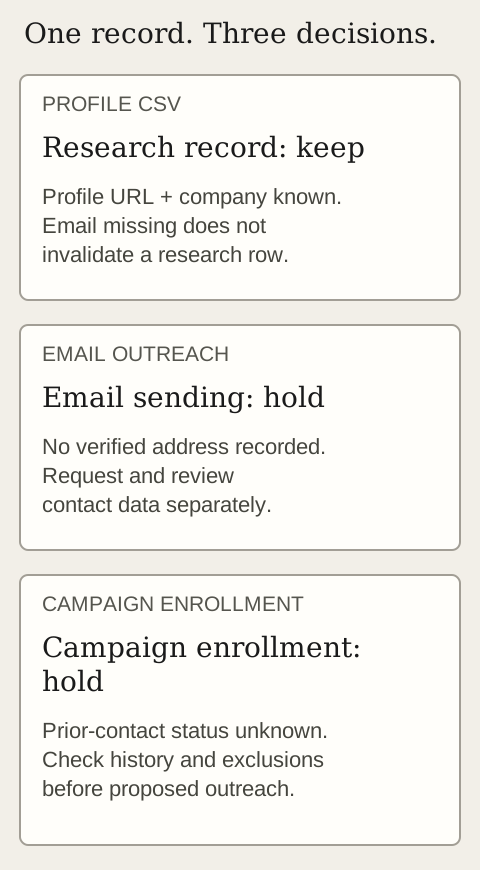
Decision 3: keep enrollment on hold until history is resolved
An email lookup cannot answer whether Alex is already in a conversation, has asked to stop or belongs to another current campaign. Check those records before proposing further contact. If history reveals an active exchange, keep its context with the person handling it. If it reveals a stop request, preserve that exclusion rather than opening a new channel.
If the history check resolves the unknown and contact is appropriate, the next decision depends on the channel. A LinkedIn campaign needs the relevant profile/account conditions; email additionally needs usable contact data. The two gates should not be collapsed into “email found, therefore ready.”
Proposed output: one retained research record; email sending held while the address is missing; campaign enrollment held while prior contact is unknown. No address has been found, no record imported and no message sent in this example. A later verified lookup would change the data status, not erase the history check.
Choose the Leadsforlinked path for the remaining job
Profile research first: the signup offer includes 100 profile leads once, released in batches of 20 after email verification, with no card. Collect a supported source into an audience with the Chrome extension and download its CSV in the app. Use the actual field discussion to assess missing values. The allowance does not establish verified email or phone coverage.
Recurring profile CSVs: Basic is EUR 4.99/month on monthly billing for extraction, CSV export and audiences. If your accepted records already feed an adequate CRM or sender, you may not need another campaign tool.
LinkedIn campaigns and human reply handling: Starter is EUR 29/month on monthly billing for one connected LinkedIn account, with multi-step campaigns, Inbox, Kanban and analytics. Review that platform scope when the missing job is follow-through after list creation. AI Responder starts on Diamond Pro, a separate plan choice.
Before using an existing file, inspect the receiving route and identities. The reviewed Leadsforlinked audience importer requires linkedin_url; a Scrupp export has not been imported for this comparison. A file does not carry over exclusions, reply context or campaign progress automatically. See the existing-audience campaign guide for the state decisions to review.
The Inbox guide explains how personal reply decisions differ from an automatic workflow. Keep a suitable current tool when it already covers the required contact data and channel. Choose the new component only for a demonstrated gap.
Questions before you switch
Does Leadsforlinked’s free profile sample include verified emails?
The accepted free offer covers profile collection into an audience and CSV export. It does not establish verified email or phone coverage. If a usable email address is required, inspect the actual file and evaluate a contact-data route for that separate job.
Is Scrupp limited to search scraping?
No. The current official pages describe additional inputs and data operations, including CSV enrichment and contact signals. Check the particular source, required account access and returned fields; a total count of source methods is not a compatibility test.
Can I evaluate Scrupp without a card?
Scrupp advertises a free 100-credit entry without a card. Its contact-data page describes a monthly allowance, while its knowledge base reserves enrichment features for paid access. Confirm the operations available in your actual account rather than assuming free verified-email results.
Can I move a Scrupp CSV into Leadsforlinked?
A file handover needs a receiving-field and identity check. The reviewed Leadsforlinked audience import requires linkedin_url; no Scrupp-to-Leadsforlinked import was performed for this comparison. A contact file does not establish transfer of replies, exclusions, campaign progress or permission to contact. No migration duration is promised.
Does finding an email make a record ready for a campaign?
No. A returned email and its verification status address the contact-data question. You still need to reconcile identity, current relevance, prior conversations and exclusions before deciding whether the proposed contact is appropriate.
Does Scrupp include outreach and an AI inbox?
Official pages disagree on which offering includes sending. Confirm the selected plan, channels, mailboxes, reply actions and charges before purchase.
Sources and review scope
Official Scrupp pricing, knowledge-base, enrichment, contact-checking, signals and terms pages were reviewed on 7 November 2026. Conflicting outreach/free-access descriptions are retained as specific purchase questions. Leadsforlinked’s accepted offer and the linked product pages bound the own-product comparison; importer and Inbox observations date to 18 October. No signup, lookup, import, campaign or sending test was performed for this article.
Need profiles to inspect? Start with the once-only free profile allowance. Campaign and verified-contact requirements remain separate decisions.
Get my 100 free profile leads Review paid campaign scope