You have two deliberately selected audiences: people who match a role-and-company search, and people your team selected from an event. Some identities overlap. You need one audience with both reasons for selection preserved, without choosing an arbitrary role or merging different people because an email cell matches.
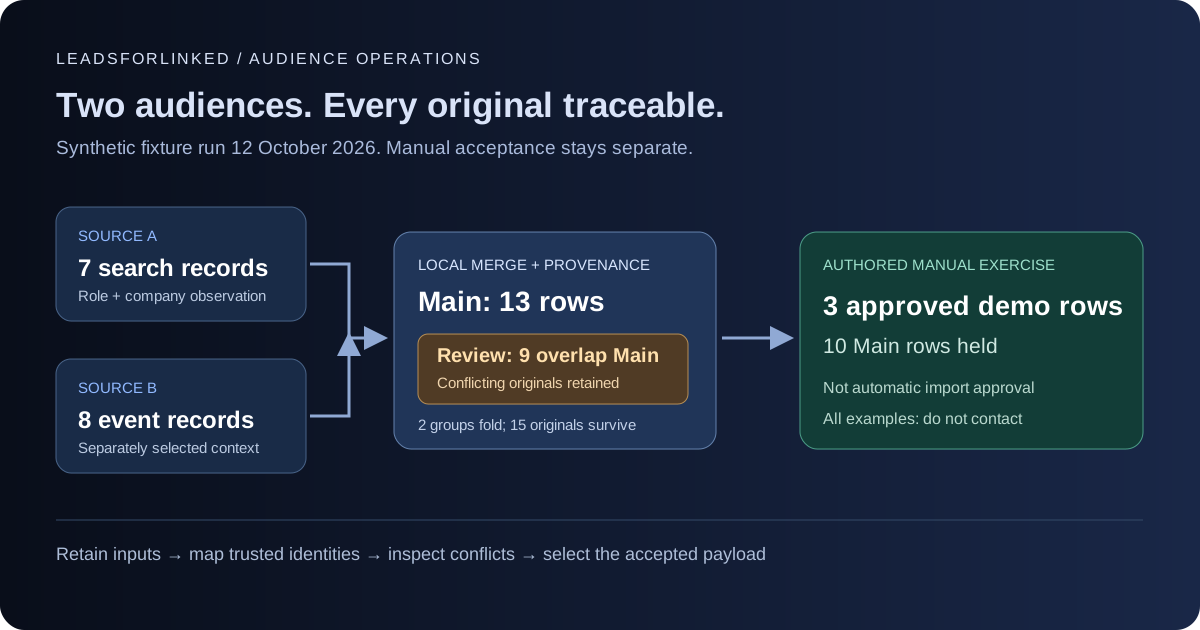
Original work product: two synthetic source files, the actual local workbench's Main and Review results, and a separate authored approval exercise. The fixture ran on : 15 source records become 13 Main rows; 9 of those rows also appear in Review. The example then accepts 3 demonstration rows and holds 10. These are processing results, not an outreach benchmark.
Every example contact row is fictional and marked synthetic=TRUE and do_not_contact=TRUE. Even the approved demonstration is for inspecting a file, not contacting, enriching or importing fictional people into a production campaign.
Decide why you need a second source audience
Start with the actual brief: required roles, companies, geography and the evidence that makes a person relevant. A search audience can cover the role requirement while a separately selected event audience contributes a different source observation. Event participation is not proof of buying intent, permission to message or a complete attendee list.
Keep a native source when it already supplies the people you need. Clay's Find People guide, checked 12 October 2026, describes criteria including role, company and location, and finding people at companies from an existing table or custom list. Using that source can avoid a separate extraction and handoff.
External extraction earns its place when you have reviewed specific LinkedIn source audiences that the current dataset does not supply. For repeat jobs, count the accepted unique people who meet the brief and are not already in your exclusions. A larger raw row count alone is insufficient reason to buy another extraction.
A 2026 firsthand B2B sales discussion describes time spent checking records across prospecting, enrichment, outreach and CRM systems. It is a useful example of handoff pain, not measured demand or evidence that consolidation fixes identity mistakes. This recipe keeps your existing destination and makes the incoming audience reviewable.
Download the source files and expected results
- First source: synthetic search audience, with 7 records and 10 columns.
- Second source: synthetic event audience, with 8 records and 10 columns.
- Expected Main result, with 13 rows and 13 columns.
- Expected Review rows, with 9 rows and 14 columns, overlapping Main.
- Manual approved demonstration, with 3 rows and 12 columns.
- Manual held demonstration, with 10 rows and 15 columns.
The dated fixture manifest records settings, counts and file hashes. The original-records JSON retains all 15 source records as their original cells and headers. That JSON is an additional example-package artifact; the current browser Merge view downloads Main and Review CSVs. Keep both original input files unchanged.
These headers are our illustrative schema, not a promised Leadsforlinked export contract or mandatory destination headers. Inspect your actual downloads before mapping. The synthetic email cells illustrate optionally supplied contact data; this guide does not promise an email field or verified emails from LinkedIn extraction.
Map identities and preserve different observations
Open Merge exports in the Prospect List Workbench. Load the search file into First prospect export and the event file into Second prospect export. Use the downloaded filenames unchanged when reproducing the supplied provenance and byte-for-byte results.
- For File A, choose
linkedin_profile_urlas the Matching identifier. - For File B, choose
profile_urlas the Matching identifier. Different header names do not prevent this explicit identity mapping. - Select
emailin both optional Email identifier selectors to reproduce this fixture. For real profile-only exports, select Not available; do not fill missing addresses with guesses. - Leave Excel-safe downloads off to reproduce the supplied CSV bytes. Then select Merge exports and inspect both downloads.
The merger aligns other columns by their exact header labels. It does not decide that role and job_title mean the same thing. Preserve separate columns unless you have checked their meanings and made a deliberate working-copy mapping. Original source files should remain intact.
Our search and event observations use separate fields, source_search_context and source_event_context. A shared person can retain both. If both files instead use one source_context column with different nonblank values, the merger treats that difference as a field conflict. Renaming a field should document two distinct observations, not hide a contradictory role or company.
Understand what the merge can establish
The current matcher accepts conservative public person paths under linkedin.com/in/.... It normalizes supported host and protocol spellings and removes query strings, fragments and the trailing slash for matching. It rejects company pages and opaque Sales Navigator paths. It does not open a profile, resolve an opaque ID or verify that a person exists.
Slug case and percent encoding remain distinct in this matcher. LinkedIn's public URL documentation, read 12 October 2026, says the customizable part is case insensitive and describes prior custom URLs. Investigate possible aliases manually; an unmatched spelling is not proof of a different person.
When selected, email matching trims and lowercases syntactically admitted values. That is not mailbox or deliverability verification. Either a matching profile key or a matching email can connect rows into one group, including chains across several rows. Different valid identifiers in that group send every original to Review.
For a group without warnings, consistent nonblank common fields can fold into one row and fill blanks from another source. Ordinary fields compare exact text: differences in case, spacing or wording may need review. The merger does not label a filled role as researched or choose which conflicting observation is current.
Read the worked result without double-counting
| Synthetic case | Actual processing result | Manual decision in this exercise |
|---|---|---|
| M01 | Consistent shared identity folds; both source contexts survive | Accept the combined demonstration row |
| M02 | A blank role is filled from the consistent matching source | Accept after the invented brief review; filling is not verification |
| M03 | Same public profile, contradictory roles; both originals in Main and Review | Hold both observations |
| M04 | One supplied synthetic email links different profiles; both originals in Main and Review | Hold both identities |
| M05 | The blank-key original is reviewed; the valid same-label row is a separate Main row | Hold both until the blank original's identity is established |
| M06 and M07 | Company URL and opaque Sales Navigator identity remain in Main and Review | Hold each unresolved identity |
| M08 | Matching profiles have an invalid selected email in one row; both originals enter Review | Hold the whole group |
| M09 | Distinct public profile remains a separate Main row | Accept the independently selected demonstration row |
The fixture folds 2 groups, reducing 15 original records to 13 Main rows. Review contains 9 of those same originals, not 9 extra people. Do not subtract Review blindly and call the remainder approved. M05's valid counterpart is not automatically flagged, but our manual exercise holds it because the blank-key observation remains unresolved.
The Main field _source_rows contains source filename, source index and CSV record number, counting the header as record 1. A folded row can cite multiple originals. Every original record is represented exactly once through Main provenance in this fixture; Review repeats the uncertain originals for investigation.
Build an accepted payload separately
Our authored approval exercise accepts M01, M02 and M09, representing 5 source records. The held file keeps the remaining 10 source records. Together they account for all 15 originals. The accepted file chooses one reviewed public URL and preserves the two context fields plus provenance. This selection is a demonstration, not an automatic workbench output or permission to message.
For real data, keep a decision, reason, reviewer and review date beside each acceptance. Check the audience brief and current exclusions, then create a destination-specific payload from that approved set. Use the separate CRM exclusion recipe to check existing contacts; merging two audiences does not perform that exclusion.
Map the accepted columns deliberately. For example, Clay's CSV import guide, checked 12 October 2026, offers a new table, append or replace route and column mapping. Replace overwrites the existing rows. Save and don't run avoids immediate enrichment; Clay's table settings separately say Auto-run is enabled by default and can run after additions or edits. Check that setting before testing a real payload.
Clay auto-dedupe can keep the oldest or newest value and delete duplicates. That is a different choice from retaining conflicting source observations. Neither a destination upload nor a folded record confirms correct identity, verified contact data or successful delivery.
The workbench processes the files locally in your browser. Clear workspace removes loaded page data; it does not delete your downloaded files. Destination uploads send the accepted data to that destination. For spreadsheet viewing, Excel-safe downloads prefix potential formula cells with an apostrophe; this changes cell text, so keep originals and inspect the destination mapping before importing.
Produce the additional audience your brief requires
Once a real sample survives identity review, exclusions and destination mapping, the paid job is producing the additional selected source audiences. Preserve source-specific context for each extraction and reconcile overlap before counting progress toward the required unique audience. Held rows remain work to resolve; they are not completed prospects.
Leadsforlinked's published offer, checked 12 October 2026, includes 100 free leads at signup without a card, released in batches of 20. Test the actual CSV fields and source coverage first. If the accepted sample supports a larger or repeated job, compare the current extraction pack or recurring plan with the remaining audience requirement. This guide promises neither complete source coverage nor a fixed usable yield.
Sources and validation scope
Primary documents and the linked firsthand discussion were read on 12 October 2026. LinkedIn displays a relative update age on its URL page; the Clay pages did not provide a precise update date in the fetched text. The local engine produced the supplied expected results. No live LinkedIn extraction, browser download test, Clay import or outreach run is claimed.
- Dated original fixture, settings and hashes
- Current local Merge exports workbench
- LinkedIn: public profile URL behavior
- Clay: native audience source
- Clay: CSV destination choices
- Clay: auto-run and deletion-based dedupe
- 2026 firsthand cross-system handoff discussion
- Current Leadsforlinked offer
Frequently asked questions
Can I merge LinkedIn exports with different profile column names?
Yes. Select each file's public profile column explicitly in Merge exports. Other columns align by exact header labels; the workbench does not infer that differently named fields have the same meaning.
Is the Main result automatically ready for a CRM import?
No. Main retains originals that also appear in Review. Resolve identity and field conflicts, check exclusions and create a separate manually accepted destination payload.
Does a blank role get filled when a matching row has one?
A warning-free group can fold consistent values and fill blanks from another source. This retains supplied text; it does not verify the role or decide which conflicting observation is correct.
Can I merge by names or convert a Sales Navigator ID?
No. Names are never a fallback matching key. The current matcher accepts conservative public profile URLs or optional syntactically admitted emails; it does not resolve opaque Sales Navigator identifiers or verify identity.
Why does the example approve fewer rows than Main minus Review?
The synthetic fixture has 13 Main rows and 9 overlapping Review rows. The manual exercise also holds M05's valid counterpart while its same-label blank-key original remains unresolved, leaving 3 approved demonstration rows. Every contact example stays synthetic and do not contact.