Start with the receiving requirement
You inherit a notes file containing LinkedIn links. Before a researcher uses it as a people list, decide what the handoff must contain. In this example, the requirement is a complete public-profile address candidate with its original source note. Identity, current role, employer fit and contact history remain separate checks.
A company page can be useful account context. A search bookmark can preserve the research question. Neither fills the same field as a person’s public profile address. Keep those useful objects, but give them the right place in the record.
The free LinkedIn Profile URL Extractor helps find recognizable links in mixed text. Its existing extraction and normalization guide explains the basic cleanup. Here, the task is deciding what may continue after that cleanup—and what still needs the original source.
Copy the 12 synthetic inputs
Every input below is invented. The address-shaped examples do not identify people or businesses to contact. Words such as ops and finance are labels in a made-up identifier, not evidence of anyone’s role. No destination profile was visited.
The row ID and fictional source note travel with each original. Paste the entire block into the URL extractor to reproduce the parser exercise. Keep this block even if you copy a cleaner-looking output.
R01 | Fictional shortlist A | https://www.linkedin.com/in/example-fixture-ops-001-not-a-person/
R02 | Fictional shortlist B | https://www.linkedin.com/in/example-fixture-finance-002-not-a-person
R03 | Fictional tracked copy of R01 | https://fr.linkedin.com/in/example-fixture-ops-001-not-a-person/?trk=synthetic-fixture
R04 | Fictional uppercase copy of R01 | linkedin.com/in/EXAMPLE-FIXTURE-OPS-001-NOT-A-PERSON
R05 | Fictional procurement note | https://www.linkedin.com/in/example-fixture-procurement-003-not-a-person?originalSubdomain=uk
R06 | Fictional company bookmark | https://www.linkedin.com/company/example-fixture-company-not-a-business/
R07 | Fictional post bookmark | https://www.linkedin.com/posts/example-fixture-post-activity-0000000000000000000/
R08 | Fictional search bookmark | https://www.linkedin.com/search/results/people/?keywords=example-fixture
R09 | Fictional opaque Sales Navigator reference | https://www.linkedin.com/sales/lead/EXAMPLE_ONLY_OPAQUE_ID,NAME_SEARCH,EXAMPLE
R10 | Fictional visibly shortened note | https://www.linkedin.com/in/example-fixture-trunc...
R11 | Fictional unfinished paste | https://www.linkedin.com/in/
R12 | Fictional school bookmark | https://www.linkedin.com/school/example-fixture-school-not-an-institution/The actual tool output includes a held row
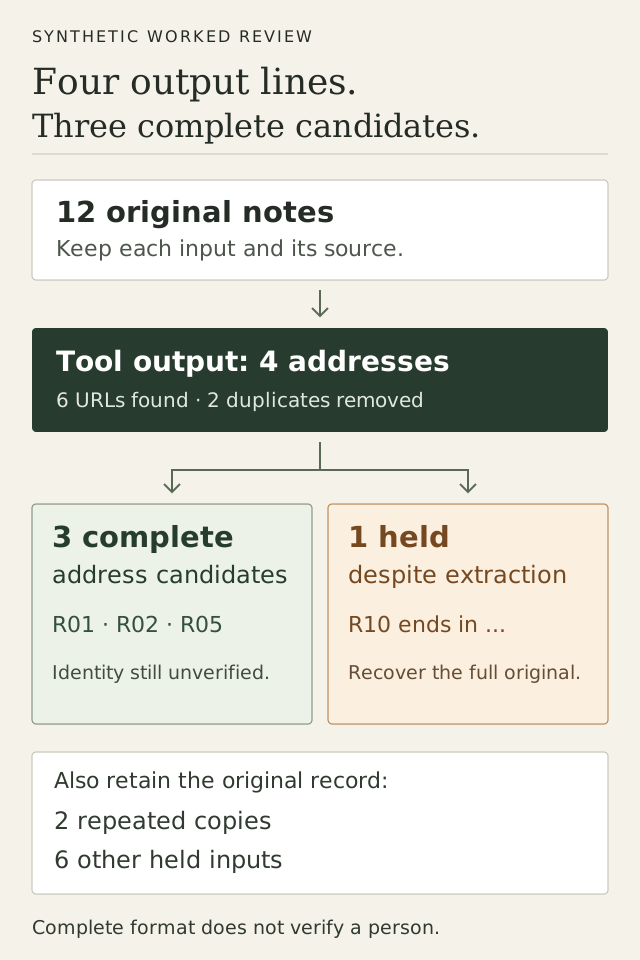
For this exact block, the live tool was checked on 30 October 2026. It displayed 6 for URLs found, 2 for Duplicates removed and 4 for Unique profiles. Its separate company box contained one address and showed 1 company page filtered out.
Copy all returned these four lines, in this order:
https://www.linkedin.com/in/example-fixture-ops-001-not-a-person
https://www.linkedin.com/in/example-fixture-finance-002-not-a-person
https://www.linkedin.com/in/example-fixture-procurement-003-not-a-person
https://www.linkedin.com/in/example-fixture-trunc...
The company box contained:
https://www.linkedin.com/company/example-fixture-company-not-a-businessThe browser check covered the displayed counters, output boxes and copied text. It did not visit profiles, resolve identities, test an import into another system or send anyone a message. These are not extraction-yield or conversion figures.
Three complete address candidates, plus two repeats
R01, R02 and R05 meet this exercise’s address-format requirement. They are format candidates, not approved people. The tracked and uppercase copies of R01 add provenance, not extra prospects. The table maps the combined output back to the original rows; these review labels are ours, not decisions made by the tool.
| Original row and source note | Observed output or repeated-address relation | Review decision |
|---|---|---|
| R01Fictional shortlist A | https://www.linkedin.com/in/example-fixture-ops-001-not-a-person | Format candidate Complete address shape in this fixture. Identity, existence, role, account fit and contact permission remain unverified. |
| R02Fictional shortlist B | https://www.linkedin.com/in/example-fixture-finance-002-not-a-person | Format candidate Complete address shape in this fixture. Identity, existence, role, account fit and contact permission remain unverified. |
| R03Fictional tracked copy of R01 | Repeated R01 address; no additional output line. | Repeated address Tracking/locale copy. Keep the original and its source note beside R01; do not add a second prospect. |
| R04Fictional uppercase copy of R01 | Repeated R01 address; no additional output line. | Repeated address Case-only copy. Keep the original and its source note beside R01; do not add a second prospect. |
| R05Fictional procurement note | https://www.linkedin.com/in/example-fixture-procurement-003-not-a-person | Format candidate Complete address shape in this fixture. Identity, existence, role, account fit and contact permission remain unverified. |
The first spelling of R01 is retained in the tool output. That does not make the later source notes disposable. In real work, two copies of an address can carry different dates, account observations or conversation restrictions. A URL-only output cannot choose which of those observations is current.
For this case, the result is three complete address candidates. It is not a count of three verified people, three suitable buyers or three records accepted by a CRM.
Seven inputs stay held, for different reasons
Keep a reason and a next action for each hold. A company or post reference can still be useful research; it simply does not satisfy this people-address requirement. A shortened or unsupported reference needs its original source rather than a guessed replacement.
| Original row and source note | Observed tool treatment | Why held and what to do next |
|---|---|---|
| R06Fictional company bookmark | Company box only; no people-output line. | Held Company page. Preserve account context separately; it does not identify a person. |
| R07Fictional post bookmark | No people-output line. | Held Post reference. Keep the post as context; obtain a supported person address separately if needed. |
| R08Fictional search bookmark | No people-output line. | Held Search reference. Keep the research query; review individual results before selecting person addresses. |
| R09Fictional opaque Sales Navigator reference | No people-output line. | Held Opaque Sales Navigator reference. Obtain the supported identifier or keep it in a documented destination field; do not rewrite the path. |
| R10Fictional visibly shortened note | https://www.linkedin.com/in/example-fixture-trunc... | Held Visible ellipsis. Hold this extracted row and recover the complete original. Do not guess the missing identifier. |
| R11Fictional unfinished paste | No people-output line. | Held No identifier after /in/. Recover the missing source value. |
| R12Fictional school bookmark | No people-output line. | Held School page. Keep institution context separately; it is not a person address. |
Do not turn a Sales Navigator reference into a public URL by editing its path
R09 is an opaque Sales Navigator lead reference. The checked tool did not return a public-profile address for it. Replacing /sales/lead/ with /in/ would invent a mapping the test never established.
If the real receiving job requires a public-profile address, return to the authorized source and obtain the supported link. If the destination accepts a different identifier, use its documented field and requirements. Keep the unresolved reference held until that requirement is met.
Recover a shortened link; do not remove the dots and declare it fixed
R10 deliberately contains .... Removing those characters would not restore the missing part. Return to the original cell, note or page and recover the complete value. The same caution applies to a copied link whose punctuation or host looks unexpected: recognition by this matcher is not a general URL-validation result.
Keep a portable review record
The extractor’s cleaned URL column does not carry the row IDs, source notes or hold decisions shown here. Keep the untouched input beside a review record. This filled record preserves both the original R10 value and what the tool actually returned:
source_row: R10
source_note: Fictional visibly shortened note
original_input: https://www.linkedin.com/in/example-fixture-trunc...
observed_tool_output: https://www.linkedin.com/in/example-fixture-trunc...
review_decision: held — visibly shortened address
required_next_evidence: complete value from the original source
identity_status: unverified; synthetic case only
receiving_requirement: complete public-profile address candidate
contact_or_import_approval: none
For a real handoff, add the actual observation date, receiving owner and evidence needed to clear each hold. Preserve a repeated input’s source note even when it points to the same cleaned address. Give the receiving team the candidate subset and the held record separately, so a hold does not silently become an approved row on the next import.
A destination may also need a current name, employer, role or another identifier. This exercise supplies none of those fields. Check its real mapping and required values before claiming the list is ready. For the later job of reconciling known contacts, use the existing CRM-contact exclusion guide; link-type cleanup does not replace that history check.
Continue only with the audience your job actually needs
If an address-only research list finishes the task, keep it. The local URL tool does not fetch profile details or send these cleaned rows into an app audience.
If you need a new audience with profile details, use the existing supported-search and first-sample workflow. Start with a reviewed LinkedIn source, use the supported extension route to create the app audience, then inspect the audience and its actual exported fields. That is a separate source workflow; it does not automatically enrich or import the three synthetic addresses above.
Once a real audience has been reviewed for the job and current contact restrictions, the next work may be relevant outreach, message sequences, replies and agreed follow-up. Leadsforlinked’s published Starter plan covers one connected LinkedIn account, multi-step campaigns, an inbox, Kanban CRM and analytics. These are paid workflow features. Cleaning a link list does not grant campaign access or demonstrate that a receiving system’s import or sending path works.
Follow the existing audience-to-campaign steps and check the current plan and conditions for that separate job. Keep reply ownership and the next agreed action explicit. A clean address establishes neither buying intent nor permission to contact someone.
Questions about mixed LinkedIn links
Can a LinkedIn company link go into a people list?
Not as a person’s public-profile address. In this test, the tool put R06 in a separate company box. Preserve it as account context if useful, and find a supported person reference separately when the job requires one.
Why did the tool return the shortened link?
The checked matcher recognized the visible /in/ pattern and identifier text, including the dots in R10. It did not recover the missing original or validate a destination. Hold that row until you obtain the complete source value.
Can a Sales Navigator lead ID be converted by changing the URL?
No supported conversion was established in this exercise. R09 produced no public-profile output. Obtain the supported identifier from its authorized source or use the receiving system’s documented field; do not invent a public identifier.
Do matching cleaned addresses prove the rows are the same person?
They show an address match under this tool’s rules. R03 and R04 collapse to R01 in the test, but identity, current employment and differences in the original notes still need review. The tool does not resolve different identifiers belonging to one person.
Can I import the cleaned output straight into Leadsforlinked?
This URL cleaner does not send its output to the app. Use the documented supported-source audience workflow when that fits your job, and inspect its real output. A cleaned address column alone does not establish an accepted app or CRM import.
Test scope and sources
The 12 inputs, review decisions and diagram are original teaching material. The browser test of the current URL extractor on 30 October 2026 checked counters, both output boxes and copied text. It used synthetic strings and visited no destination profile. It did not test identity, existence, a receiving-system import, payment, message delivery or a commercial outcome.
The current profile-link extraction guide supplies the broader normalization and separate-audience workflow. Its retained LinkedIn public-profile URL guidance is useful background; this case does not change anyone’s identifier. Published paid-plan scope comes from the current tool’s audience-to-campaign handoff, not a completed paid-feature test in this exercise.