A Kaspr alternative is useful only when it solves the missing part of your prospecting job. A selected LinkedIn audience, a file of person identifiers and usable contact data are three different deliverables. Buying more profile rows can help with the first two; it does not automatically produce the email addresses or phone numbers required for the third. Start with the source and the receiving route before comparing subscription prices.
This guide focuses on selected-profile sourcing and the manual CSV handoff to contact enrichment. For the broader decision about keeping Kaspr, adding a source or changing your budget, use our 2026 Kaspr purchase guide. Neither comparison treats profile extraction as a substitute for verified contact data.
First check whether Kaspr already covers your source
Kaspr has native ways to obtain contact data from LinkedIn. Its Sales Navigator guide documents a Chrome-extension workflow for saved lead lists, plus a search-list route. Choose the saved list in Sales Navigator filters, open the extension, select the enrichment workflow and destination Kaspr list, then launch within your plan's limits. The resulting contacts can be exported or sent to an integration. This route avoids feeding Sales Navigator URLs into the CSV uploader.
Its LinkedIn search guide also describes bulk enrichment from LinkedIn searches. Kaspr's source playbook includes groups and events. Do not switch on the assumption that Kaspr only handles one profile at a time or cannot use Sales Navigator. If a native route already supplies your chosen people and required contact fields, keep it in the comparison.
The reason to test an additional profile source is narrower: you need a selected audience that your working route does not supply, a portable reviewed profile file for another workflow, or more profile input for a substantial audience job. Define that audience first. “More contacts” is too vague to decide whether the new source adds anything beyond the list you already have.
CSV enrichment has a different identifier contract
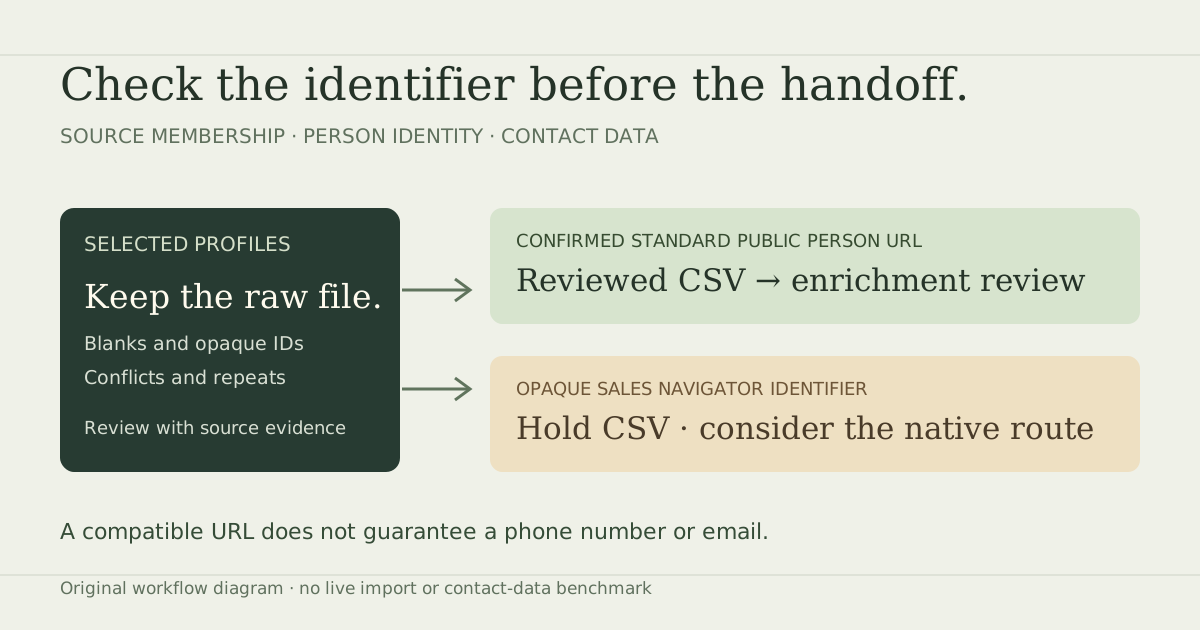
Checked 13 October 2026, Kaspr's CSV Enrichment help requires standard public LinkedIn person URLs in a mapped column. It excludes Sales Navigator URLs and flags opaque identifiers under an /in/ path as problematic. It advises three or fewer CSV columns, with name mapping optional. The page labels the feature Beta. Those requirements apply to this upload route, not to every Kaspr workflow.
An October 6 firsthand buyer post describes paying for Sales Navigator and another export tool, then encountering failed Kaspr CSV launches because the file contained Sales Navigator URLs. It is one reported handoff problem, not measured demand or a verified comparison of competitors. Replies recommending vendors do not establish their supported inputs. The official route documentation is the stronger basis for choosing how to proceed.
| What the file contains | Review action | Route to consider |
|---|---|---|
| Confirmed standard public person URL | Retain the original and map a reviewed person-URL column | Kaspr CSV enrichment, subject to current entitlement and output checks |
| Opaque Sales Navigator URL only | Hold the CSV handoff; do not replace the path to invent a public URL | Kaspr's native extension/list workflow, or source-backed identity review |
| Blank or opaque value under /in/ | Hold for confirmed person identity | Resolve the actual input before buying more of it |
| Company URL or another website | Reject for this person-upload contract | Return to the person source; a company record is a different object |
| Same URL, conflicting observed people | Keep both observations held | Manual identity review before payload projection |
A column named “LinkedIn URL” does not prove that every row is a usable public person identifier. Look inside the cells. Preserve the original export so a reviewer can trace later corrections back to their source. A confirmed public URL captured separately is different from a guessed conversion of an internal ID. Our exercise demonstrates that distinction without claiming a conversion service.
Decide which contact data is actually required
For account research or preparing a LinkedIn conversation, a reviewed profile identity, current role and source context may be the deliverable. For a call list, a usable phone number is mandatory. For an email campaign, an address and the evidence your team accepts are mandatory. Write the rule before requesting enrichment; otherwise a large source count can conceal a small usable contact list.
Kaspr's CSV settings let you choose phone, B2B email and direct email, with mandatory options. Its help explains that a mandatory field can stop other enrichment when that field is unavailable. It also distinguishes contact-data credits from export credits and warns that repeated enrichment and downloads can consume credits. Review the chosen settings and available buckets before rerunning a failed job. A successfully uploaded URL is still not proof that a required number or address will be returned.
Use a receiving team's rule, such as “confirmed person at one of these accounts, current role reviewed, phone required, source record retained, existing contacts excluded, owner assigned.” Avoid silently changing that rule to “any row with a URL” when results come back. Contact evidence and permission to use a record should remain part of your actual operating process; this guide does not certify either.
Work through the original identifier acceptance exercise
Download the blank handoff worksheet
The worksheet has ten decisions: source route, identifier shape, separately confirmed identity, conflict/repeat review, required contact fields, mandatory settings, thin CSV projection, allowances, actual sample approval and final destination handoff. Actual file names, columns, evidence, counts, owner, date and decisions are blank. Fill them with your own sample. Its example prompts are editable, and its headers are teaching fields rather than an asserted vendor export schema.
Practice with 14 original fictional observations and the exercise instructions. Every raw record is marked synthetic and do not contact. No real profile was extracted and no vendor import was performed. The exercise asks whether a confirmed person identifier can enter a separately reviewed thin payload; it does not score an email or phone brief.
K01 has a confirmed standard public identity. K02 retains an opaque Sales Navigator URL but also has a separately confirmed public URL supplied by fictional source review. K09 retains its original tracking URL and a separately confirmed canonical value. These three enter the exercise's accepted subset. No path replacement is used to convert K02, and no original cell is overwritten to simplify K09.
K03 has only an opaque Sales Navigator identity; K04 remains opaque despite its public-looking path; K05 is blank. K07 and K08 disagree about the person attached to the same identifier, so both remain held. K10 and K13 lack confirmation for formatting repairs, and K14 has a malformed slug. K06 is a company URL, K11 uses another host, and K12 repeats K01. The repeat is omitted from the payload while its observation remains available.
| Disposition | Rows | Result |
|---|---|---|
| Accepted for this exercise | K01, K02, K09 | 3 confirmed identities in the separate teaching payload |
| Held | K03, K04, K05, K07, K08, K10, K13, K14 | 8 preserved observations needing evidence or conflict review |
| Rejected for this route | K06, K11 | 2 wrong entity/host records retained outside the payload |
| Repeated observation omitted | K12 | 1 observation preserved without sending it twice |
Compare your decisions with the complete decision ledger, accepted subset, held observations and omitted records. Each retains its original cells. The separate three-column teaching payload demonstrates projection only. Do not upload it: names and request references identify it as synthetic, and mapping or retention of an extra reference field has not been tested in Kaspr.
Raw observation + identity evidence
  → full decision ledger (all 14 originals)
  → accepted subset (K01, K02, K09)
  → profile_url | name | request_ref
  → actual enrichment output review still required
These counts are not a product yield forecast. None of the three accepted identities has a found or verified email or phone in this exercise. If your brief requires contact data, the job remains incomplete until actual enrichment results pass that rule. The local prospect workbench can help with reference exclusions or snapshot comparison afterward; its outputs also require review. It does not resolve opaque Sales Navigator IDs.
There is a useful trap in K04. The unchanged workbench's URL function produces a generic matching key for its opaque /in/ACw… value, while Kaspr's CSV guidance rejects that input form. A matching key is not a provider eligibility decision. The exact local normalization outputs retain each original and the separate manual disposition. They also show normalized keys for K10 and K13, which this exercise still holds without confirmed identity evidence. No provider acceptance was tested, and the workbench was not changed.
Test profile input before buying a larger audience
If the missing job is a selected public-profile audience, test Leadsforlinked on the intended source. Start with 100 free signup profile leads, in batches of 20, with no credit card. Use the actual export to record its column names, blanks, opaque values, conflicting identities and mandatory profile fields. Exact production headers and contact-enrichment parity are not assumed here. Do not buy a larger source batch simply because the raw row count looks attractive.
Review one batch against the worksheet. Establish whether the selected people match the brief, whether the destination accepts the reviewed identifiers and whether a contact-data service is still necessary. Keep source provenance outside a thin upload payload. Join any later enrichment results back using actual retained identifiers or an explicitly supported reference, then approve the final destination file separately. Our enrichment-result join guide explains how to preserve unmatched and conflicting observations.
Our published euro offers include an eligible once-only 500-profile offer at €1.99, Basic at €4.99 monthly, or €35.88 for the full year, equivalent to €2.99 monthly. The once-only offer is not a recurring pack. These buy a different job from Kaspr contact enrichment; do not turn their profile price into an assumed verified-email or phone price.
For context, Kaspr's current euro pricing lists Starter at €59 per user on monthly billing and €45 monthly equivalent on annual billing; Business is €99 monthly or €79 monthly equivalent annually. Its plan help includes credit rollover on paid plans. Add-on credits have a separate renewal and unused-credit policy. Check the actual quote and the needed data/export allowances. A universal “monthly credits disappear” comparison is inaccurate.
Keep a working Kaspr native route when it already supplies your selected people and required contact data. Add a profile source when the missing deliverable is that audience's reviewed input. If the file has only unresolved opaque identifiers, fix the source/route decision first. A lower source price cannot make an incompatible file acceptable.
Sources checked 13 October 2026: Kaspr CSV help (9 March 2026), Sales Navigator guide (30 October 2024), search guide (9 March 2026), pricing and plan help (2 March 2026), add-on guide (3 March 2026), and the dated buyer thread. Public free-plan allowance descriptions differ between Kaspr pages, so no exact Kaspr free-output count is used. No account, live enrichment, import, checkout or comparative performance test was performed.
Frequently asked questions
Can Kaspr use Sales Navigator?
Yes. Kaspr documents a native Chrome-extension workflow for Sales Navigator saved lead lists and searches. Its CSV uploader has a different requirement: standard public LinkedIn person URLs.
Can I turn an opaque Sales Navigator URL into a public URL by replacing its path?
No. A path change does not establish the person behind an opaque identifier. Keep the original value and obtain a separately confirmed public identity, or use a supported native route.
Does an accepted public profile URL guarantee an email or phone?
No. Identifier acceptance and required contact data are separate checks. Review the actual enrichment result against your email or phone requirement before approving a destination handoff.
What does the downloadable exercise prove?
It demonstrates local review and projection of 14 fictional observations: 3 accepted, 8 held, 2 rejected for this route and 1 repeat omitted. It is not a vendor import, a product yield test or a verified contact-data result.
How can I test Leadsforlinked for the source-input job?
Start with 100 free signup profile leads, released in batches of 20, without a credit card. Check the actual exported identities and mandatory fields before enrichment or a larger purchase.