You may not need Sales Navigator to complete a finite profile-list job. You may still need it for a structured search, a saved working list or a conversation already in progress. The useful alternative is the one that completes your actual task without quietly dropping a requirement.
This guide helps researchers and small sales teams separate those jobs before changing subscriptions. It is published by Leadsforlinked. Official LinkedIn sources were reviewed on 7 November 2026, alongside our current product catalogue. No live search comparison, extraction or account cancellation was performed for this article.
Which Sales Navigator capabilities do you actually need?
LinkedIn’s plan comparison help lists advanced filters, alerts and 50 monthly InMail credits on Core, Advanced and Advanced Plus. Shared team lists and buyer-intent features are listed on Advanced and Advanced Plus; CRM sync is listed on Advanced Plus. Choose the relevant tier by capability, not a generic assumption about “Sales Navigator.”
Start with the last real research task your team completed. Write the exact inclusion rules and the tools or records used to apply them. “Find senior decision-makers” is too broad to judge. “Find people in a specified seniority category at companies within an approved employee range” gives you conditions you can check in the interface.
Then identify dependencies beyond finding names. A saved list may be part of a weekly review. Alerts may inform a research schedule. An InMail conversation may contain the context needed to answer a buyer’s question. A CSV of profile links serves a different purpose from those working records, even when some of the same people appear in both.
When a standard search deserves a test
A keyword query can help when your task is exploratory. Suppose you want to inspect profiles that mention a particular responsibility or industry phrase. You can try a focused search, review the actual people returned and decide whether that result is useful for a finite brief. That is a search hypothesis, not proof that it implements a structured filter.
Consider a query containing “Head of Operations” and “distribution.” A person might mention distribution in a former role, describe a different responsibility or use a title that does not match your intended seniority category. Those are reasons to inspect the evidence. Adding more keywords does not by itself reproduce the meaning of a headcount or seniority filter.
Test against the requirements you wrote down. Can you apply each mandatory condition directly, or does someone have to verify it separately? Is the result set sufficient for the brief? What evidence would cause you to hold a person out of the list? A smaller list that meets the brief can be more useful than a larger one that merely matches the words.
Do not turn that test into a claim about identical LinkedIn results. Different search routes and access conditions can produce different working sets. Keep the source and review method with your list so the next person understands how it was selected. See the guide to supported extraction without Sales Navigator for the collection job.
Check the extraction tool’s dependency separately
If you use an extractor alongside Sales Navigator, distinguish its required input from your own research requirements. Ask which source you actually collect, what access that source needs, and whether the tool supports the route you intend to use. Do not cancel a subscription on the assumption that every extractor accepts every LinkedIn source.
You might keep Sales Navigator for its search and working records while changing only the way you prepare a downstream file. Or a finite audience may be available from a supported standard-LinkedIn route, making a separate profile-export evaluation sensible. Neither choice proves that your saved lists, alerts or messages have been replaced.
For a current comparison involving another extractor, use that vendor’s official input and plan requirements. This guide does not quote an Evaboot price or prescribe cancelling it. The decision here is whether the complete workflow still needs Sales Navigator, not whether adding two unrelated headline prices produces an attractive saving.
What Leadsforlinked covers: profiles versus campaigns
For profile extraction, Leadsforlinked offers 100 free profile leads once at signup, released in batches of 20, with CSV export and no card required. For recurring CSV extraction, Basic is €4.99/month on monthly billing. Starter is €29/month on monthly billing for one connected LinkedIn account and includes campaigns, follow-ups, Inbox, Kanban and analytics. Compare the current extraction and campaign plans before choosing.
Choose the profile extractor when the missing output is a list to review or hand to your existing tools. Inspect the actual CSV columns and incomplete fields before deciding it meets the receiving system’s requirements. A person’s profile URL and role observation do not supply a verified email address, phone number or permission to contact them.
Choose the LinkedIn outreach platform when you need the paid campaign and reply workspace. A connected-account allowance is not a count of human team seats. Check who will send, who will answer and which account owns the work. The platform page explains the real builder capture and the difference between visible controls and tested execution.
Optional profile packs and recurring extraction subscriptions are different purchase routes. Keep the one-off list requirement separate from recurring collection or campaign work. There is no need to buy an unnecessary campaign plan to inspect a CSV, and the free profile allowance does not unlock the paid campaign workflow.
Keep the capability when it remains a requirement
| Your dependency | What to establish | Sensible decision |
|---|---|---|
| A structured search condition | Whether your proposed route can apply the required condition or supply reliable separate evidence | Keep the needed filter if a keyword hypothesis cannot demonstrate the same job |
| Saved lists and alerts | Who uses the existing workspace and which records must remain available | Retain the working route until its dependency is resolved |
| InMail and active messages | Where the conversation exists and how the responsible person will continue it | Protect the conversation context before any subscription change |
| Team or CRM workflow | The exact plan, shared records and receiving objects your team uses | Evaluate the whole handoff rather than comparing individual profile counts |
| A finite profile CSV | Supported source, reviewed people, usable fields and destination requirements | Test that bounded job separately from the rest of the workspace |
The table gives a decision method, not a feature-parity score. It does not establish that every undocumented feature is absent from another product. If an essential capability remains unknown, resolve that specific question before treating the alternative as a replacement.
Worked decision: a required filter and a separate CSV brief
Fictional scenario. A consultant has two pieces of work. For an account-research assignment, the client requires a specified seniority category and an approved company headcount range. The consultant also has an unanswered scope question in an existing Sales Navigator message thread. Separately, a colleague needs a small list of profile links for manual review against an agreed service brief.
The first assignment is defined by structured conditions, not just title wording. The consultant could form a keyword hypothesis, but has not demonstrated that it applies both conditions. The decision is to retain the required search capability while checking the available controls and evidence. The live message dependency is another reason to resolve the handover before cancelling; it is not solved by exporting profile links.
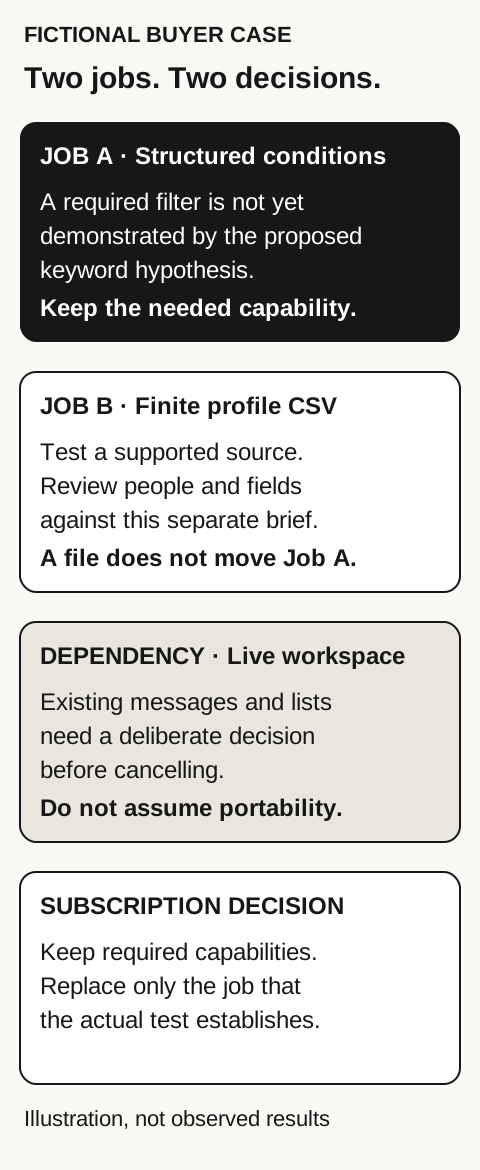
For the second assignment, the colleague writes a simpler finish: a reviewed set of people with usable source links, current-role checks and no unresolved identity duplicates. If an appropriate supported standard-LinkedIn source supplies that audience, the colleague can evaluate the free extraction route. Each retained person still needs review; a matching phrase is not enough.
The proposed output is therefore two different decisions: keep the capability and message context needed by the first assignment; test the profile-file requirement independently for the second. No number of returned profiles or projected saving is invented. A successful CSV test would answer the second brief, not prove that the first assignment’s filters, messages or saved workspace were portable.
If the CSV test fails, diagnose the actual failure. Wrong people require revisiting the source or brief. Missing fields require checking the export and receiving tool. A missing structured predicate requires retaining or finding an appropriate research capability. Upgrading an unrelated campaign plan does not automatically correct any of those problems.
Compare the actual bill only after the capability decision
LinkedIn’s official comparison page, marked updated 27 September 2026 and reviewed 7 November, lists the following starting estimates per licence. Currency, tax, promotions, region and purchase route can affect the actual offer; check your own subscription rather than treating these figures as a universal bill.
| Plan | USD monthly / yearly | EUR monthly / yearly |
|---|---|---|
| Core | $119.99 / $1,079.88 | €120.99 / €1,088.88 |
| Advanced | $159.99 / $1,799.88 | €148.21 / €1,693.88 |
Compare the same currency, billing commitment and required work. A yearly total is not a monthly price. If you retain Sales Navigator for a required capability and add a profile-export tool, both costs belong in that workflow. If you no longer need the capability, first establish that the replacement job actually works before calculating a saving.
Use the Sales Navigator Cost Calculator to work from your actual quote. Select the correct currency and whether the input is monthly, a yearly total or an annual equivalent. Keep required companion tools and the commitment period in the comparison.
Before making a cancellation decision
LinkedIn’s cancellation guidance warns that critical messages, saved leads and accounts have no save option and may become inaccessible on cancellation. It also says the account ends at the close of the billing cycle. Those statements do not clearly establish the data-access cutoff; confirm it with LinkedIn before acting. Your personal LinkedIn profile is unaffected. Do not infer a CSV export or restoration window.
Use that warning to make a deliberate decision. First inventory the records and active work you still depend on. Then verify the current official account guidance and any authorized options available to you. Establish the replacement for the exact job you intend to move. Resolve ongoing conversations and outstanding responsibilities before deciding whether to cancel.
Do not copy a generic menu path from an old article and assume it applies to your billing route. Consult the official instructions for your account. This guide does not ask you to circumvent access controls, reconstruct restricted records through another account or rely on an undocumented retention grace period.
Collection access and LinkedIn’s rules are separate questions
LinkedIn’s prohibited-software guidance explicitly prohibits scraping and unauthorized automation. Human pacing and the visibility of profile information do not establish permission. A tool’s available controls are not a certification of compliance or protection from account restrictions.
Review the applicable product and platform conditions before choosing a collection or outreach route. The price and capability comparison here does not decide those obligations for you. Keep research quality, access permission and whether further contact is appropriate as separate questions.
Questions before you decide
Can a free Boolean search replace every Sales Navigator filter?
No equivalence is established here. A keyword query expresses a search hypothesis; test whether the actual search supports the structured conditions your job requires. Keep the required capability when the proposed alternative cannot demonstrate it.
Is the free Leadsforlinked profile allowance a campaign trial?
No. The free offer is 100 profile leads once, in batches of 20, with CSV export and no card. Recurring CSV extraction is Basic; campaigns and Inbox start on paid Starter.
Does a CSV preserve my Sales Navigator messages and saved lists?
Do not assume so. A profile file and an active Sales Navigator workspace are different records. Check the official cancellation guidance and resolve critical dependencies before deciding to cancel.
Does using an extension slowly make it permitted by LinkedIn?
No. LinkedIn’s prohibited-software guidance restricts scraping and unauthorized automation. Human pacing or visible profile data does not establish permission. This comparison does not certify compliance or protection from restrictions.
Sources and verification
Sources reviewed 7 November 2026. The comparison is documentation-based; the worked case is original and fictional. No live app, search-result equivalence, extraction, campaign or cancellation result is implied.
- LinkedIn: current plans and estimated prices
- LinkedIn Help: Sales Navigator plan features
- LinkedIn Help: cancelling Sales Navigator
- LinkedIn Help: prohibited software and extensions
- Leadsforlinked: extraction and campaign catalogue, saved current offer reviewed 7 November 2026.
- Leadsforlinked: supported profile-export scope and actual-file limitations.