When an accented name looks wrong in a prospect CSV, reopen the untouched file with the intended character encoding before editing the name. A decoding mistake can make valid UTF-8 bytes look corrupted. Saving that mistaken display can create a second, different file and make recovery harder.
The useful finish is a readable working copy that preserves the supplied spelling, rows and identity keys, together with a record of what changed. This guide demonstrates bytes and reversible decoding with authored names. It does not report an Excel, LibreOffice or CRM import, and it does not establish a person's correct name from an encoding pattern.
Decide whether the problem is display, parsing or source data
Three problems can look similar on a screen. A character-decoding mismatch produces text such as José where UTF-8 was intended to represent José. A separator mistake can put several fields in one column. A source can also genuinely contain a misspelling. The first calls for a different decoding choice; the second needs the correct delimiter; the third requires evidence about the underlying record.
Start with the untouched downloaded file. Keep the current broken-looking copy too if it is needed to explain what happened, but do not make it the reference. Record which application opened it, whether anyone saved it and what they selected. “It looks right on my laptop” is not an encoding specification.
Microsoft's UTF-8 CSV guidance, checked on 7 November 2026, describes normal opening for UTF-8 files saved with a byte order mark and a Get Data text/CSV route otherwise. That supplies a documented opening method. It does not prove that your file is UTF-8, that every version has identical menus or that previously overwritten bytes can be restored.
Follow one name from characters to bytes
Here is an authored teaching input with three fictional display names and internal row IDs. It contains no profile addresses and identifies no prospects. The CSV is comma-delimited, and the company in the second row intentionally contains a comma.
record_id,display_name,company
U01,José,Demo Alder
U02,Zoë,"Demo North, East"
U03,Łukasz,Demo Fern
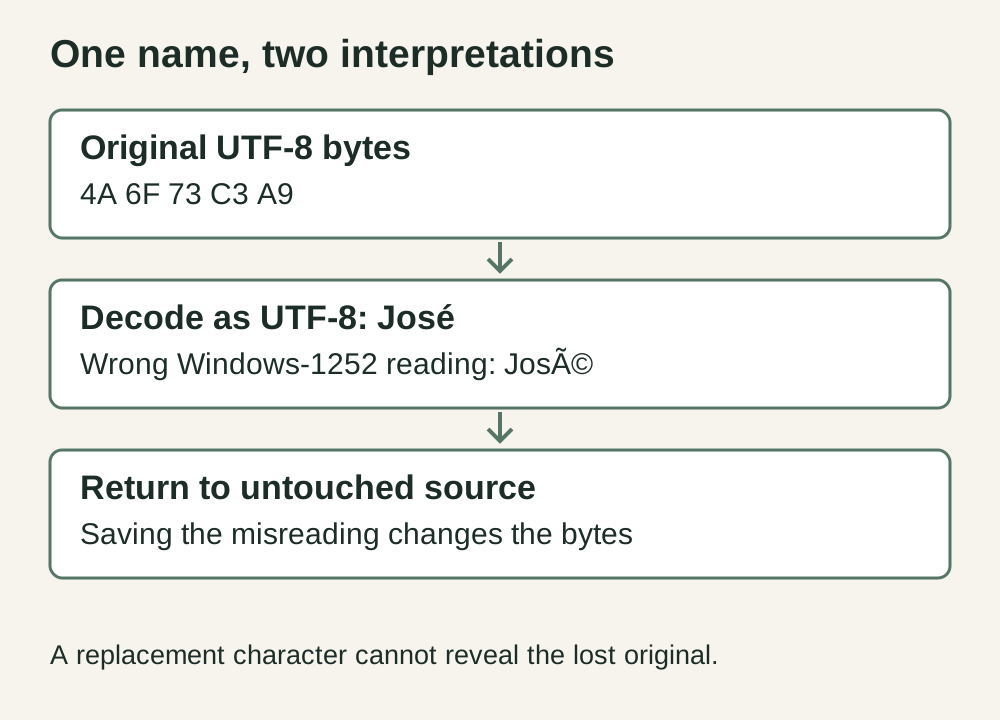
In UTF-8, the name José has hexadecimal bytes 4A 6F 73 C3 A9. Reading the last two bytes individually as Windows-1252 produces é, so the visible result becomes José. Those are two interpretations of the same original bytes; the mistaken appearance alone does not mean that the source name was changed.
If someone saves that mistaken text as UTF-8, however, the resulting bytes encode José itself. The working copy has now changed. Choosing UTF-8 again will correctly display the wrong string. That distinction explains why repeatedly switching encodings in a saved copy may not fix the problem.
Use an explicit import preview
Open a working copy through the application's text/CSV import route. Inspect both character encoding and delimiter. In a suitable UTF-8 import, U01, U02 and U03 should retain their authored names, while Demo North, East remains one company field. A correctly accented name in a single oversized column is only a partial success.
Power Query's Text/CSV connector documentation explains the File Origin choice and notes that UTF-8 inference depends on a UTF-8 byte order mark. Choose the encoding appropriate to the source instead of assuming detection is always reliable. Inspect later type-conversion steps too: decoding text and choosing data types are distinct decisions.
LibreOffice's Text Import help separately exposes Character Set, separators and column type. In that documented route, select the intended character set and inspect the preview. Keep identifiers and fields that must remain textual under suitable text handling. These instructions are documentation-based; no application dialog was operated for this article.
For your real file, compare several known original strings, including any language characters the job actually contains. Check more than the first row. A mostly English file may look plausible under several encodings until one accented name, currency symbol or non-Latin character exposes the mistake.
Understand what a byte order mark can and cannot do
The UTF-8 byte order mark is the byte sequence EF BB BF at the beginning of a file. It can help a receiving application recognize the encoding. It is not a repair instruction, a delimiter or evidence that the people in the file are correctly identified.
Adding it to bytes that already encode José will not turn that text into José. Likewise, inserting it in the middle of a file is not the same as marking the file's encoding. Avoid editing a production export byte by byte unless the technical owner understands the format and keeps a reversible record.
If the destination needs UTF-8 with a mark, generate a separately named copy from correctly decoded text and verify that destination's requirement. Some software handles the marker explicitly; a less suitable parser may expose it in the first column name. Test the exact receiver rather than assume every CSV consumer agrees.
Read the local fixture's exact result
The accompanying local check creates the three-row authored CSV, encodes it as UTF-8, decodes it as UTF-8 and compares the parsed cells. It also demonstrates the Windows-1252 misreading of José. This is a deterministic text-and-byte check in Python, not a product export or application import.
| Check | Expected result | Meaning |
|---|---|---|
| UTF-8 round trip | José; Zoë; Łukasz | Authored text survives this encoding/decoding pair. |
| U01 misread as Windows-1252 | José | Wrong decoding can explain this specific display. |
| CSV parsing | Three data rows, three fields each | Quoted comma is retained inside U02's company. |
| Person identity or import success | Not tested | No real person, spreadsheet or destination was used. |
Download the original fixture and exact check results. Use them to understand the boundary before testing an approved real sample. The record IDs belong to the demonstration; they are not exporter headers or CRM identifiers promised by Leadsforlinked.
Recover from the earliest unchanged source
Do not apply an application's repair instructions to every file that looks similar. Blackbaud's import troubleshooting answer describes converting an input to UTF-8 for its specific special-character issue. The official answer was available through the search index on 7 November; direct retrieval returned an access error. It is a useful example of a receiver-specific remedy, not proof that an already damaged UTF-8 file can be repaired by another conversion. First establish whether you have unchanged bytes, a saved misreading or information that was discarded.
If the original bytes remain intact, reopen that original with the correct decoding and build a new working copy. Compare row count, column count, selected names and identity keys before using the result. Keep the unsuccessful copy labelled as such so nobody later mistakes it for the authoritative input.
If only the saved mistaken copy remains, a reversal can be possible for a known, fully reversible transformation. For this specific teaching string, encoding José as Windows-1252 and decoding those bytes as UTF-8 returns José. That is a conditional demonstration, not a safe bulk repair for unknown files. Mixed encodings, manual edits and replaced characters can break the premise.
A question mark or replacement character is a counterexample. If a conversion discarded an original character and stored ? or �, that stored symbol does not reveal which character was lost. Do not infer a person's spelling from nationality, a similar name or the version you would prefer. Obtain a fresh source or hold the affected field.
Preserve spelling separately from matching rules
Removing accents may make two strings easier to compare, but it changes the display value and does not establish identity. Keep the supplied spelling and use a documented comparison key separately if your process requires one. Two people can have similar names; the same person can also appear with different display forms.
The enrichment reconciliation guide handles the later relationship between two supplied files. Resolve decoding first so the reviewer can see what each source actually said. Do not repair a conflict by silently replacing one source's name with another merely because their keys appear to match.
Take the corrected sample to its actual destination
Your final acceptance note should name the source, encoding, delimiter, working-copy filename and comparison checks. Then test the actual onward import under that application's rules. A local byte round trip proves only that particular transformation; it does not certify a CRM parser, custom-field mapping or message personalization.
If you need a first real profile sample, the existing Leadsforlinked route offers 100 profile leads once at signup, without a card, released in batches of 20. Check the actual file before collecting more. If you already have sufficient input, keep it and finish the decoding and destination checks. A larger list cannot restore characters discarded from an earlier copy.