Count the LinkedIn accounts you need to connect, the people who will operate them and the client workspaces they may enter separately. A subscription allowing several senders does not establish that one client's reviewer cannot see another client's conversations. Agency fit depends on supported access boundaries as well as account capacity.
This guide helps an agency compare a multi-client purchase before inviting colleagues or clients. It uses a fictional two-client permission decision, six cross-client checks and current supplier documentation. The matrix states the agency's desired policy; it is not a list of features proven in Leadsforlinked or a security certification of another vendor.
Name the five units in the purchase
A sender is the connected LinkedIn account from which an action occurs. An operator is a person authorized to use the software. A workspace is a product's organizational or access boundary, whose actual behavior needs checking. A permission allows an action within a scope. A subscription owner controls the commercial arrangement under the supplier's rules.
One operator may work on two clients, while two operators may assist one sender. Neither relationship tells you how many licences are charged. A workspace label may organize campaigns without enforcing every visibility restriction you need. Obtain the supplier's definitions before translating your agency headcount into a plan.
The existing LinkedIn CRM guide covers sender relationship, record ownership and the next action. This page owns a different purchasing decision: which users may enter each client's environment and what they can do there. A clean handoff note cannot replace a required access restriction.
Read the permission detail beneath the agency proposition
HeyReach's agency guide describes dedicated client workspaces and workspace-specific permissions. That is a relevant documented alternative to evaluate. Its general proposition should be read alongside the detailed roles help, dated 11 September 2026 and checked on 7 November.
The roles help says Members can be assigned to selected workspaces, while Admin invitations give access to existing and future workspaces. It describes permissions at screen level, with dependencies: campaign access brings viewing access to accounts and lead lists, and Inbox access exposes the workspace's conversations rather than only the member's own sender. Those details matter when a client asks for a narrowly limited review role.
These are supplier-documented boundaries, not permissions we tested. Do not infer that a campaign viewer can see only one draft, or that Inbox access is limited to one conversation, without evidence. If the supported scope is broader than the client's approved access, change the proposed arrangement or keep the purchase held.
Work a two-client agency requirement
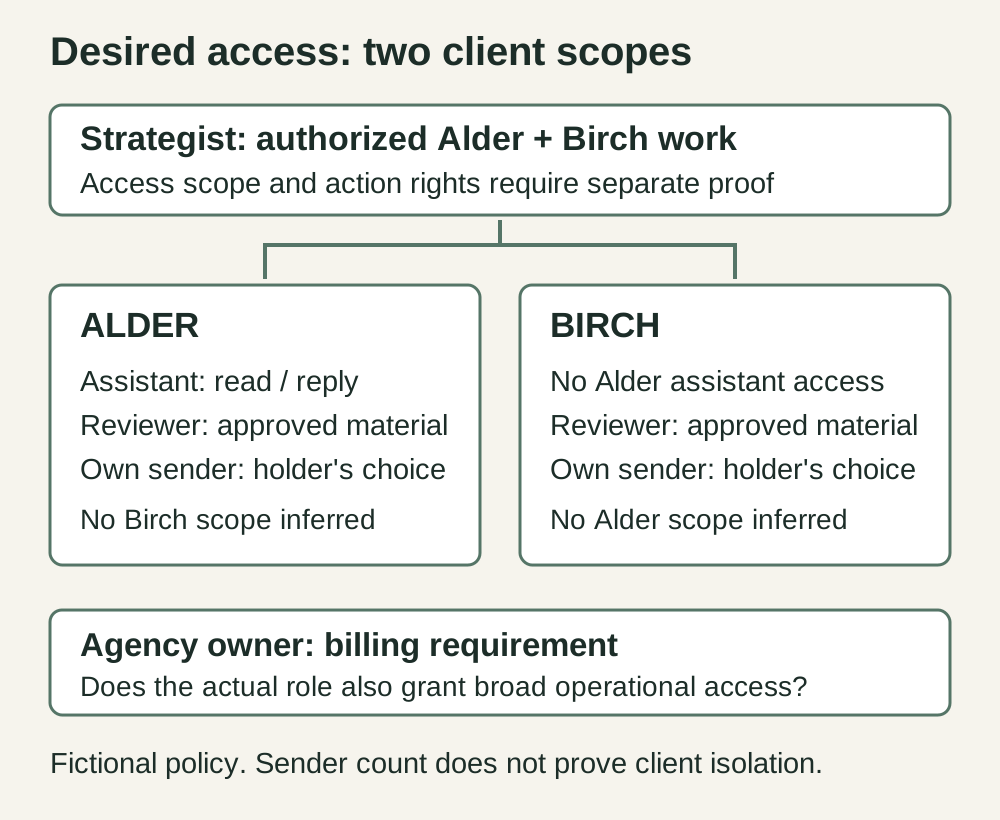
Everything in this example is fictional: clients Demo Alder and Demo Birch, their sender accounts and the agency's requirements. The agency has written permission to carry out the stated work within the case. That stipulated permission is not proof that any real client has authorized account connection, delegated sending or data sharing.
The strategist works on approved campaigns for both clients. An assistant handles replies only for Alder. Each client has a reviewer who should see approved material for their own client without accessing the other. The agency owner handles the subscription. Client account holders retain the connection decision for their own sender.
In this five-role case, each client's reviewer is also the account holder for that client's sender. Their authority to connect that sender is separate from the proposed review-only campaign access. No agency colleague acquires that authority merely by being assigned a campaign role.
| Role and scope | Connect sender | Edit campaigns | Read / reply | Export | Billing |
|---|---|---|---|---|---|
| Strategist · Alder and Birch | Only with separate explicit authority | Approved work for both | Authorized conversations for both | Separate case approval required | No |
| Assistant · Alder only | No | No | Alder read and reply; no Birch access | No | No |
| Alder reviewer | Own sender connection by account holder | Review approved Alder material; no edit | No Inbox access required | No | No |
| Birch reviewer | Own sender connection by account holder | Review approved Birch material; no edit | No Inbox access required | No | No |
| Agency owner | Only authorized client connection work | Operational access only where needed | Operational access only where needed | Approved administration only | Yes |
This matrix accounts for two client environments and five operator roles; it does not declare five billable seats or two agency licences. The client-review requirement is especially specific. If a supplier can expose only all campaigns in a workspace, review of a selected approved draft may require an approved external document instead of a software login.
The result is a purchasing specification: show the supported arrangement for each role, name any wider access and quote its actual licence unit. The assistant's need to reply does not justify campaign-edit or export access by default. The agency owner's need to pay does not, by itself, establish that the product can separate billing from operational administration.
Run six cross-client checks on approved test data
Ask the supplier to demonstrate the proposed configuration with harmless fictional records in an authorized test environment. Test as the actual proposed role, not only as an administrator. Record what was observed and what remains documented or unanswered. Functional checks can expose a buying mismatch without proving complete security isolation.
- Workspace entry and direct links. As the Alder assistant, inspect which environments are available. Use supplier-provided links to fictional Birch records only within the authorized demonstration and confirm the expected access denial. A hidden menu alone is weaker evidence than the supported handling of a direct link.
- Search and aggregated views. Inspect permitted searches, dashboards and conversation filters. Alder-only work should not expose Birch's names, subjects or counts through the views available to that role. Ask which administrator views deliberately combine clients.
- Reading and replying. Verify the assistant can answer the intended Alder conversation without accessing Birch's Inbox or gaining unrelated campaign controls. Treat reading and sending as separate requirements. A client who needs only a draft review should not automatically receive reply access.
- Export and connected routes. Inspect the export, report, integration and API access exposed to the role. Establish whether an export restriction also fits the supported connected tools; a disabled visible button does not explain every data route. Missing evidence remains an open item, not a passed restriction.
- Sender and campaign context. Before a harmless draft action, inspect the selected client, sender and campaign. Check whether the role can select an unintended client sender or move it elsewhere. Do not run a real send to prove this boundary.
- Removal and handover. Remove the fictional test member through the permitted process and inspect the resulting access, including an already open session. Reconcile their owned tasks and pending work separately. Membership removal does not, without evidence, establish that every queued job stopped.
For each check, record the role, client scope, exact action, expected result, actual result and unresolved question. “Alder assistant could not enter the supplied Birch test link” is a bounded observation. “All client data is secure” is a much broader conclusion that these six checks cannot establish.
Understand the administrator and master-view counterexample
A product may separate client workspaces for ordinary members and intentionally combine them for administrators. HeyReach's Master View documentation describes an aggregated dashboard and Unibox across workspaces. That documented oversight feature is a reason to inspect which role the client was actually given, rather than infer isolation from the workspace name alone.
In the fictional agency, inviting Alder's reviewer as a broad administrator would conflict with the desired boundary even if the agency uses an Alder-labelled workspace. Correct the role or use a narrower supported review route. Do not resolve the mismatch by assuming the reviewer will avoid the other client's records.
Permission dependencies can also change the decision. If viewing a campaign necessarily reveals lead lists that the reviewer may not see, the requested in-app review is not satisfied by a nominal view-only label. Ask whether the supported configuration can meet the actual policy; an approved document can be the better option when it cannot.
Treat moving a sender as an operational change
A sender is not merely a transferable seat number. Its current campaigns, conversations and client authority matter. HeyReach's sender-move help restricts that action to Admins and describes immediate campaign effects when a sender is removed from the current workspace. That is a product-specific documented workflow, not a tested universal transfer rule.
Before changing a real arrangement, identify the source and destination client, authorized account holder, affected work and review owner. Ask what happens to campaign participation, history, failed items and access. Retain the previous relationship so a future operator can explain why an old conversation belongs to its original client context.
When an operator leaves, reassign the needed work and review their permissions through the supported process. When a client leaves, keep export, retention, disconnection and outstanding-reply obligations as separate questions under the actual agreement. This article supplies no universal data-retention or offboarding promise.
Where Leadsforlinked fits, and what remains unknown
The current Leadsforlinked platform page advertises Starter at €29 per month on monthly billing for one connected LinkedIn account, campaigns, follow-ups, Inbox, Kanban and analytics. It provides a concrete route for an appropriately authorized one-account operator who needs that workflow. It does not certify the two-client permission matrix above.
The reviewed source does not establish client tenancy, workspace-level isolation, delegated operator seats, client-reviewer access, export restrictions, billing-role separation or revocation behavior. Multiple connected accounts are not evidence for any of those rights. Do not recommend a higher account-count plan solely because two clients each have a sender.
For a single-account job that fits, review the platform description and its existing Starter billing route, checking the actual selected offer before commitment. For the two-client case, retain the matrix and require supported answers before choosing a plan. No authenticated arrival, checkout or agency configuration was tested here.
If the agency already has a suitable authorized workspace, retain it. If all that is missing is profile input, the free CSV offer is a separate source decision and does not supply operator or client-workspace rights. A sender allowance, a login and a client label should never stand in for the actual access contract.