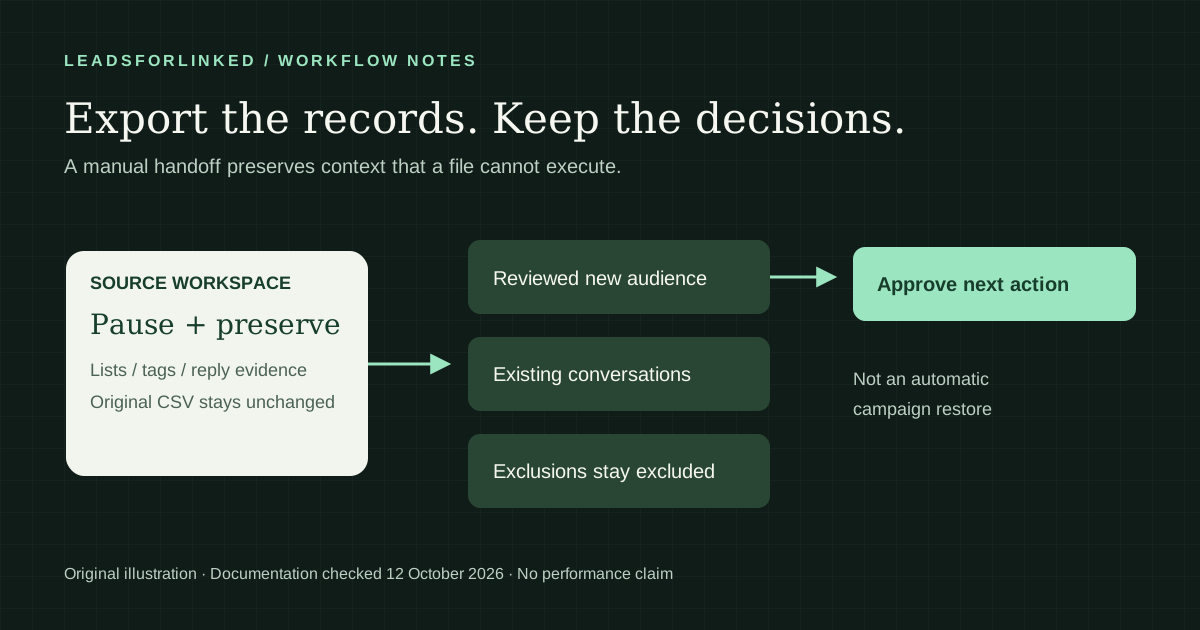
A Waalaxy export is useful when you change your prospecting stack, but copying a list is only part of the handoff. A profile that has already replied needs a different next action from someone who has never received an invitation. Losing that distinction can restart a conversation with the wrong message.
This guide separates the downloadable records from the decisions you must preserve yourself. Original work product: a downloadable export checklist and a worked handoff example, backed by dated Waalaxy documentation. It is a preparation method, not a claim that another application can restore a Waalaxy campaign.
Vendor instructions checked on . Export help dated 8 July 2026; CSV guide updated 14 September 2026. No competitor prices or performance benchmarks are used.
Freeze the scope before exporting
Write down the sender account, campaign, source list, active filters and intended destination. If you are handing the work to another person, record who owns each existing conversation. Save the original download unchanged and do all cleanup on a copy. A file named only “leads.csv” is difficult to interpret once several client audiences are involved.
Waalaxy's campaign Prospects guide, dated 8 July 2026, documents viewing campaign progress and pausing selected prospects. Pause the relevant prospects before a replacement system starts acting on them. Check your other active campaigns too; a scoped pause is not evidence that the entire account has stopped.
Record the pause decision in the checklist. Do not delete a source campaign merely because a CSV downloaded successfully. First establish what has been preserved and what still exists only in the application.
Export the selected lists and campaign audience
Waalaxy's official export instructions describe this route for both a prospect list and a campaign:
- Open the relevant list or campaign and select the prospects you intend to preserve.
- Choose Export in the options bar.
- Confirm the CSV download. If filters are active, record them alongside the file.
Make the scope explicit before reconciling totals. An export of “interested” prospects should not be compared with the whole campaign audience. If you export several overlapping lists, keep their original files and source names. Joining them into a single sheet should not erase where a record came from.
Preserve contact data and campaign evidence separately
The vendor's CSV guide lists profile details, tags, sent/replied indicators and list membership among its export fields. These are useful evidence, but they do not establish a transferable sequence engine. Inspect the headers and populated values in your own download.
| Information | What to preserve | Handoff decision |
|---|---|---|
| Profile identity | Original LinkedIn URL and any source identifier | Match records before merging; do not use a name alone |
| Tags and list membership | Original labels and which file supplied them | Keep client and source context visible |
| Sent or replied indicators | Values as exported, with missing values kept missing | Review previous contact before choosing another action |
| Campaign progress | A separate note of the step, state and planned action | Rebuild only an approved next action |
| Exclusions | Your own suppression record and reason | Exclude before any new enrollment |
The last two rows describe our handoff method, not guaranteed CSV columns. An empty reply field should remain unknown until checked. “Not interested” is not a fresh lead. An unanswered invitation is not the same as an accepted connection waiting for a follow-up.
Check custom data rather than assuming it transfers
Waalaxy's Custom Properties guide, dated 15 June 2026, documents importing custom CSV fields and using them as message variables. Older assertions that Waalaxy only allows standard name and company variables are not a reliable description of the current feature.
Build an inventory of the custom values your campaign actually uses: an icebreaker, a client label, a source post or a prepared message. Compare that inventory with the downloaded headers. Where a value is absent, preserve it through a verified export method or a manual handoff. Ask vendor support about an unresolved route before removing the source data. Do not hide a prepared message in a name field to force an incompatible import.
Use the worksheet as a release checklist
Download the Waalaxy export checklist CSV. It is our original worksheet with synthetic example notes, not a vendor export or an upload payload. Replace its examples with your own filenames, owner and evidence. Keep lead records in your controlled working files rather than a public share link.
Work through it in order: define the audience, pause the relevant activity, preserve originals, inspect fields, retain custom data, review exclusions, reconcile duplicates, assign conversations, and approve the destination. Mark a check complete only when its evidence is available. “The file exists” and “the receiving tool accepted the right people” are different checks.
If your team cannot answer who owns a replied prospect or why someone was excluded, keep that row in a review queue. A smaller approved handoff is more useful than a large file whose contact history has been flattened away.
Worked example: the same export, different next actions
Synthetic example, not a customer result: imagine that your download contains these cases. The decisions below are proposed handling rules, not automatic Waalaxy or Leadsforlinked behavior.
| Case | Evidence to retain | Proposed destination action |
|---|---|---|
| Already replied | Reply indicator, conversation owner, next agreed step | Manual follow-up review; no new introduction |
| Invitation pending | Last action and source campaign | Review the existing invitation before another request |
| Requested no more contact | Suppression reason and identity | Exclude from the replacement audience |
| Never contacted | Source and qualification notes | Eligible for a reviewed new campaign |
Now consider a profile appearing in an event list and a search list. Match the identity, retain both sources, and assign one owner. Do not create independent campaign entries just because two export files contain the same person. If the profiles are ambiguous, leave them separate for review rather than guessing.
Rebuild the workflow you can actually support
Separate the approved new audience, existing conversations and excluded records. Use the Prospect List Workbench for list preparation, then check the receiving application's documented fields and behavior. Keep a rollback copy of the source files and record which destination batch corresponds to them.
Where Waalaxy has an advantage: keeping an established campaign in its current workspace preserves the context you already use. If that workflow is working, exporting a backup does not mean you need to switch. A manual handoff is not a substitute for a native campaign transfer.
If sourcing is the missing part, test a fresh LinkedIn audience with Leadsforlinked before changing the sending layer. Our published offer, checked 12 October 2026, includes 100 free leads at signup, no card required. Compare the actual CSV with your destination requirements. This guide makes no promise to import Waalaxy replies, exclusions or sequence progress into Leadsforlinked.
Primary sources and verification
Read on 12 October 2026. Vendor documentation supports the cited mechanics; our worksheets and decision examples are original, synthetic planning aids.
- Waalaxy Help: export prospects to CSV (French). Dated 8 July 2026; checked 12 October 2026.
- Waalaxy: CSV export routes and published fields. Updated 14 September 2026; checked 12 October 2026.
- Waalaxy Help: campaign prospects and pause controls. Dated 8 July 2026; checked 12 October 2026.
- Waalaxy Help: Custom Properties. Dated 15 June 2026; checked 12 October 2026.
- Leadsforlinked published free allowance and CSV offer. Checked 12 October 2026.
Frequently asked questions
Can I export leads from a Waalaxy campaign?
Yes. Waalaxy documents selecting prospects inside a campaign and exporting a CSV. Check the file against the selected audience, and preserve a separate record of campaign steps and exclusions before switching tools.
Does a Waalaxy CSV let another tool resume the same sequence?
An exported profile row does not establish sequence compatibility. Keep campaign history separately, rebuild the approved next action manually, and verify the destination's documented import behavior before enrolling anyone.
Can Waalaxy export tags and reply information?
Waalaxy's published CSV guide lists tags and sent/replied indicators. Inspect the columns in your actual download rather than assuming every export contains the same information or a complete conversation history.
Does Waalaxy support custom CSV message fields now?
Its dedicated Custom Properties guide, dated 15 June 2026, documents custom CSV fields and message variables. Preserve and verify those values separately during a handoff. Do not rely on older claims that only standard variables are possible.
Can Leadsforlinked import my Waalaxy campaign history?
This guide does not claim that capability. Leadsforlinked can supply a fresh LinkedIn profile CSV for a sourcing test. Keep previous messages, exclusions and campaign decisions in a separate handoff record until destination support is verified.