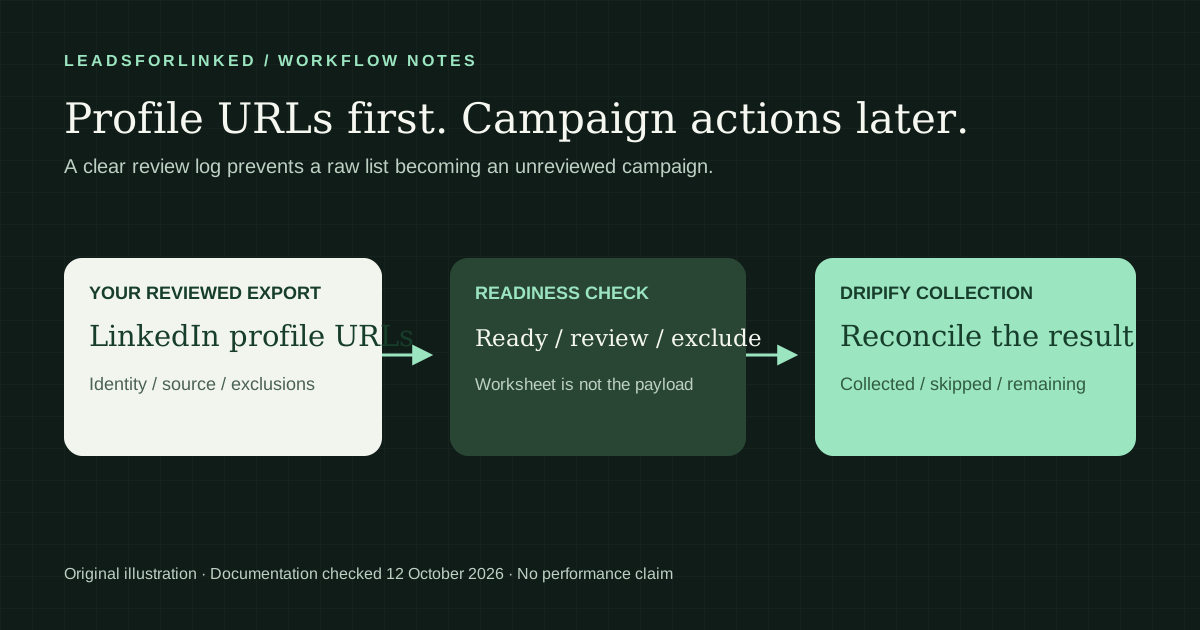
You have a LinkedIn audience and want to use it in Dripify. The important requirement is the profile URL, not a guessed email address or a particular lead database subscription. Prepare the list, account for exclusions, and check what Dripify actually collects before you reuse the batch.
Original work product: a ten-record curated audience exercise with three explicit decision files, a blank template matching a vendor-supplied example structure, and the original import-readiness worksheet. The mechanics below come from Dripify's own documentation, checked on . This is a documented preparation guide, not a claim that we ran a live campaign or tested your account.
Choose the documented input route
The campaign setup guide, dated 21 July 2026, includes importing from LinkedIn Basic search and adding LinkedIn profile URLs directly or through CSV. Sales Navigator is therefore not required for those particular routes. It may still be useful when you need filters that basic search does not provide.
If an existing search expresses your audience correctly, the search route may be sufficient. Use CSV when you need to review an audience outside the sender first, combine your own sources, or exclude records from an existing customer list. Do not assume CSV bypasses account limits or changes which profiles are accessible.
When a curated external audience is worth preparing
An external CSV is useful when the selected people and their review history are the deliverable. Imagine an operations consultancy combining a chosen search audience, several direct post commenters and a reviewed event audience. Its brief requires current operations or revenue roles, the chosen territory and no active conversation owned by another teammate. A person appearing under a post still needs that role and history check. The source interaction is context, not an indication that the person wants to buy.
Honest native concession: Dripify already documents search, network, event and profile-URL inputs. Its current LinkedIn Post guide, dated 27 May 2026 and checked 12 October 2026, also documents reactions and direct comments in separate lead lists; replies are skipped. Advanced includes its documented Evergreen mode. Keep that native route when it supplies the audience you need. Preparing an external file does not recreate continuous collection or carry universal conversation history.
The CSV job begins when you need a deliberately selected cross-source subset, a client's approved exclusions or a reusable delivery to more than one destination. Keep the raw observations, their source and date, then produce a distinct accepted destination payload. Do not send every person in a source list simply because a URL passes syntax checks. If the native audience is already sufficient, additional extraction adds no necessary step.
A 2026 agency operator discussion asks for automatically refreshed lists and filtering outside the ideal customer profile while describing current Dripify use. That is firsthand workflow preference, not measured keyword demand or evidence that this manual workflow beats native automation. It explains why source selection and repeated review deserve attention before a larger export.
Reproduce the fictional acceptance decisions
Download the ten-record synthetic audience and its decision manifest. Counts and decisions were authored and reconciled on 12 October 2026: three manually approved exercise rows, five held rows and two excluded rows. All ten originals appear once across those separate files. These are review layouts, not Dripify upload schemas.
D01 and D03 refer to the same fictional public profile in different source contexts. D01 represents the chosen record; D03 remains held so its event provenance is not erased. D04 belongs to an active fictional conversation and is excluded. D05 is a recruiter outside the example brief. D06 has an opaque Sales Navigator identifier and D07 lacks a URL; neither is repaired by guessing a public path or matching a name. D08's company/role remains unresolved, and D10 still lacks its original context/date. D02's direct-comment context and D09's event context remain in their approved exercise records after the separate fictional role/history review.
The phrase “approved” describes this authored exercise decision only. Every row retains synthetic=TRUE and do_not_contact=TRUE; all names, URLs, companies, history and decisions are fictional. Those flags do not enforce a destination blocklist. Do not upload or contact them. The files demonstrate a review method rather than measured import success, verified identity, permission or usable-row yield.
For your real job, write the required accepted count before sampling. Count only reviewed people who pass that brief, then subtract your already approved audience. A synthetic three-row decision does not predict how many people your next source will produce. Use the actual-input extraction planner with your observed sample and current balance if you still need more source profiles. A missing conversation reference or unresolved identifier requires research before another purchase.
What the vendor's downloadable examples actually contain
We retrieved both attachments linked from Dripify's campaign setup article on 12 October 2026. Its first example uses semicolons and the five headers below. Its second is a headerless, single-column profile-URL list with an initial blank line. These are observed vendor-supplied layouts, not a claim that your account has accepted a file or that every optional cell is imported into a personalization field.
First name;Last name;Title;Company;Linkedin urlThe blank documented-format template retains that first example's header spelling and delimiter, with one entirely empty editable row. It contains no prospects. Fill it only with your real, reviewed destination values and inspect the current import preview before proceeding. The template is not useful for upload until its required identity values are supplied. Obtain the original examples from the vendor's current help article if the upload interface differs.
Map the actual public-person URL column from your exporter into Linkedin url. Do not assume that an illustrative public_profile_url column exists in the production export. The reviewed source file and synthetic exercise use their own schemas; the five-column template is a separate destination layout. Preserve source/context, exclusions and approvals beside the payload rather than inventing extra vendor columns. A blank name, title or company remains unknown until supported by the source or the documented destination process.
Before a real import, inspect delimiter choice, quoting, accented characters and the number of parsed columns. A spreadsheet can silently change a semicolon file into a comma file or turn a URL cell into different text. Save the exact payload version, and compare the current preview with the reviewed identities. No local formatting check establishes that Dripify will accept every person or that LinkedIn exposes every field.
Separate the upload file from the review worksheet
Dripify says the CSV must contain LinkedIn profile URLs so it can locate the leads. Its setup article links official example files. Start with those examples and the current upload interface when preparing the payload. A column called “Name” cannot substitute for the profile's identity.
The following is an illustrative preparation schema. The header label is our description, not a documented mandatory Dripify header:
LinkedIn profile URL
[replace with a reviewed profile URL from your own export]
Keep your review fields in a separate worksheet: source, identity check, duplicate review, suppression check, decision and reason. Upload the required payload, not an internal checklist containing placeholders. The vendor's samples and current upload screen remain the authority for that format; this article does not claim an exact header contract or a successful live import.
Download the import-readiness CSV. Its rows are clearly labelled synthetic and must be replaced. It is a review log, not a ready-to-upload lead list.
Prepare identities before uploading
Keep the original export unchanged. Identify the profile URL column, retain the URL that came from the source, and remove accidental whitespace in a working copy. A company page, a search-results URL and a person's profile URL serve different purposes; inspect mixed records before they reach the campaign.
Use the Prospect List Workbench to prepare your list and compare it against records you already hold. Match identities before merging. A name is useful for human review, but two people can share one and a person can change it. Keep uncertain matches in a review file instead of silently deleting them.
Keep exclusions explicit. If someone is already a customer, already in an active conversation or has requested no further contact, decide how your destination should handle that record before importing. Preparing a clean profile list does not establish permission to restart every conversation.
Give every row a review decision
Synthetic worksheet example: the downloadable file shows proposed decisions, not collected prospect data or measured import outcomes.
| Example case | Review result | Next step |
|---|---|---|
| Profile URL present, no conflicting history found | Ready for an approved test | Replace the placeholder with your real reviewed URL |
| Same identity appears in another source list | Duplicate review | Retain source context and choose one record |
| Profile already belongs to an active conversation | Existing-contact review | Check the conversation owner before enrollment |
| Exclusion or missing identity | Do not upload yet | Keep the reason and resolve it separately |
Separate “ready”, “review” and “excluded” files. Your upload total should come from the approved payload, not the size of the raw download. Record the filename and campaign beside that total so a later collection report can be reconciled against the right version.
Add the approved list to the campaign
Open the intended Dripify campaign and use the documented CSV or profile-URL input route. Confirm that it is the correct sender and audience before proceeding. Review the sequence's first intended action and make sure it matches the people you approved. Keep the source file and worksheet available while collection is underway.
A test should answer a concrete question: were the intended profiles identified, were exclusions respected, and did the visible fields populate as expected? Importing a large unreviewed file will not answer those questions more clearly. Do not start a messaging action merely to see whether a column changes.
Why imported profile fields can initially be blank
Dripify's data-timing guide, dated 5 December 2025 and rechecked on 12 October 2026, distinguishes search imports from CSV or direct-URL imports. It says profile data for the latter appears after the first sequence action.
That explains why a newly imported URL can look less complete than the original spreadsheet. It does not prove that a missing field is correct, nor that an action should be sent to an excluded person. Check the collection state, the relevant profile and the intended sequence behavior. If a required personalization value is still unknown, resolve it before relying on it in a message.
Reconcile the Lead Collection Report
The Lead Collection Report guide, dated 9 December 2025 and rechecked today, directs you to the campaign's Audience tab and View report. Inspect the current report for your collection method rather than expecting the same labels in every screen.
The current detailed report guide, dated 30 June 2026 and checked 12 October 2026, separates requested, added and skipped profiles and initial versus Evergreen collection. Keep separate figures in your worksheet: approved source rows, profiles added and rows still needing a decision. These are your own batch counts, not a promised completion rate. A processed file need not produce a campaign entry for every row: the vendor notes that existing campaign membership and other conditions can cause skips.
Inspect the reason before retrying. A duplicate does not become a new prospect because you upload it again. A pending row is not the same as a permanently invalid URL. Record a retry decision only for the affected records; keep a link to their original source row.
Troubleshoot the list, not just the upload
- Wrong URL type: compare the source value with the profile you intended to reach. Keep uncertain identities out of the approved file.
- Names or titles are empty: check the documented enrichment timing and current action before rebuilding the CSV.
- Collected count is lower: inspect the report and preserve skip reasons; do not interpret every skip as lost data.
- Duplicate source lists: keep one identity and all relevant provenance, rather than repeatedly importing overlapping batches.
- History exists in another sender: review the handoff manually. A profile CSV does not carry a universal conversation or suppression state.
If the report and your approved payload still disagree, preserve the file version and the report evidence for Dripify support. Avoid adding speculative extra columns or changing identity values until the actual issue is understood.
Keep the sending tool that meets your requirements
The honest concession: if your current Dripify sequence already matches your workflow, you can keep it and improve the input list. Its documented collection reporting is useful for this handoff. Leadsforlinked is not presented here as a replacement for every Dripify campaign feature or as an importer of historical campaign state.
For a fresh sourcing test, Leadsforlinked's published offer, checked 12 October 2026, includes 100 free leads at signup without a card. Export a small audience, review the profile URLs, and compare its fields with your destination. The profile export is not a promise of verified email addresses. When your accepted audience still lacks source profiles, check the real remaining balance and current checkout. The published eligible 500-lead €1.99 offer is one-time, not a repeatable sourcing pack. Basic publishes extraction and CSV access at €4.99 monthly or €2.99 effective monthly billed yearly, a €35.88 annual commitment; checked 12 October 2026. These prices concern source profiles, not accepted audience yield or verified email. Choose paid extraction or outreach only after the missing requirement is identified.
Primary sources and verification
Read on 12 October 2026. Vendor documentation supports the cited mechanics; our worksheets and decision examples are original, synthetic planning aids.
- Dripify Help: adding leads to a campaign. Dated 21 July 2026; checked 12 October 2026.
- Dripify Help: when profile data is added. Dated 5 December 2025; checked 12 October 2026.
- Dripify Help: Lead Collection Report. Dated 9 December 2025; checked 12 October 2026.
- Dripify Help: native post sourcing and Advanced Evergreen. Dated 27 May 2026; checked 12 October 2026.
- Dripify Help: current report definitions. Dated 30 June 2026; checked 12 October 2026.
- Leadsforlinked published free allowance and CSV offer. Checked 12 October 2026.
Frequently asked questions
Do I need Sales Navigator to add leads to Dripify?
Not for the documented basic-search or CSV routes. Dripify's campaign setup guide includes LinkedIn Basic search and CSV files containing LinkedIn profile URLs. Paid search filters remain a separate choice.
What must a Dripify CSV contain?
Dripify documents a profile-URL requirement. One vendor attachment checked on 12 October 2026 uses First name, Last name, Title, Company and Linkedin url with semicolons; the other is a headerless URL list. Our blank template reproduces the first structure, while the synthetic review files are separate. Check the current preview; no live upload acceptance is claimed.
Why are names and company fields blank after my CSV import?
Dripify says CSV- or URL-imported profile data is populated after the first sequence action. Review collection status and the intended action before treating blank fields as evidence that the file is broken.
Why does the collection report show fewer leads than my CSV?
Dripify's collection guide explains that some leads can be skipped, including leads already in a campaign or matching an exclusion condition. Inspect the report's reasons and reconcile the rows before retrying.
Does Leadsforlinked verify emails for the Dripify import?
No verified-email result is promised here. The bridge is LinkedIn profile extraction and CSV preparation. Keep separately obtained email data and verification results distinct from profile URLs.