Choose a free LinkedIn extractor by the file you need to download. A profile CSV helps you review people and roles; email outreach also needs usable contact data. Check the free download cap and required account before setting up a tool.
We make Leadsforlinked. The six routes below serve different jobs; they are not a scored performance ranking. Keep a native export or an existing contact database when it already gives you the list you need.
Compare six free and trial routes
Tool and native-export limits were rechecked 18 October 2026; Evaboot pricing, credit and trial sources were rechecked 20 October. Free accounts, one-off signup allowances and temporary trials have different renewal rules. “Not specified” means the checked source did not establish a dependable numeric allowance; it does not mean zero.
| Route | Best matching job | Required account or access | Published free access | Downloadable output gate | Email requirement | Primary source |
|---|---|---|---|---|---|---|
| Leadsforlinked | Selected LinkedIn profile audience | Own account, Chrome extension, LinkedIn; Sales Navigator optional | 100 at signup, released in batches of 20; no card | Use the released balance and inspect actual CSV fields | Do not assume verified email coverage from a profile CSV | Published offer |
| LinkedIn native archive | Your existing first-degree connections | Your LinkedIn account and archive request | Native connection-data request | Your own first-degree network; not an arbitrary search | Only connection emails members permit to be seen or downloaded | LinkedIn Help |
| PhantomBuster | Evaluate a connected search-export workflow | Workspace, connected LinkedIn session, search URL | 14-day trial: 2 hours total, 5 slots; later Free: 30 min/month, 1 slot | Free and trial: 10 results per export; runtime is not full-file access | Search output is profile data; email discovery is a separate resource | Plan limits |
| Kaspr | Test contact enrichment for a small shortlist | Kaspr, Chrome extension and LinkedIn; Help requires at least 20 connections | Help lists 5 phone, 5 direct-email and 10 export credits/month | Help equates 10 export credits with 10 contact profiles; pricing contains conflicting figures | Separate pools; check B2B entitlement and export balance in your account | Help allowances |
| Apollo | Existing Apollo contacts or database email research | Apollo account; extension and LinkedIn for the profile route | Ongoing free plan; eligible Basic/Professional trial lasts 14 days with limited credits | Current account allowance; trial bulk selection limited to 25 at a time | Saved-contact export does not automatically enrich missing emails | Trial terms |
| Evaboot | Sales Navigator export with email discovery | Evaboot account and active Sales Navigator seat for search exports | Help confirms once-only trial credits per person/company; quantity not specified | Check trial balance; monthly Starter is $9 for 100 credits, Grow $29 for 400 | Email discovery included with lead export; an email is not found for every lead | Current pricing |
Do not sum a phone-credit pool, an email-credit pool and an export-credit pool into one lead total. Likewise, an execution allowance says how long a workflow can run; it does not establish how many rows you can take into another tool.
Try the route that matches your list
Leadsforlinked: get a small profile audience into CSV
Use this route when you want to select people on LinkedIn and review their profiles in a spreadsheet. Standard LinkedIn is supported; Sales Navigator is optional. Search, post commenters, event attendees and group members are published source options. Start with People search if you are building a new list:
- Set up the extension. Create and verify your account, then install the Chrome extension linked from the app and sign in.
- Choose the people. Open LinkedIn People search and narrow it to the role and location you need. Review the results before collecting them.
- Import into an audience. Open the Leadsforlinked import control, choose a small available batch and select or create an app audience. Use the balance shown in your account.
- Export from the app. Open that audience in Leadsforlinked and choose CSV export. Check the actual columns and people before expanding the list.
The published signup allowance is 100 profile leads with no card, released in batches of 20. Source access and populated fields can vary; a profile export does not by itself establish verified-email coverage. Follow the search-to-CSV guide for the full People-search walkthrough.
Native LinkedIn archive: use the relationship list you already own
If the task is refreshing a spreadsheet of your connections, begin with LinkedIn's own archive. Its documented path goes through Me → Settings & Privacy → Data privacy → Get a copy of your data, then an archive request including connections. LinkedIn sends the download link to your primary email. This avoids introducing an extractor just to copy an existing network.
The boundary is decisive: this route does not export contacts outside your first-degree connections. It will not reproduce a new People search, a post's commenter audience or an arbitrary target-account list. Missing connection emails also do not prove an exporter failed; LinkedIn documents that member visibility and download permissions determine which emails appear.
PhantomBuster: evaluate the workflow, not an unlimited free file
The LinkedIn Search Export guide requires a connected LinkedIn account and search URL. It distinguishes standard LinkedIn from its separate Sales Navigator export workflow. That is useful if you are evaluating connected automation as part of a larger process.
The free export cap still governs the handoff. A successful run showing more collected records does not mean the free CSV contains those records. Compare the downloaded file with the audience you intended to review. Use the trial to inspect output and setup, then budget a paid route if the required deliverable exceeds the documented free download boundary.
Kaspr: small contact-data checks with published-limit conflicts
Kaspr's pricing page and Help page disagree on some free entitlements. The pricing card lists 15 monthly B2B email credits, another table lists 25, and an export section shows 100 while another shows 10. Help states 10 monthly export credits and describes unlimited B2B emails as conditional on inviting three colleagues.
We therefore use the Help figures as a disclosed planning reference, not a guarantee for every account. Confirm the dashboard's B2B and export entitlement before promising a client a file size. Phone and direct-email credits are separate from export capacity. The free route is relevant for checking a small contact shortlist; “unlimited B2B” wording does not by itself establish unlimited downloadable contacts.
Apollo: keep existing contacts inside the workflow that already has them
Apollo's current extension overview explains that it matches the open page to its database. Coverage varies. This is different from preserving every member of a deliberately selected LinkedIn audience: an unmatched profile can remain unresolved even when it matters to your brief.
Its 8 October CSV documentation says saved-contact export uses no credits. For net-new selected people, Apollo saves them before exporting and charges one credit for each with a verified email. Existing records are not automatically enriched at export. If your approved contacts are already saved there, use that native export first. Check your account limits and selected email-status filter rather than rely on an old blanket export-credit claim.
Evaboot: trial discovery for a Sales Navigator and email workflow
Evaboot's current pricing requires an active Sales Navigator seat for its search-export route. Its free-account Help article confirms trial credits intended for once-only use per person and company, but does not specify their quantity. A free signup label is not a numeric export promise.
The credit explanation says lead export includes email discovery, with one credit charged even when no email is found. This can fit an email-oriented Sales Navigator workflow. Inspect missing emails and statuses after download; included discovery does not mean complete email coverage. Its current public entry plan is shown in the matrix so a trial decision has a visible next commitment.
Optional: plan the fields for a larger export
Use this brief when several tools or a client handoff need the same field requirements. Choose the output, source and whether an approved file already exists. The result is a planning brief; check the selected account's actual export allowance separately.
What must the file contain?
Download the blank candidate shortlist. For each tool, record the real CSV filename, required columns, missing values and download cap. The requirements matrix below helps you review the rows; neither file is an app import template.
Optional worksheet: check the fields you need
Download the editable requirements matrix
The matrix contains ten requirement rows across two example briefs: profile research and email preparation. Each has an acceptance rule, a suggested source observation and empty cells for your actual CSV column, checked-row count, accepted-row count, reviewer and decision. Fill those cells from your real export. It is a review worksheet, not a file to import into Leadsforlinked or a promise about any tool's output headers.
For profile research, the example rules ask for an identifiable person URL, current role, company fit and retrievable source context. For email preparation, the same person-fit rules remain, and the email value and acceptable verification evidence become additional requirements. Change the rules to match the destination and your team's process before testing a tool.
Mark a missing optional field separately from a missing required field. An absent phone number may be irrelevant to a LinkedIn research brief and fatal to a call brief. A company URL is useful company context but cannot replace a required person URL. A /sales/lead/... value is an opaque Sales Navigator identifier; replacing its path with /in/ does not establish the public person's identity.
Optional example: one file, two different needs
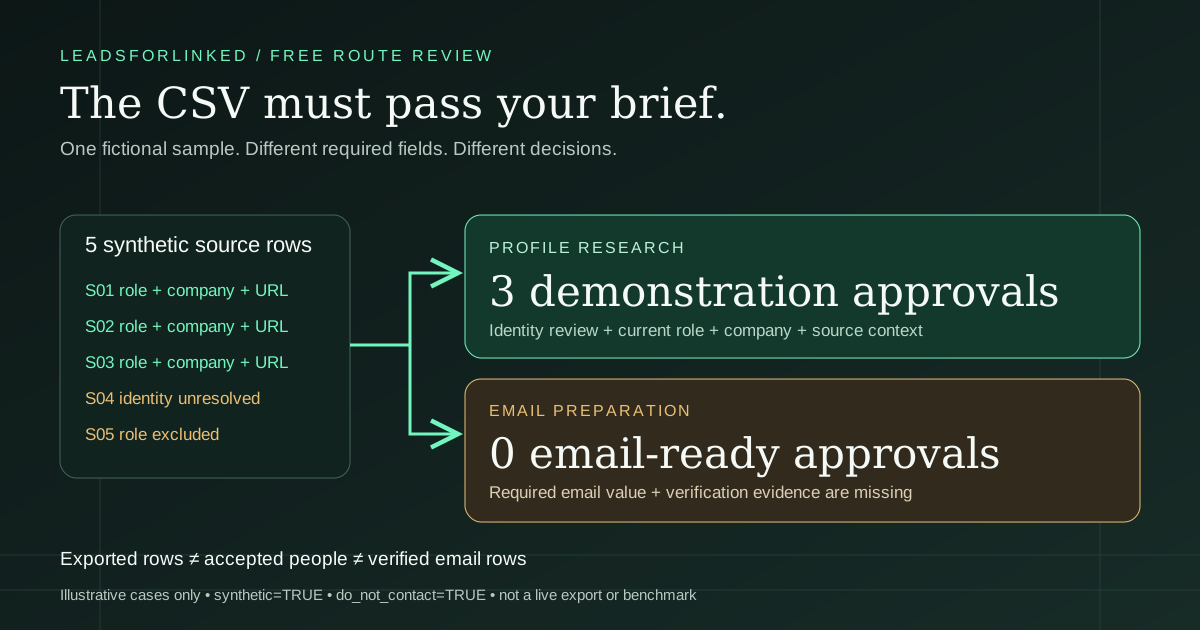
Download the fictional five-row acceptance exercise. Every record and source reference is invented. Every row has synthetic=TRUE and do_not_contact=TRUE; these labels do not enforce suppression in another platform. Do not enrich, upload into a sender or contact these example identities.
| Fictional record | Profile brief | Email brief | Reason |
|---|---|---|---|
| S01–S03 | Accepted demonstration | Hold | Relevant role, selected company and profile-shaped URL; no email verification evidence |
| S04 | Review | Hold | Relevant title but opaque Sales Navigator identity |
| S05 | Excluded | Hold | Public profile shape but current role outside the example brief |
The exercise produces three profile-research approvals and zero email-ready approvals. Those are counts of authored cases, not a test of a vendor, real people or expected enrichment coverage. They show why “five rows exported” does not answer either buyer's acceptance question.
The profile buyer can carry the three demonstration approvals into a separate reviewed subset. The email buyer must hold them until a real email value and the required evidence exist. Copying a hypothetical address into an empty cell would hide the missing work. Buying more raw profile rows would also leave the email requirement unresolved.
Check a real sample before expanding the list
- Write the brief. Choose the actual source audience, destination, mandatory fields, exclusion list and review owner. Avoid changing the brief after seeing which fields a tool happened to fill.
- Record the account state. Note the free or trial entitlement, remaining released balance, export cap and trial end. Do not add a fresh signup allowance to an existing account that has already spent it.
- Export a manageable real sample. Preserve the raw file unchanged and record the selected search or audience manually when the export does not supply that context.
- Map and inspect. Put the real column names into the matrix. Check identities, current roles, company fit, missing required values and status evidence. Keep excluded and unresolved rows distinguishable.
- Reconcile existing contacts. Use actual identity columns against your reference file. Missing or invalid reference identities make the exclusion incomplete; a name-only match is not proof that a person is new.
- Make the handoff decision. Count only rows that satisfy all mandatory rules. Confirm that the destination accepts the mapped payload before expanding the extraction or enabling downstream work.
If the free download cap is smaller than your inspection plan, reduce the initial check or choose another route. Do not pretend a tiny, conveniently selected sample predicts acceptance for a much larger audience. Recheck when the search, geography, role mix or required fields change.
When to keep it free, top up or subscribe
The published Leadsforlinked offer, checked 12 October 2026, is 100 free signup leads without a card, released in batches of 20. The current 500-lead €1.99 one-time offer is limited and depends on your checkout eligibility. Basic is €4.99 monthly or €2.99 effective monthly billed yearly, an arithmetic €35.88 annual commitment. Confirm current checkout terms before purchase.
Use your real remaining balance and extraction horizon. Here is a separate synthetic planning scenario, not the result of the five-row exercise: you need 240 approved profiles, already have 80, reviewed 100 raw sample rows and accepted 60, and have 50 extraction credits left. The approval gap is 160. Assuming the next batch behaves similarly, ceil(160 ÷ 0.60) = 267 raw profiles are needed; the balance shortfall is 267 − 50 = 217.
A currently available eligible 500-lead pack could cover that raw shortfall for this scenario. It does not guarantee 160 accepted profiles, and the €1.99 offer cannot be multiplied into repeated promotional packs. For repeated extraction, compare monthly Basic across your actual horizon with the full annual commitment, rather than compare one month's work with an annual effective monthly label. Use the extraction offer planner with your own inputs.
If your sample fails the required email fields, resolve enrichment and status requirements before buying volume. If your existing CRM, Apollo contacts or native connection archive already supplies the approved audience, use that existing route. A purchase is useful when it closes a demonstrated source-row gap.
Keep reviewed people separate from the raw export
The Prospect List Workbench exclusion view helps compare uploaded files using the identity column you select. Its merge view helps inspect overlap. A conflict can remain in the main output as well as review; resolve it before building an accepted destination payload. Formatting and deduplication do not establish a person's identity or relevance.
For a deliberately selected external audience, follow the Clay CSV handoff or the downloadable n8n preparation workflow. The latter processes an uploaded file on your n8n instance and separates format-clean and review rows; clean does not mean identity-approved. Neither route implies a live extraction integration tested in this comparison.
Keep source observations, review reasons and dates beside the accepted subset. Repeated research should identify what changed in the brief as well as what changed in the rows. A missing person in a later result set is a prompt to investigate, not proof of an employment change.
Sources, limits and how this guide was prepared
A 2026 recruiting discussion describes the practical pain: relevant candidates are easy to find, but copying profile details into a tracking sheet consumes time. That is firsthand workflow context, not evidence of market size or a product's performance. It illustrates the list-preparation problem, not a vendor performance test.
This comparison reads dated public documentation and supplies original worksheets and fictional review cases. It does not claim a live extraction, email-verification benchmark, destination import or measured restriction rate. Exact production headers and field completeness need your actual export. Vendor limits can change, and account-specific entitlements can differ from a marketing card.
LinkedIn prohibits scraping and automation extensions and says accounts using prohibited tools risk restriction or shutdown. A small batch, free plan or human-like pacing does not create a platform-policy exception. Use a native approved route when it already meets the job, and assess collection and outreach permissions for your own use.
The practical selection rule is simple: first identify the audience, then the required fields, then the rows you can actually download, and finally the commitment needed after review. That sequence keeps a free evaluation useful without pretending that profile volume, verified email volume and accepted audience volume are interchangeable.
Sources and verification
The original source check was 12 October 2026; tool and native-export limits were rechecked 18 October 2026. Evaboot pricing, credit and trial sources were rechecked 20 October; the other dated links retain their earlier checks. The worksheets, synthetic cases and decision method are original work, not customer results. This update preserves the original 7 May 2026 publication date. No live vendor export or email-coverage benchmark is claimed.
- Leadsforlinked: own public offers and extraction route. Checked 12 October 2026.
- LinkedIn: native connection archive and email permissions. Checked 12 October 2026.
- LinkedIn: prohibited scraping and automation extensions. Checked 12 October 2026.
- PhantomBuster: trial, Free and export caps. Checked 12 October 2026.
- PhantomBuster: search input, account connection and output scope. Checked 12 October 2026.
- Kaspr: pricing-page entitlements and conflicting figures. Checked 12 October 2026.
- Kaspr: Help free allowances and connection requirement. Checked 12 October 2026.
- Apollo: ongoing free plan and current public plan scope. Checked 12 October 2026.
- Apollo: 14-day trial and selection limits. Checked 12 October 2026.
- Apollo: database matching and coverage. Checked 12 October 2026.
- Apollo: current saved-contact export and net-new credit rules. Checked 12 October 2026.
- Evaboot: current prices and Sales Navigator requirement. Rechecked 20 October 2026.
- Evaboot: included email discovery and no-email lead charge. Rechecked 20 October 2026.
- Evaboot: once-only trial credit scope. Rechecked 20 October 2026.
- 2026 recruiting discussion: firsthand spreadsheet pain, not a performance source. Checked 12 October 2026.
Frequently asked questions
Which free LinkedIn lead extractor is best for profile-only CSV research?
For a selected search audience, Leadsforlinked publishes a 100-lead signup allowance in batches of 20 with Sales Navigator optional. Check your actual sample fields and fit. For your own first-degree connections, LinkedIn's native archive may already finish the job.
Does a free trial mean I can download every collected lead?
No. PhantomBuster documents a 10-result export cap on Free and trial plans. Other tools use separate data or export allowances. Read the downloadable-row limit and inspect the account meter instead of treating a signup or runtime allowance as unlimited CSV output.
Are verified email addresses included in every profile export?
No. Profile extraction and email enrichment are different requirements. Require an actual email value and the verification evidence your team accepts. Apollo and Evaboot document email-related workflows, but neither this guide nor a synthetic case establishes complete coverage for your audience.
Can LinkedIn's native archive export an arbitrary search audience?
No. LinkedIn's connection export covers your own first-degree connections. Its documentation says contacts outside that degree cannot be exported through this route, and connection emails appear only when members allow them to be seen or downloaded.
When should I buy the one-time pack instead of Basic?
Review a real sample, the remaining balance and your extraction horizon first. The current 500-lead €1.99 offer is one-time, limited and subject to checkout eligibility. Basic is €4.99 monthly or €35.88 for a year at €2.99 effective monthly. Exported volume does not guarantee accepted rows.